
Participant
September 16, 2023

P: (macOS Sonoma) Photoshop 2023/2024 Save for Web shows incomplete preview

  • September 16, 2023
  • 184 replies
  • 38222 views

Have just updated to Photoshop 2024 and my save to web panel is now not displaying correctly - see screengrab.  How can I adjust it to have the full image fill the four windows?  cheers, Bob
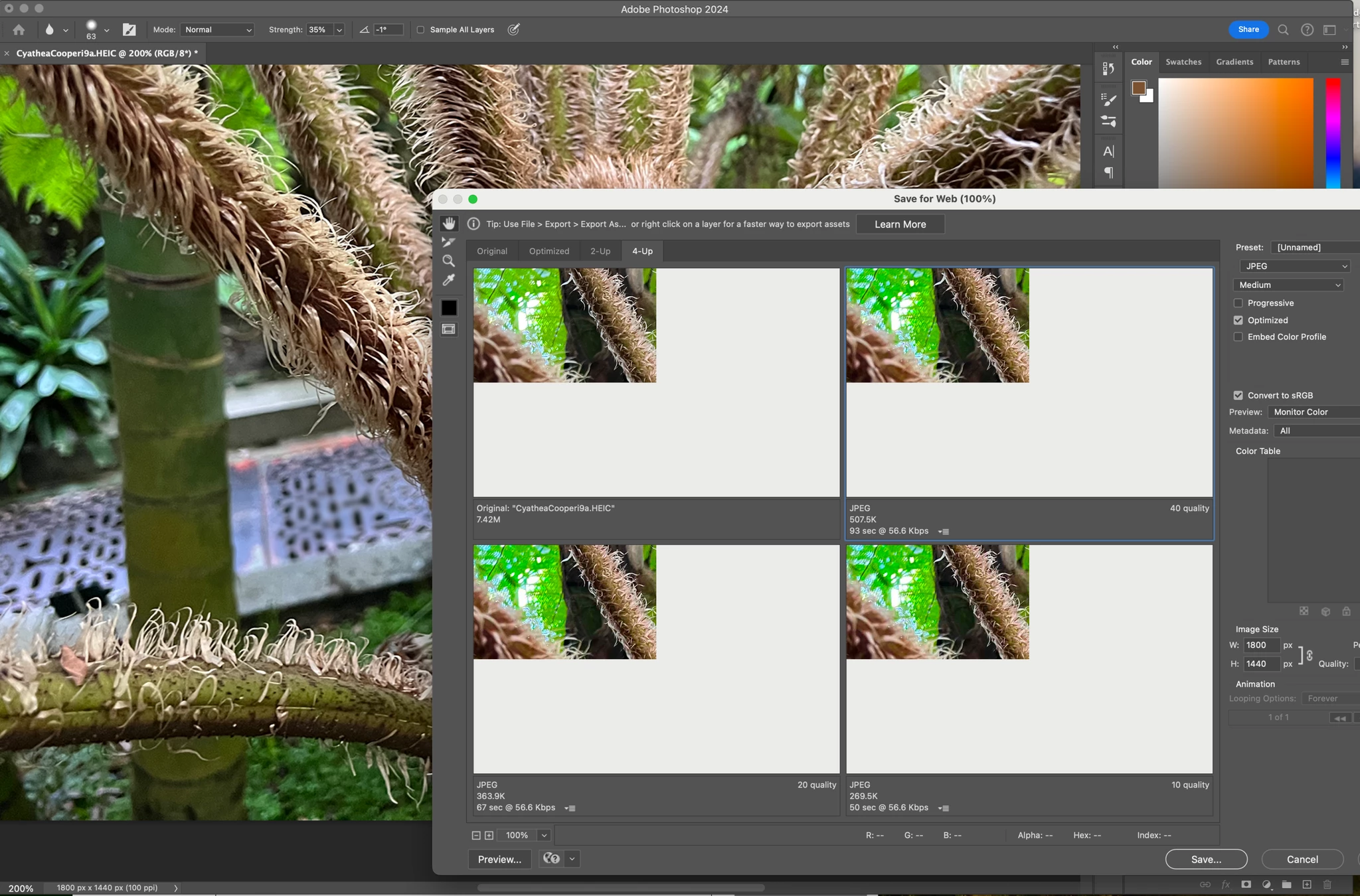


184 replies

Participant
September 30, 2023

dispaly is wonky, but exported image appears to be OK

pnilz
Participant
September 30, 2023

I just upgraded my computer to Sonoma and now have the same problem, both with PS 2023 and 2024.

silk-m
Community Expert
Community Expert
September 30, 2023

This issue is caused by macOS Sonoma 14.0, so please wait for a macOS update.
I cannot go into further detail as any further comments may violate Apple's confidentiality.

--Susumu Iwasaki
Elsbeth R
Participant
September 30, 2023

I'm having this same issue - the preview is completely blank unless I use the 4-up window (where only a very small portion of my image is visible). I noticed this problem after I updated my laptop (MacBook Air) to Sonoma. 

Participating Frequently
September 30, 2023

Also experiencing this issue in macOS Sonoma - basically the only bug I've seen so far in any app. Happened in PS 2023 and I just upgraded to PS 2024 - same thing. This breaks my workflow; really need the Save for Web panel working for web development purposes. 

mglush
Community Expert
Community Expert
September 29, 2023

Not a problem! 🙂 We just want to make sure we are trying to give you every option to get it fixed.

Dave Z #225
Participating Frequently
September 29, 2023

Now that you mention it, this thread has grown... sorry for over-reaction. 

mglush
Community Expert
Community Expert
September 29, 2023

Sorry about the redundant question--I missied your response in the 34 replies!

Dave Z #225
Participating Frequently
September 29, 2023

Not only did I try that, I wrote that I tried it already.

mglush
Community Expert
Community Expert
September 29, 2023

Hi!

Did you try Stephen's suggestion above regarding the Graphics Processor? If you haven't, go to Preferences>Performance and uncheck "Use Graphics Processor" and restart Photoshop. If it doesn't change it, you can always follow the same steps and turn it back on.


Here is some helpful information on the troubleshooting the Graphics Processor: https://helpx.adobe.com/photoshop/kb/troubleshoot-gpu-graphics-card.html

Let us know if that helps or if you are still experiencing the same issue.

Michelle