This topic has been closed for replies.

62 replies

Inspiring
June 22, 2020


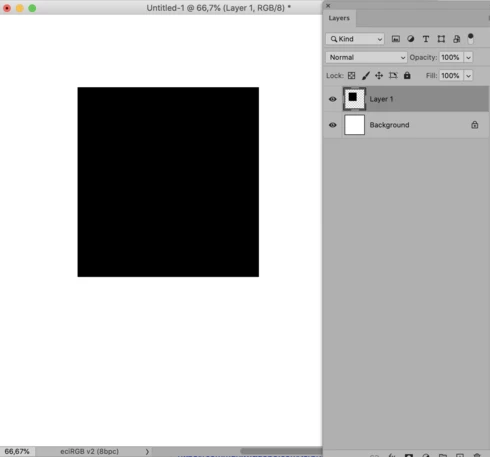
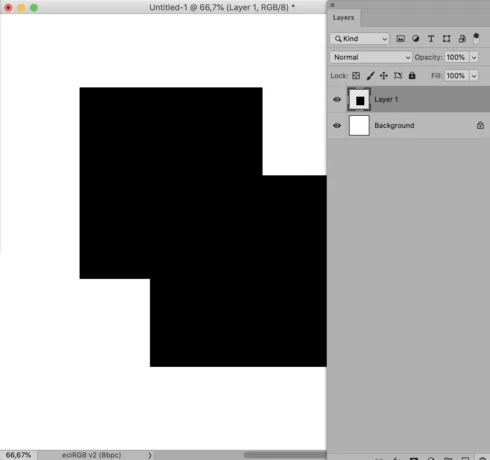
In version 21.2.0, whenever I have a layer and move it, the original image stays behind as if I hadn't moved it AND the new one goes to where I place it. The only way I've found to update it is to turn a background layer off and back on again. Anyone else running into this?
c.pfaffenbichler
Community Expert
Community Expert
June 22, 2020
»that previous problem« doesn’t quite do the issue justice ... there was more than one. 
Two I remember were 
• Layer Styles on Groups got clipped 
• some Blend Mode combinations provided incorrect results
But there might have been more. 

And don’t be too quick with considering turning off »Legacy Compositing« a solution. 
I have experienced intermittent nonsense both with and without GPU usage with the modern Compositing Engine. 
dpgeller
Inspiring
June 22, 2020


I open a (raw image). I (on a Mac) use Cmd-shift-N to create a new layer. In the dialog box I chose Difference as the blending mode. I then attempt to fill the layer with white, which should give be a negative image. Nothing happens. However, if I make that layer invisible, then the layer below it shows up in negative. THis also happens if I create the new layer from the context menu and select Difference at that time.This does NOT happen if I make the new layer with Ctl-Shift-N and then set the blending mode in the Layers panel. It only began with the latest update (21.2.0 on Mojave)
Participant
June 22, 2020


If I, say, add a Black & White adjustment layer, the image will change from color to b & w.

But when I tinker w/ sliders, the first change or two is reflected on the image, but then all further edits are not. It's as if the preview of the edits is hung up. If I save, close, and reopen the doc, all of the latest edits are reflected (even those that I couldn't see the moment I made the edit).

So I'm guessing it's a caching issue?
Inspiring
June 22, 2020


I'm using the newest version Photoshop. I updated a few days ago. When I try to move an object, there is always a "shadow". See the attachment. You can see in the Layer, there is only one image. 

Inspiring
June 22, 2020
Yes, turning off the Legacy Compositing solves the problem for me.   I seem to remember that I turned that on to solve a previous problem but can't remember what that problem was!   Can anyone suggest to me what that previous problem was?  Thanks.
Inspiring
June 22, 2020


I have a problem with the latest update for PSCC.  If I move an element (which is on its own layer) I can see that element twice on the document screen, once in its new position and also in its old position.i.e. if I have a circle and move that circle to a new position I can see two circles on the document even though I can only see one circle in the layers panel.  Moving stuff worked perfectly until this update and it still works fine in any of the older versions that I have.  Can you help please?  Thank you.
Inspiring
June 22, 2020


After the last Photoshop update (21.2) my Photoshop is nog previewing anything right anymore. It seems it can't even show a simple dragging of layers right without starting to ghost. 

The moment I move a layer (even a simple text layer), it shows the layer double, on the original spot (or very close to it) and the new spot I moved it to. It wil only be visible as it should when my background layer below is made invisible and then visible again.

I'm working on a 2018 MacMini, 3,2 Ghz 6-Core Intel Core i7, 32 GB RAM, Radeon RX 560 (eGPU) with a 4K display connected on the eGPU. MacOS 10.15.5

I've got about 85% of RAM assigned to Photoshop, using the GPU with OpenGL, cashlevel at 6.

A screengrab-video of a Linkedin Mockup I'm working on is attached to show the issue.


ReneDamkot
Inspiring
June 19, 2020
I reverted to the previous version.

NB: Which you should only try if you have your settings on a backup somewhere, because of another bug:
https://feedback.photoshop.com/photoshop_family/topics/ps-cc-21-2-0-text-bug?topic-reply-list[settings][filter_by]=all&topic-reply-list[settings][reply_id]=20565398#reply_20565398
c.pfaffenbichler
Community Expert
Community Expert
June 19, 2020
No that’s some diligent sleuthing!