



Jeff Arola
Community Expert
Community Expert
March 15, 2022

P: Photoshop 23.2.2 Share Button is distracting

  • March 15, 2022
  • 170 replies
  • 20899 views

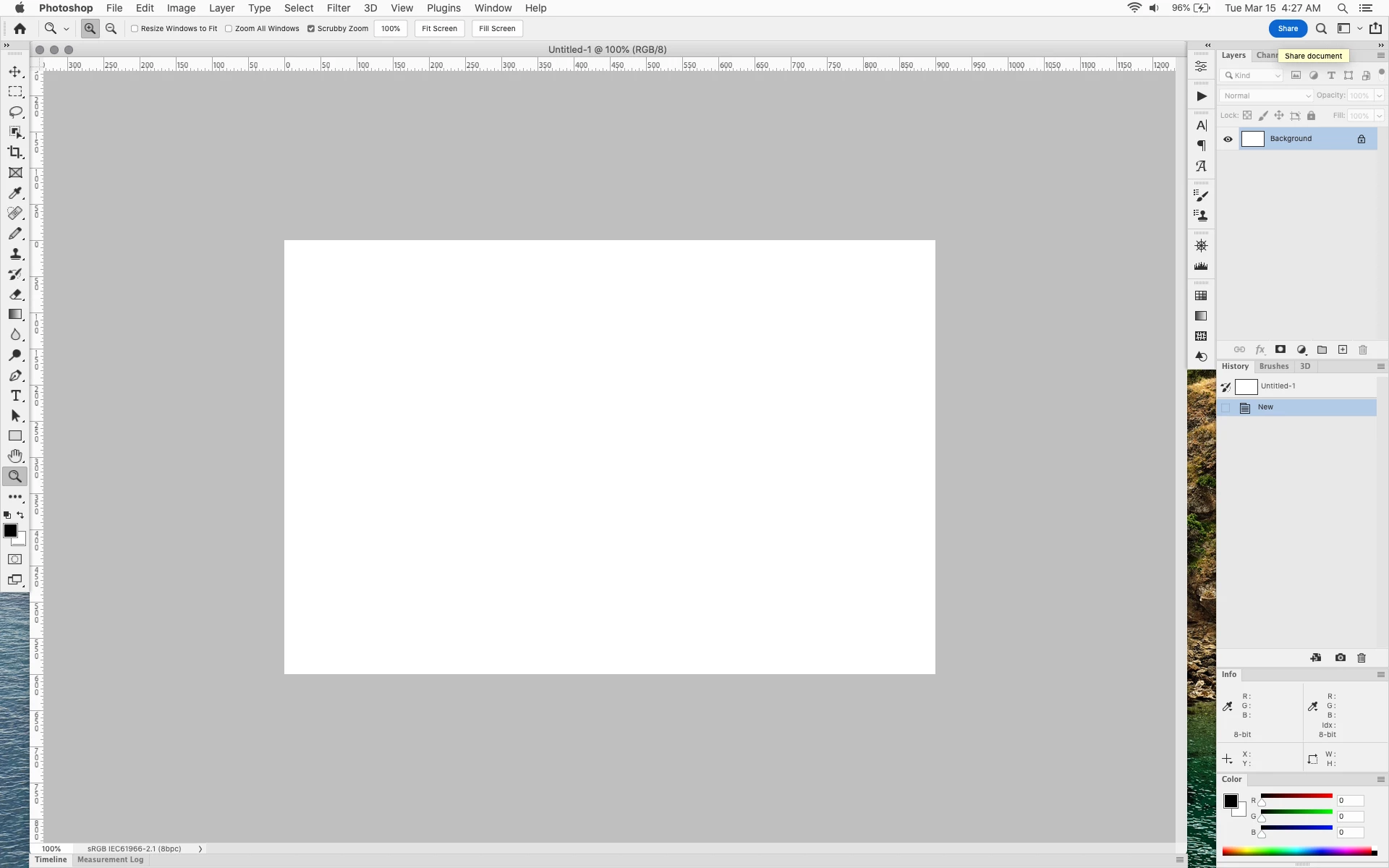
In photoshop 2022 (version 23.2), photoshop implemented a Blue Share button in the

top right corner of the app workspace that is supposed to turn into a button of the sme color as

the other tool options bar icons.


With the latest 23.2.2 update the Blue Share button does not go away after first use as described

on this page under Easily find the Share button


https://helpx.adobe.com/photoshop/using/whats-new/2022-1.html


I reset the photoshop preferences as i do after every photoshop update by trashing the preferences folder.


Share button that the Blue Share button is supposed to appear as after first use
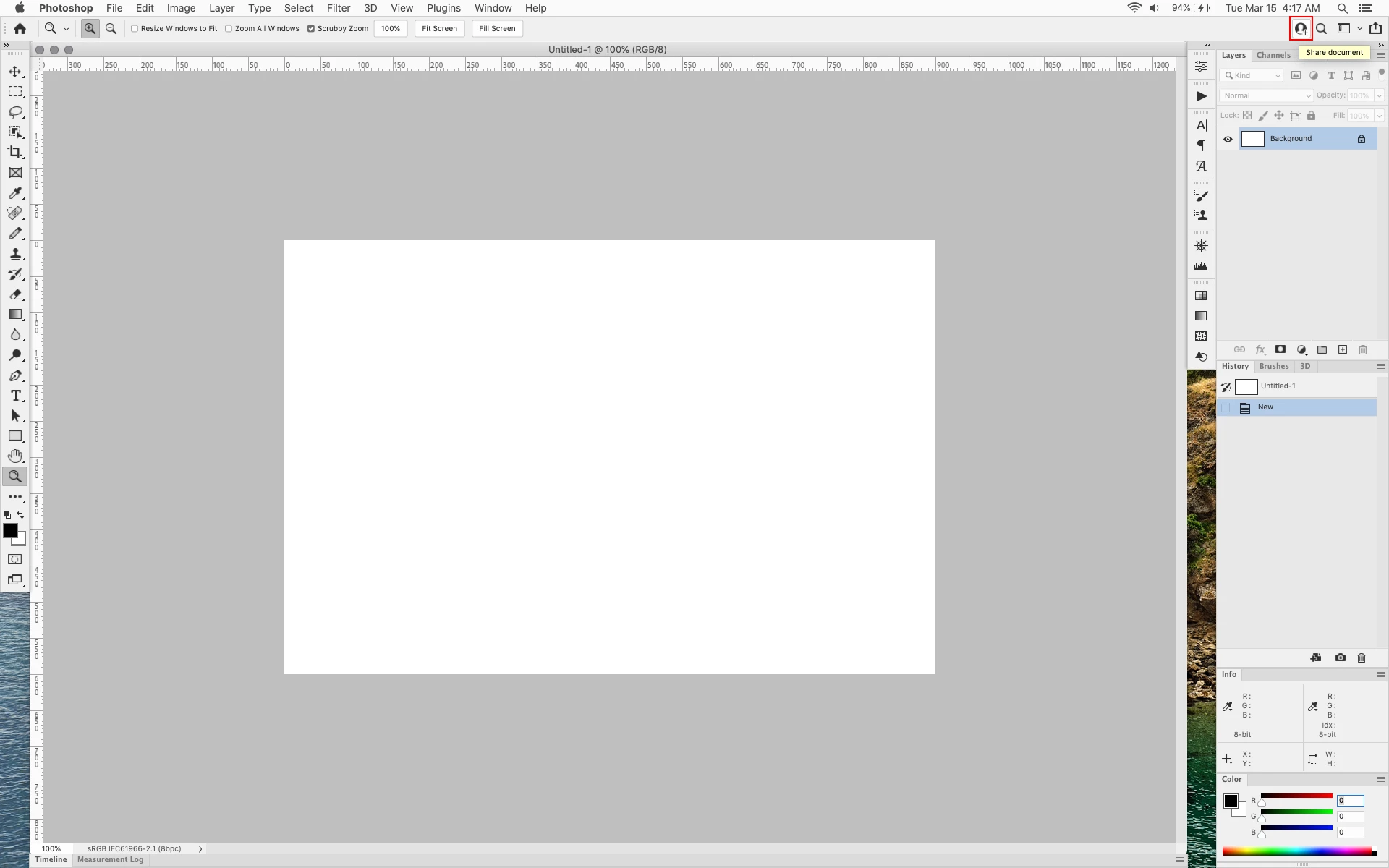


In the 23.2.2 update the button still stays as a Blue Share button after first use


170 replies

dmitryeliseev
Participant
May 25, 2022

Hide this awful blue button!!!!!

Participant
May 16, 2022

Get rid of this awful button! I will never share anything right out of photoshop. And it's freakin BLUE in all black interface! All my attention goes always to this freakin button when I glance there and reminds me how much it bothers me. Fix it!

Participant
May 12, 2022

Thank you. Very frustrating to see the only color on my user interface is a giant blue Share button that I'll never use. And for there to be no option in Preferences to disable it... Wow Adobe.

Kukurykus
Legend
May 8, 2022

Loll it's unusual, but nice at same time to finally meet explicit criticism coming from you to apps changes.

jane-e
Community Expert
Community Expert
May 8, 2022


@susanneb71083453 said

"so I don't see what's wrong with adding my support with a comment and an upvote."


Nothing is wrong with adding your support and upvote, Susanne. Adobe does not consider this a bug, as they have said on this forum that it was intentional. That being said, we have seen them reverse course sometimes when enough users speak up and upvote,  so we can hope they will reconsider the ugly distracting obnoxious blue button!


I'd like to address that you tried the work-around and it didn't work for you. Can you share screen shots of your settings? Maybe we can spot the error and assist you there.


As volunteers, we cannot change the software. We can only offer explanations, work-arounds, and opinions that are our own.


~ Jane


Kukurykus
Legend
May 8, 2022

In my opinion 'Adobe' agrees with us completely how this one element has a negative effect on our well-being, just for understandable reason they won't admit it 😛 Like most ordinal humans their employess are sensitive as well as we all are, so when working singly with applications we use, they would be very alike badly affected by anything of that the users massively report. Sadly for us, as far as they have benefits of anything implemented to their app products the cold income calculation is much more worth than respect to customers. It's after all their leading business, so they're allowed to act how they prefer, even saying something is made with a view to us, despite the fact how much we dislike it 😉

susanneb71083453
Participant
May 8, 2022

At no point did I say this workaround would be bad, whatever works for you. (I also tried it, but it doesn't work so far, but maybe restarting the computer might help.) But from what I understood, this forum/community exists for people to voice their concerns or wishes, so... that's what I am doing. To my knowledge there hasn't been any "official" statement that this won't be changed, so I don't see what's wrong with adding my support with a comment and an upvote.

c.pfaffenbichler
Community Expert
Community Expert
May 8, 2022

»Regardless, this is just a workaround, not a fix, and it shouldn't be necessary for us to do so.«

If Adobe (or certain parties at Adobe) and you (and in this case quite a few other Photoshop users) disagree on something having a work-around may be as good as it gets … 

susanneb71083453
Participant
May 8, 2022

Thx, I wasn't sure if this would be a good idea considering some people commented on an issue with further updates, which may or may not be linekd to it. (Seems like it was false alarm though...?) Regardless, this is just a workaround, not a fix, and it shouldn't be necessary for us to do so. Adobe should add a checkbox in the UI settings for turning it on or off, or a drop-down menu where you can choose the version you like or anything similar. Otherwise this issue could hardly be considered solved in my opinion. So I'll stick with my initial statement.

Kukurykus
Legend
May 8, 2022

If Adobe wanted us to use UIColors.txt workaround they would mark appropriate reply as correct solution (till they solve it profesionally), so I doubt they are happy it's possible to hide Share button. It might ruin their plan of getting us used to this feature 😉