
Yustas240
Inspiring
December 28, 2017

P: Photoshop 23.3 opens images with everything in white color.

  • December 28, 2017
  • 150 replies
  • 77262 views

Hey!

Just updated my Photoshop to 23.3 version. And when I'm trying to open any RGB file - it opens with all layers colored in white color. Seems like RGB is not active at all.

IF I transfer it into CMYK - all good.


Windows 10 Home.

Below is the print screen of RGB file turned into CMYK. Cuz I was unable even to make a printscreen in RGB.
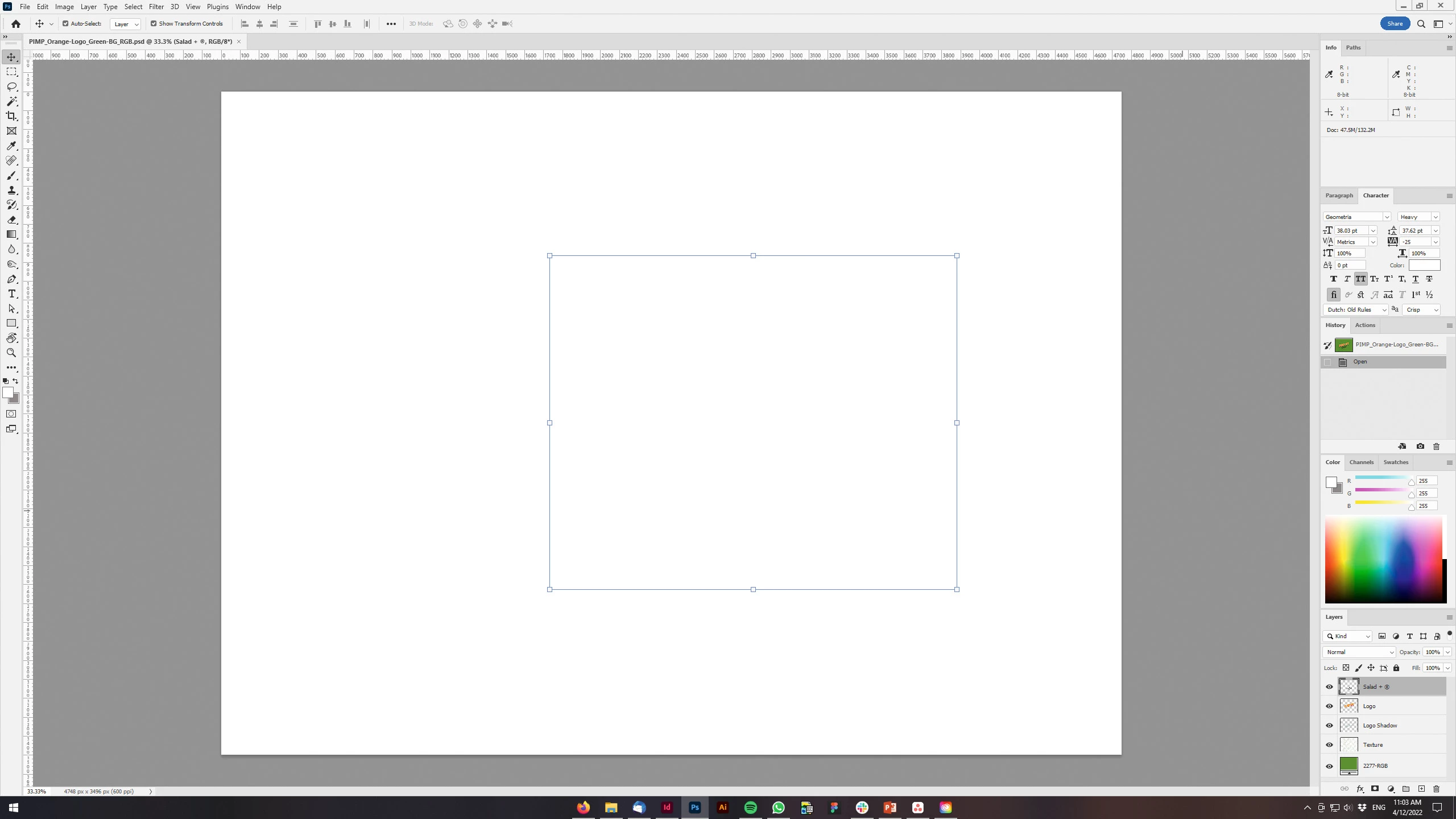
 

150 replies

phil180
Inspiring
April 19, 2022
Go to: Edit/Preferences/Performance/click Advanced Box…then UNTICK GPU.
Close Photoshop & reopen…
--
Sent from Gmail Mobile
phil180
Inspiring
April 19, 2022
Go to EDIT/Preferances/Performance/Advanced Settings/then UN TICK GPU
box…close Photoshop & re open…--
Sent from Gmail Mobile
marcocapone
Participating Frequently
April 19, 2022

Hi everyone,

this is my problem, nothing is shown on photoshop canvas.

I definitively see something from navigator but nothing  in canvas.

I already updated my NVidia drivers and reset preferences.

It's also a problem for me to post screenshots because i really can't use PS 🙂

Any known issues?


Thanks

TheDigitalDog
Inspiring
April 19, 2022

First, try disabling GPU in the Preferences (Performance tab). Any better?
If not, go to Preferences > Technology Previews... and check "Disable Native Canvas" - then restart Photoshop. Better?
If not, recalibrate and build a new ICC display profile, the old one might be corrupted.
If you are using software/hardware for this task, be sure the software is set to build a matrix not LUT profile, Version 2 not Version 4 profile.
If turning OFF GPU works, it's a GPU bug and you need to contact the manufacturer or find out if there's an updated driver for it. On the Mac, that's part of the OS update(s) so if this is the latest OS version, you may need to roll back a release.
Also see: https://helpx.adobe.com/photoshop/kb/acr-gpu-faq.html
Also see: https://community.adobe.com/t5/photoshop-ecosystem-bugs/weird-ps-bug-psd-file-looks-messed-up/idi-p/12780573

Author “Color Management for Photographers" & "Photoshop CC Color Management/pluralsight"
Participant
April 19, 2022

Every tool i use turns all image blank, and i cant see what im doing. Tried reset preferences, but it didnt work.

Participant
April 19, 2022

I'm using Photoshop V23.3

Participant
April 19, 2022

Recently opened photoshop 2022 after about a week and a half to try and edit something, and noticed that once I did layer from background on an image it turned blank. I then opened old files and saw that it was blank for them all.

I'm using photoshop 2022 and my computer has updated from Windows 10 20H2 to Windows 10 21H2 since I last used photoshop. What can I do to fix this? 

I've attached three images, the first one is an old file, the next two are before and after of doing layer from background.

Ged_Traynor
Community Expert
Community Expert
April 19, 2022

Hi

Disable this option in preferences and restart Photoshop

jane-e
Community Expert
Community Expert
April 19, 2022

Seven seconds Ged! 😊


Participating Frequently
April 19, 2022

App version: 23.3 (just updated automatically this weekend)

Platform and OS: Windows 10 64-bit on a Samsung desktop computer

Problem:

I open a JPG image in Photoshop, and it automatically opens as a background. That's fine - that's what it's supposed to do. But when I try to convert the background to a layer, the image disappears, but the layer preview says it's still there. When I try to convert the image to a smart object, same thing happens. When I add a new transparent layer with the image still on the background, same thing happens. I was able to use the paint bucket tool directly on the image while it's in the background, but if I try to use the magic eraser tool, I have this issue again. The thumbnail shows it worked, but the image is gone and the canvas is white, not transparent. All this happens whether I'm working in the image file directly or a Photoshop document. Apparently this same thing happened in 19.1 on Mac OS 10.13.2 and 10.13.3 and on PS CC 19.1.2, and in versions (don't know which version, platform, or OS) in 2020 and 2021.

Participating Frequently
April 19, 2022

UPDATE:

I just selected a portion of the image and pasted it into an entirely new document, and had the exact same issue as before. If I export the file to a PNG while it's showing this blank canvas glitch, the image saves the way it's supposed to, the way it looks in the thumbnail.

JP DELVALLE
Participant
April 19, 2022

Merci pour la mification sur le GPU,effectivement une fois décoché dans les préferences tout rentre dans l'ordre !

phil180
Inspiring
April 19, 2022
I would guess you are getting a white blank document on your screen since
the last
Photoshop CC update?
To resolve this problem go to: EDIT/PREFERENCES/PERFORMANCE/ADVANCED
SETTINGS...
then UN-TICK GPU COMPOSITING BOX...close Photoshop and re-open.

Phil

Participant
April 19, 2022

Good Morning. 
I am having problems with photoshop since two days ago. 
When I launch the program Isee a unusual white background. If I try to move a windows it duplicate it

and if I click on the "new layer" button it creates a white layer (same things if I duplicate the background layer)
Photoshop 2022 relese 23.3.0 
I ran antivirus and everything is ok and protected.

I have 75gb of virtual memory disk
How can I solve? Photoshop is useless. thank you! 🙂

jane-e
Community Expert
Community Expert
April 19, 2022

@Niccolò24090748budx wrote:

When I launch the program Isee a unusual white background.
How can I solve? Photoshop is useless. thank you! 🙂


Hi

Try this: go to Preferences > Performance > Advanced Settings > GPU Settings > uncheck GPU Compositing > close and relaunch Photoshop.

~ Jane


Participant
April 19, 2022

Desde hace unos días, con la versión 23.3 instalada, al desbloquear o copiar una capa de cualquier imagen o al tratar de abrir un PDF, automáticamente desaparace la capa y solamente se muestra el espacion en blanco Por favor, ¿alguién me podría dar alguna idea para resolver el problema. Mi sistema operatico el Windows 10. Saludos, Miguel Ángel

italosan
Community Expert
Community Expert
April 19, 2022

Hi, can you attach a screenshot or a short video?