
Yustas240
Inspiring
December 28, 2017

P: Photoshop 23.3 opens images with everything in white color.

  • December 28, 2017
  • 150 replies
  • 77262 views

Hey!

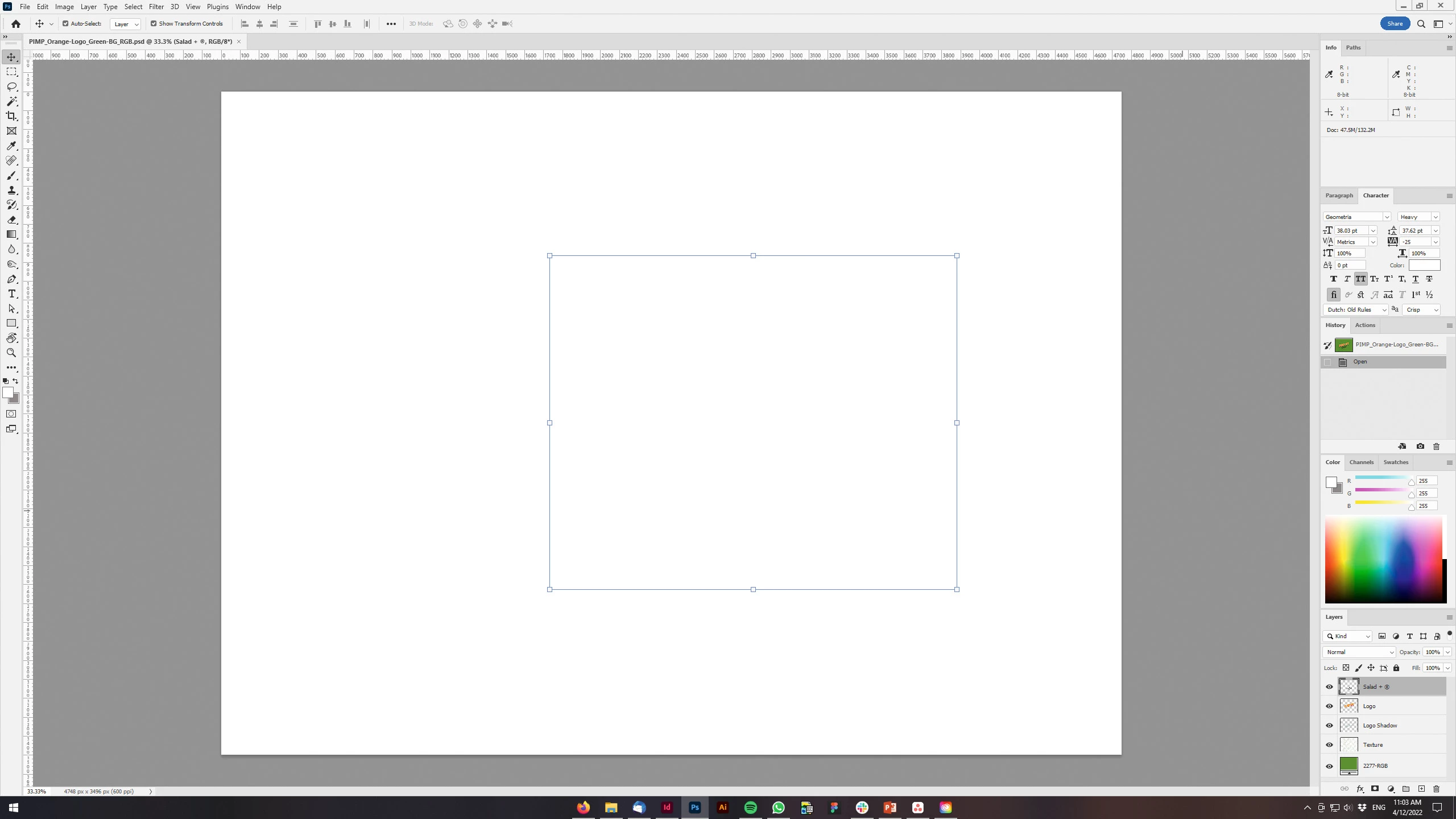
Just updated my Photoshop to 23.3 version. And when I'm trying to open any RGB file - it opens with all layers colored in white color. Seems like RGB is not active at all.

IF I transfer it into CMYK - all good.


Windows 10 Home.

Below is the print screen of RGB file turned into CMYK. Cuz I was unable even to make a printscreen in RGB.
 

150 replies

marcocapone
Participating Frequently
April 20, 2022

Update: disabling gpu solved the main problem but took me to other fancy stuff (transform handlers not shown, refresh problems and other small things)

marcocapone
Participating Frequently
April 20, 2022

Same here, disabling GPU solved the problem


Thanks!

Participant
April 20, 2022

Po otevření jakéhokoli souboru obrázku (jpeg, tif, png) a odemčení vrstvy se mi přestanou na obrazovce zoobrazovat všechny vrstvy. Vidím jen bílý podklad. Při otevření souboru psd se mi po jeho otevření nezobrzují vůbec žádné vrstvy a opět jen bílý podklad. Po přeinstalaci problém přetrvává. Prosím kde může být problém? Jedná se o poslední verzi 23.3.0 

davescm
Community Expert
Community Expert
April 20, 2022

The latest version has put more of the compositing workload onto the GPU rather than the CPU. That is good news as it should help performance with the larger image files we use these days. However, it could expose existing bugs in GPU hardware or drivers.
You can try going to Preferences > Performance > GPU Settings >Advanced and unchecking GPU Compositing. Then close and restart Photoshop.

If that helps, try updating your GPU drivers to the latest versions designed for creative work (e.g NVidia release Studio drivers) and when updating use the clean install option. Once done you can try rechecking the GPU compositing option and restarting Photoshop.

Dave

Participant
April 20, 2022

When I duplicate a layer in photoshop it becomes white. Why is that happening? Is there any solution?

Ged_Traynor
Community Expert
Community Expert
April 20, 2022

Hi

If you're using Photoshop version 23.3, try disabling this option in preferences and restarting Photoshop

Participant
April 20, 2022

Hey Ged_traynor,


Thanks for the help. It worked succesfully.


Participant
April 20, 2022

Bij het laden van tiff bestanden krijg ik alleen maar witte pagina's op mijn scherm. Kan ook geen bewerkingen doen.
een idee hoe dit kan?

Ged_Traynor
Community Expert
Community Expert
April 20, 2022

Hi

If you're using Photoshop version 23.3, try disabling this option in preferences and restarting Photoshop

Participant
April 20, 2022

Dank u wel maar ik heb geen idee waar ik dit scherm kan vinden

Fotopogledi
Participant
April 20, 2022

Tried to add a © symbol for copyright on an image and the text is not visible till I merge all layers.. also when I type text the lower layers dissapear or become blank (white) I went down on previous version of PS to continue with my work and now all is ok. Hope the bug will be fixed. thanx Robert


Intel(R) Xeon(R) CPU E5-2640 v2 @ 2.00GHz 2.00 GHz 64,0 GB RAM WIN 10 PRO 21H1 Nvidia Quadro K5000 8GB

Ged_Traynor
Community Expert
Community Expert
April 20, 2022

Hi

Try disabling this option in preferences and restarting Photoshop

Participant
April 20, 2022

When I import a png file, I just have a white document. In the layers I do see the file, but on the the page that I am working on. Forgive me for not using the correct language.


Mike_Gondek10189183
Community Expert
Community Expert
April 20, 2022

Where are you importing the .png?  Open the png in photoshop and if it says index change to RGB in image mode and save, That should fix your issue.

Participant
April 19, 2022

Hi,


When using any shape tool, the shapes are not visible--neither fill nor stroke.  


The shape is set to "shape" (not path) and I've reset preferences and re-installed photoshop clean.


You can see the preview in the layers, just not on the artboard. 


How can I fix this?


Thanks.


Community Manager
April 19, 2022

Please try going to Preferences > Performance > GPU Settings >Advanced and unchecking GPU Compositing. Then close and restart Photoshop.

If that resolves the issue, please make sure your drivers are up to date.  If not, install the updated driver using the clean install option.

Ariane Aguiar
Participant
April 19, 2022

Olá, estou tendo problemas ao criar nova camada (texto, duplicar camada, criar camada com preenchimento ou com transparencia etc) e essa SEMPRE fica com preenchimento em branco. Gostaria de ajudar.
Obrigada

Ariane Aguiar
Participant
April 19, 2022

Observei que somente no canal RGB isso acontece. Quando mudo para CMYK fica "normal".

Kukurykus
Legend
April 19, 2022

Then mark Ged_Traynor reply as correct, not yours if you did?