
Yustas240
Inspiring
December 28, 2017

P: Photoshop 23.3 opens images with everything in white color.

  • December 28, 2017
  • 150 replies
  • 77262 views

Hey!

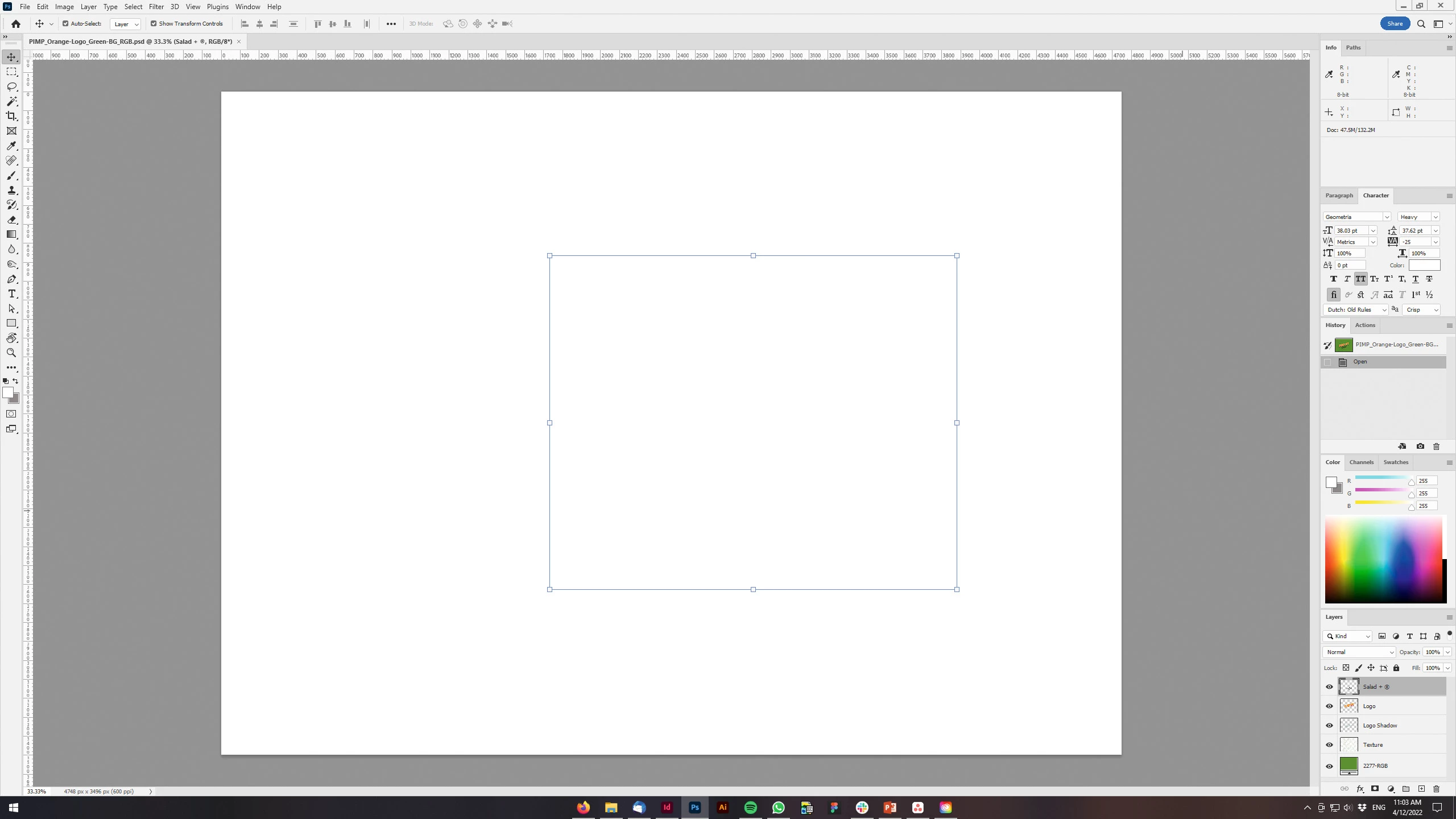
Just updated my Photoshop to 23.3 version. And when I'm trying to open any RGB file - it opens with all layers colored in white color. Seems like RGB is not active at all.

IF I transfer it into CMYK - all good.


Windows 10 Home.

Below is the print screen of RGB file turned into CMYK. Cuz I was unable even to make a printscreen in RGB.
 

150 replies

Participant
April 19, 2022

Graphics stopped showing in Photoshop. They are not visible if pasted from the clipboard.

Ged_Traynor
Community Expert
Community Expert
April 19, 2022

Hi

You haven't mentioned which version of Photoshop you're using but if it's version 23.3 try disabling this option in preferences and restarting Photoshop to see if it helps

Participant
April 19, 2022

23.3.0

Thank you helped.

Known Participant
April 19, 2022

Hi, what happened to the last photoshop update? When I open a PSD design, I only see a white page ???

OS Windows 10 / 64 bit.


Known Participant
April 19, 2022

solved 


Known Participant
April 19, 2022

turned off Use GPU Compositing

Participant
April 19, 2022

Bonjour, 

Je me permet de publier ici car je rencontre un problème avec Photoshop depuis plusieurs joursque je n'arrive pas à résoudre. 

Lorsque j'ouvre une image, mon photoshop se fige, et je ne peux plus rien faire. Photoshop semble fonctionner quand je cré un nouveau fichier, mais dès que j'ouvre ou importe une image, il bug. 

J'ai essayer de le mettre à jour, de le désinstaller et de le réinstaller, mais j'ai toujours le problème. Je ne sais donc pas quoi faire de plus. 

Quelqu'un à une idée ? 

PS : Je vous insère des pièces-jointes afin de voir ce que donne photoshop dès que j'oubre une image. 

------------------------------------------------------

Version 23.3

Windows 11 Famille, Système d’exploitation 64 bits


AxelMatt
Community Expert
Community Expert
April 19, 2022
My System: Intel i7-8700K - 64GB RAM - NVidia Geforce RTX 3060 - Windows 11 Pro 25H2 -- LR-Classic 15 - Photoshop 27 - Nik Collection 8 - PureRAW 5 - Topaz Photo
Kukurykus
Legend
April 19, 2022

By the way there is interesting difference between 214 and 215 images. On first there's not 3D menu yet.

Participant
April 19, 2022

A couple of days ago, PS stopped showing any pictures or graphics in the workspace, even though there were pics and graphics being displayed in the layers panel window.  It doesn't matter what type of pic or graphic (jpeg, png, etc.) or how old/new it is.  I've uninstalled and re-installed PS to no avail; the problem persists.  If I open a jpg that is a background (that is a picture with the background lock icon on the picture in the layers panel) I can see the picture.  But the moment I drag that background lock icon to the trash or add a layer or try to do anything to the picture, the picture in the workspace window disappears.  It's still there (I can see the frame and move it around; and I can tell it moves b/c the image in the layers panel updates), but it's not showing in the workspace (see example in two screenshots attached; one with background lock inlayers panel; then with background lock in layers panel removed).  I cannot figure out why this just started happening, except that PS updated 6 days ago and then when I used PS a couple of days later, this anomoly occurred.  It's driving me crazy!  I have work to get done but cannot get PS to work properly.  Has anyone else experienced this, and if so, how did you resolve it?  

I'm on Windows 10 Pro w/the following:

Intel(R) Core(TM) i7-3970X CPU @ 3.50GHz 3.50 GHz

32.0 GB RAM

Thanks for any help anyon


Participant
April 19, 2022

I am having the same experience.  I even reinstalled my video card and current drivers but to no effect.  What's up Adobe?

Participant
April 18, 2022

Todas as minhas imagens desapareceram. Elas aparecem somente na visualização das camadas, na área de trabalho elas não aparecem. 


Quando abro a imagem diretamente pelo aplicativo (ao invés de usar o visualizador de imagens do windows) elas até aparecem, mas qualquer edição feita na imagem, aparece como um grande retângulo branco. 


Ao criar qualquer camada, tudo fica branco. Mesmo assim, quando eu faço a exportação da imagem, embora ela fique em baixa qualidade, a exportação acontece como se não houvesse erro algum na edição. 


Já resetei o programa, desinstalei e reinstalei, mudei os discos e ainda assim o erro continua. 


Alguém tem ideia do que devo fazer?


Ged_Traynor
Community Expert
Community Expert
April 19, 2022

Hi

Try disabling this option in preferences and restarting Photoshop

Participant
April 20, 2022

Hi, it worked!
Thank you

Participant
April 18, 2022

Thanks a lot!!! Fixed! 😄

x3DGime
Known Participant
April 18, 2022

Hi, 

I think there should be a bug in the latest Photoshop version, what is 23.3.0 (it is 2022.APR.18. now). 


I experienced that when I open a PSD with layers Ps shows only white canves and nothing else. 

See the attached screenshots. 

On Screenshot (216).png is the view of my PSD after flattening the image (Layers menu > Flatten image), it is very weird. 


In the conversation with Help Centre we figured out that it might be because of outdated video drivers. 


So... It was recommended to update my graphic card driver as it was utdated (7 months instead of 6 months). Well... we downloaded from nVidia site what we found... it is even more outdated (23 months...).
 

But the problem is not with thw driver! The problem is with Photoshop.
 

The experienced error happened in Ps version 23.3.0, and so because of the outdated drivers I was recommended to install v22.


But before going back to v22 I tried the very previous version instead: v23.2.2
 

And it is working perfectly!
 

So the problem is not with the video driver but it should be a bug in Ps v23.3.0!  


P.s.: below I have to choose a "keyword", so I choosed Windows, as my computer has a Win10pro x64 ENG system with 32 GB RAM etc., but IMHO this issue is nothing to do at all with the computer and/or the Windows and/or with the graphic drivers. 

Participating Frequently
April 18, 2022

Thank you all very much.

Resolved by:
Go to Preferences > Performance > Advanced Settings and uncheck the "GPU
compositing" option.

Much abbreviated.

Cheers
John

--
*John Kelly LRPS CPAGB*


[Links removed by moderator]

Participant
April 18, 2022

Olá, pessoal.
Eu sei que este post é antigo, porém aconteceu comigo pela primeira vez. Toda vez que abro um PNG, ele abre o documento totalmente em branco e a imagem não é mostrada. O mesmo acontece quando abro um documento em camadas. A imagem só aparece se estiver "flatten".
Como corrigir isso?
Grata pela ajuda.