


Participant
November 7, 2023

P: Photoshop 25.0 Graphics Processor Compatibility Check fails: Unknown GPU

  • November 7, 2023
  • 179 replies
  • 26350 views

Hello, I just updated to Photoshop 2024 but I cannot get it to work with GPU acceleration. When I start Photoshop, I get this error: 


I am running a Windows 10 PC with two Nvidia RTX 3090 video cards and a 5950x CPU. 


So far, I have tried:

- Setting Photoshop and sniffer.exe to use my, uh, 'high performance 3090' as opposed to my 'power saving' 3090 (excellent work, Windows)  
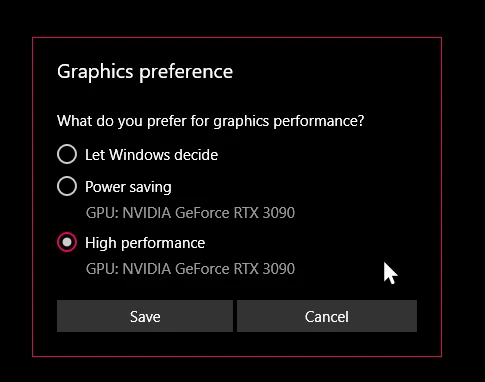
- Updated to the latest Nvidia studio drivers and installed all Windows 10 updates
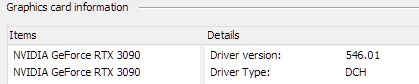
 

- Removed 'sniffer.exe' from the Photoshop folder as suggested, causes Photoshop to not boot. 

- Enabled "Older GPU Mode" in the Technology Previews, get same error so I disabled it again. 

-  Tried setting the GPU in Nvidia Control Panel, but I don't have a "Preferred GPU" setting like a laptop or PC with integrated graphics. 

- Disabled SLI

- Uninstalled and reinstalled Photoshop 2024

- Manually ran sniffer.exe, it sees the video cards just fine
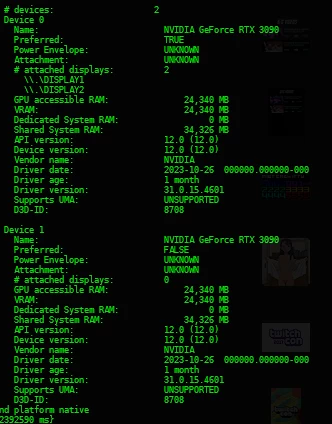
 

Thanks for the update Adobe, it works really well

179 replies

D Fosse
Community Expert
Community Expert
December 12, 2023

Dual GPU laptops are pretty much the norm nowadays, so I keep telling people to disable the integrated one. And very often that does it. This is well covered in the GPU troubleshooting Help document. So we can cope with that one 🙂

Mark.Dahm
Community Manager
Community Manager
December 12, 2023

We are working toward shifting our CL and GL dependencies to more modern native APIs, but game vendors in particular have been slow on then uptake, which causes drivers to depend on older APIs (OpenCL and OpenGL), which introduces uncertainty; did Adobe make a change that broke, or did a driver update perform badly, or maybe a Windows update?


Unfortunately, Adobe can reliably only diagnose crash reports for code that it authors; crashes in drivers are untraceable by us, and we are seeing that bucket increase recently, so we are doing what we can from our side to find and fix any issues, and working with partners for the rest.


Dual GPUs have always been tricky for PS, since resources could be hot swapped across cards, but without warning, we haven't figured out how to navigate that use case. I believe removing the second card would settle down many of the dual card issues, but nobody, including us, want to stop there.

D Fosse
Community Expert
Community Expert
December 12, 2023

Thanks for all your efforts, Mark. It's appreciated. I'm not affected myself, but as Community Expert I feel really bad for not knowing what to tell these users who are.


What's clear is that there has been a very significant increase in GPU problems the last couple of months. I've never seen anything quite like it, except perhaps back in 2010 when Photoshop CS4 first started using OpenGL. But that eventually settled down, as I'm sure this will when you get to the bottom of it.

Mark.Dahm
Community Manager
Community Manager
December 12, 2023

@Nik Nastev , we are reaching out to nVidia for help diagnosing an uptick in driver crashes; can't say at this point if it's the same issue as we are seeing with the dual GPUs; the number of issues seems larger than I would expect for dual GPU configurations. Maybe by coincidence we started noticing issues around the time Microsoft bumped Windows 11, though I see you are on Win 10 and I haven't investigated whether Win 10 was also updated in early November. Still much to unpack.


I don't recall whether an older version of Photoshop works with your current OS and configuration; if it does, then it's going to point to a Photoshop change, and if not, it could be some other environmental factor.


I also don't recall whether we tried falling back to a pre November nVidia driver; at this point, I've asked you to do enough,  but if anyone is willing, that could help us further nail things down,

RealXanathon
Known Participant
December 12, 2023

@Mark.Dahm 

PS Beta 25.4 does not work.

Participating Frequently
December 11, 2023

@Mark.Dahm Btw, do you have connection to Nvidia devs for drivers? In current days with all this hype on GPU's (AI and etc.) - I think you need to have a close connection to them.

May be they have changed something again in their drivers, that make a problems with new sniffer or GPU abstraction layer you have.

Best!


Participating Frequently
December 11, 2023

@Mark.Dahm if old sniffer is not working - then devs need to find solution to make new sniffer to work with multiple GPU's on desktop systems. This is not good to have broken Photoshop and Photoshop Beta in current state.

Thanks! 🙂

Participating Frequently
December 11, 2023

@Mark.Dahm updated to latest version - same story. Not working.


Mark.Dahm
Community Manager
Community Manager
December 11, 2023

@Nik Nastev ,


We are releasing another update, this time to the regular version, in the next 24 hours (you may have already received it). Let us know if anything changes there for you. We had a couple more changes, indirectly to our GPU booting procedure, which may change results.


I asked about reverting sniffer, and my dev team indicated that the older version of sniffer does not work with the current version of our GPU abstraction layer, so reverting would be just putting a broken sniffer into process.

RealXanathon
Known Participant
December 8, 2023

I also have two instances of sniffer.exe running. If sniffer only is needed at PS startup to identify the GPU, why do they keep running?