


Participant
November 7, 2023

P: Photoshop 25.0 Graphics Processor Compatibility Check fails: Unknown GPU

  • November 7, 2023
  • 179 replies
  • 26351 views

Hello, I just updated to Photoshop 2024 but I cannot get it to work with GPU acceleration. When I start Photoshop, I get this error: 


I am running a Windows 10 PC with two Nvidia RTX 3090 video cards and a 5950x CPU. 


So far, I have tried:

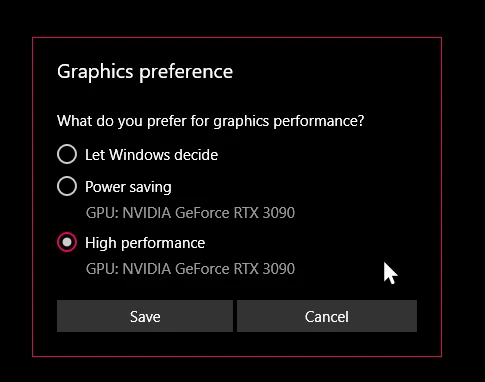
- Setting Photoshop and sniffer.exe to use my, uh, 'high performance 3090' as opposed to my 'power saving' 3090 (excellent work, Windows)  
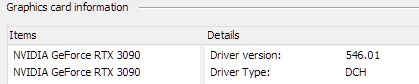
- Updated to the latest Nvidia studio drivers and installed all Windows 10 updates
 

- Removed 'sniffer.exe' from the Photoshop folder as suggested, causes Photoshop to not boot. 

- Enabled "Older GPU Mode" in the Technology Previews, get same error so I disabled it again. 

-  Tried setting the GPU in Nvidia Control Panel, but I don't have a "Preferred GPU" setting like a laptop or PC with integrated graphics. 

- Disabled SLI

- Uninstalled and reinstalled Photoshop 2024

- Manually ran sniffer.exe, it sees the video cards just fine
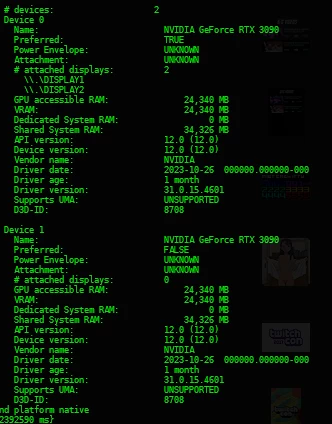
 

Thanks for the update Adobe, it works really well

179 replies

Participating Frequently
December 8, 2023

@Mark.Dahm you are welcome.

We need to find and fix this nasty bug.

Honestly - I still think that the problem is in sniffer.exe. File is changed compared to working version of sniffer.exe.

Just my thougths. 

Mark.Dahm
Community Manager
Community Manager
December 8, 2023

@Nik Nastev , dangit, thank you for the info.

Participating Frequently
December 8, 2023

@Mark.Dahm after closing Beta - in Task manager Photoshop.exe is not exist, but I have 2 sniffer.exe proccesses active there and need to kill them manually.

Otherwise I could not do any future updates at least.

Participating Frequently
December 8, 2023

@Mark.Dahm m.2426 is the same - not working still. 😞

All points are RED, except the last one.

Looking forward for next possible fix.

Thanks!

Mark.Dahm
Community Manager
Community Manager
December 8, 2023

@Nik Nastev , we found a spot where something was breaking the GPU. That patch is in this Beta update. We don't know if it works with multiple GPU configurations, though. Looking for your feedback.

Mark.Dahm
Community Manager
Community Manager
December 8, 2023

The Beta has been posted; let us know how it goes; we have more we know we need to do, but thanks for letting us know if this changes anything.

Participating Frequently
December 8, 2023

@RealXanathon It's been the same here all the time from one of updates, where sniffer was edited from Adobe devs.

All points, except the last one are RED. Probably our GPU's and systems are very old and not compatible with Photoshop anymore (laugh).

Anyway, let's hope we will get a fix soon in new Beta.

Best!

RealXanathon
Known Participant
December 8, 2023

@Mark.Dahm I just tested Photoshop Beta 25,4. No improvement, in fact it's even worse than in 25.2, now OpenGL and OpenCL are again shown as "unavailable".

RealXanathon
Known Participant
December 7, 2023

@Mark.Dahm all information about our systems are already in this thread and in the system infos you requested. Also I already explained that I went through all available Adobe help articles about this and also through heaps of information about this in literally hundreds of posts all over the web about this issue before contacting support.


Then I had to jump through all kinds of hoops that your support let me jump through, claiming for days that this is a Windows problem or a problem of my rig, which it obviously is not.


So, please excuse if my patience with Adobe is wearing VERY thin after all this time of being ignored and taken for a dumb user (and this is still the case with another bug I reported in 2021 that was promised to me by an Adobe representative to be solved "soon" in april 2022 and is unsolved until today - for that bug I was and am passed through from supporter to supporter, all asking the same questions all over again and all giving the same wrong advise all over again. My impression is that Adobe support tries to get me so frustrated that I give up and stop inquiring about the bug. I have wasted way more time than is convenient on that other issue. That's another reason why my patience with Adobe is wearing VERY thin).

Participating Frequently
December 7, 2023

@Mark.Dahm About MultiGPU config that you post a link - this is for laptops, where you have integrated GPU in CPU and External GPU. Please, see our systems - they are NOT laptops and we use external NVIDIA GPU's only. 

I have tried to alocate one of GPU's only for Photoshop (sniffer) apps without ANY luck.

Only bringing back sniffer from v23 give me compatible result with GPU.

Probably this is not a perfect, but it's better for work. Otherwise it is very slow to work in Photoshop.