


Inspiring
May 22, 2026

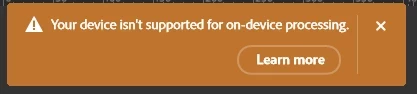
P: Photoshop 27.7 & 27.8 on-device Remove Tool model remains unavailable, or Your device isn't supported for on-device processing

  • May 22, 2026
  • 43 replies
  • 2995 views

Hello Adobe team,

I am reporting an issue with Photoshop 27.7 on Windows 11 where the new Remove Tool on-device generative AI model cannot be enabled on an NVIDIA GeForce RTX 5080.

The “Device” option remains greyed out, even though all documented requirements appear to be met.

SYSTEM SUMMARY

Photoshop version: Adobe Photoshop 2026 / 27.7

Operating system: Windows 11

GPU: NVIDIA GeForce RTX 5080

VRAM: approximately 16 GB

DirectX: DirectX 12 / DirectX 12.2 available

NVIDIA driver: current and newer than Adobe’s stated minimum requirement

Photoshop GPU acceleration: enabled

Photoshop GPU status: GPU is detected and allowed

Available disk space: sufficient

The GPU is usable for normal Photoshop GPU acceleration.

The important detail is that Photoshop appears to detect and use the RTX 5080 for general GPU acceleration, but in the system information / GPU identification path the card is shown as:

NVIDIA GeForce RTX 5080 UNKNOWN

This strongly suggests that the issue is not general GPU acceleration, but the separate GPU qualification or capability check used for the on-device AI model.

WHAT I ALREADY CHECKED

I confirmed that “Use Graphics Processor” is enabled in Photoshop.

I checked the Remove Tool / Image Processing preferences.

I confirmed that the Remove Tool setting is set to “Faster”.

I also checked the “more stable / safer” setting path and switched back as needed.

I restarted Photoshop after changing the setting.

I reset Photoshop preferences.

I deleted / reset the relevant Photoshop user configuration data under AppData / Roaming.

I reinstalled Photoshop 27.7.

Adobe removal / cleanup components were triggered during reinstall.

The additional / advanced Adobe cleanup tool had to be started manually again.

I checked that the GPU is detected by Photoshop.

I checked that GPU acceleration is not disabled.

I checked that the VRAM requirement is fulfilled.

I checked that the NVIDIA driver is current.

I checked that the issue is not caused by insufficient disk space.

The standard Remove Tool components were installed automatically during the Photoshop reinstall.

After the the complete reinstallatiom I saw the missing “Remove Tool advanced components” anr installed manually the Photoshop plug-in through the Creative Cloud app.

So the issue should not be caused by missing Remove Tool Advanced  components.

I considered whether the Windows system language / locale could be involved, but there is no evidence for that so far.

Despite all of this, the on-device option remains unavailable.

SNIFFER / GPU DETECTION SUMMARY

The Photoshop GPU sniffer runs successfully and detects the RTX 5080.

The GPU is not rejected for normal Photoshop GPU acceleration.

The relevant situation is:

GPU detected: NVIDIA GeForce RTX 5080

GPU acceleration: enabled / allowed

DirectX: available

VRAM: sufficient

Photoshop system info reports GPU as: NVIDIA GeForce RTX 5080 UNKNOWN

So the card is not missing, disabled, or unusable in Photoshop. The problem seems to happen later, in the qualification path for the local AI model.

COMPARISON WITH OTHER USERS

Other users appear to report the same or very similar issue with RTX 50-series / Blackwell GPUs.

Reported affected GPUs include RTX 5070 Ti, RTX 5080, and RTX 5090.

The pattern appears to be the same:

Windows 11

Photoshop 27.7 or recent Photoshop version

Current NVIDIA driver

RTX 50-series GPU

More than enough VRAM

GPU acceleration works in Photoshop

Remove Tool on-device model remains greyed out

Photoshop system info may show the GPU as UNKNOWN

This suggests that the problem may be related to RTX 50-series / Blackwell GPU qualification rather than an individual local installation issue.

CURRENT CONCLUSION

At this point, this does not look like a local configuration problem anymore.

The RTX 5080 fulfills the published requirements:

RTX 30-series or newer

At least 14 GB VRAM

Current NVIDIA driver

GPU acceleration enabled

Remove Tool set to Faster

Sufficient disk space

However, the on-device model is still blocked.

My suspicion is that Photoshop 27.7 currently does not correctly qualify some RTX 50-series / Blackwell GPUs for the local Remove Tool AI model.

The GPU works for normal Photoshop acceleration, but the separate on-device AI model check seems to fail because the GPU is internally treated as UNKNOWN or is not yet properly whitelisted / recognized.

REQUEST TO ADOBE

Please confirm whether RTX 50-series / Blackwell GPUs, especially the RTX 5080 and RTX 5090, are currently officially qualified for the Photoshop 27.7 on-device Remove Tool AI model on Windows.

If they are supposed to be supported, this appears to be a bug in the GPU detection / qualification / gating logic for the local AI model.

A clear confirmation would be helpful:

Is RTX 50-series support currently expected to work in Photoshop 27.7?

Is the UNKNOWN GPU identification relevant to the Device option being greyed out?

Is this a known issue?

Is a fix planned for an upcoming Photoshop Beta or release build?
    43 replies

    Participant
    July 3, 2026

    the Beta version I tried was/is 27.9.0

    Inspiring
    July 3, 2026

    you have to check the specific version of 27.9.0.
    It doesn’t exist one specific version. adobe release around every 4 days an update

    3 june (260603) kryptic error message
    10 june (260610) not enough ram message
    14 june (260614) not enough ram message 
    16 june (260616) runs for the first time but freeze after several runs
    21 june (260621) start hanging after around 10 tasks and freeze later
    24 june (260624) runs much smoother but not good enough for a stable release

    Participant
    July 3, 2026

    oh ok, it’s: Adobe Photoshop Version: 27.9.0 20260624.m.3583 6d2c17c  x64 (beta, PublicBeta)

    Participant
    July 2, 2026

    I can confirm that this issue is still present on an RTX 5070 Ti with Photoshop Beta 27.9.

    System

    • Windows 11 24H2
    • Photoshop Beta 27.9.0
    • NVIDIA Studio Driver 610.62
    • NVIDIA GeForce RTX 5070 Ti (16 GB)

    Behaviour

    Photoshop 27.8:

    "Your device isn't supported for on-device processing."

    After installing Photoshop Beta 27.9 and the Remove Tool Advanced Components, the message changed to:

    "Your NVIDIA GPU doesn't have enough VRAM for on-device processing."

    Diagnostics performed

    • GPU Compatibility Check passes.
    • Photoshop detects the GPU correctly.
    • GPU acceleration enabled.
    • Remove Tool Advanced Components installed.
    • Latest Studio driver installed.
    • Fresh reboot with minimal background applications.
    • Same result.

    Photoshop System Info reports approximately 15,997 MB accessible VRAM.

    Windows Task Manager reports 16.0 GB dedicated GPU memory.

    nvidia-smi -q reports:

     
    FB Memory Usage

    Total : 16303 MiB
    Free : 14877 MiB

    This was immediately after a clean reboot with Photoshop Beta as the primary application.

    It appears the Remove Tool runtime is incorrectly failing the VRAM validation despite the GPU meeting the published requirements.

    Inspiring
    July 2, 2026

    which beta version do you try exactly?

    since beta 20260616 it works with a rtx 5080 and
    since 20260624 it can handel more than around 15 tasks


    Participant
    June 28, 2026

    RTX 3090 24GBVRAM, 64 RAM, Intel i5-13600K
    Latest studio Nvidia drivers 610.62 and older stable 596.49 - same bug.

    Participant
    June 28, 2026

    Remove tool not working on my RTX 3090 24Gb VRAM and 64RAM. Your device isn’t supported for on-device processing. How much bugs with any new release!

    Inspiring
    June 22, 2026

    @Sameer K 

    Yesterday, I tried using the AI ​​removal tool to take people out of a harbor scene filled with sailboats. The result using auto-detection was poor—very poor. Areas where no people were visible got selected and edited.
    The complex textures created by the many overlapping sailboats, parasols, and advertising displays completely overwhelmed the AI. The result was a useless, pixelated mess.

    When I manually selected individual people (step-by-step), the removal tool worked great at first, but Photoshop became increasingly sluggish with each step. After 15–20 operations, the mouse started lagging significantly while I was selecting objects for removal, even though the GPU wasn't heavily taxed during the actual processing and was delivering usable results.

    After restarting Windows, Photoshop ran normally again.
    I have no idea if the RAM or VRAM wasn't being cleared properly; the CPU was idling at 4% usage, and the GPU had nothing to do during the manual selection process either. Adobe definitely still has some work to do here.

    Sameer K
    Community Manager
    Community Manager
    June 22, 2026

    Hey, ​@Matthias.G.ermany. We appreciate your feedback, especially when it is use-case oriented, specific, and detailed. However, this thread is primarily for tracking new user reports, development updates, and other health metrics. 


    It would be helpful if you could create a separate post in either the Photoshop or Photoshop (beta) section, since the local model has only worked for you since you installed version 27.9 (beta). Please continue to add your feedback in that new post.


    I hope you understand. Thanks!
    Sameer K

    Inspiring
    June 19, 2026

    Hello there,

    I thought I would give the removal tool a go on device
    I've updated my Photoshop to 27.8 and reinstalled the advanced tools for removal as it did not work the first or second time. System has been rebooted.

    My system is far above the required specs for using the removal tool on device.

    AMD 7950x
    Nvidia RTX4090 24gb Vram Drivers 610.62 Updated earlier today
    64GB Ram
    3TB spare on ssd

    Win 11 Pro up to date

    Yet when I try to use on device I get the message "Your device isn't supported for on-device processing". How can this be?

    Please advise

    B Lucky

    Gary

    Inspiring
    June 19, 2026

    Wrong GPU detection you can try Photoshop Beta. Since yesterday the beta 20260616.m.3575 (199f0a1 x64). Works with blackwell.maybe your 4090 will also work. Let us know!

    Inspiring
    June 20, 2026

    I’ve just installed Photoshop Beta 27.9.0. I eventually got the Remove Tool Advancerd Componants on and rebooted PC and I get the same "Your device isn't supported for on-device processing" with my RTX4090 with 24GB Vram.

    gener7
    Community Expert
    Community Expert
    June 18, 2026

    I tried installing “Device mode” for the remove tool, but the Macbook Neo doesn’t meet M1pro/16GB/8 cores requirements. OTOH ACR 14 is just fine.


    Sad note: The ACR splash screen pays tribute to Jeff Schewe who passed away May 28.

    Inspiring
    June 18, 2026

    the new release version Adobe Photoshop Version: 27.8.0 20260610.r.13 4081857  x64 (final, Release): your nvidia gpu does not have enough VRAM for device-side processing

    @Sameer K 

    Confirmed working in Photoshop Beta 27.9.0 20260616.m.3575 (199f0a1 x64).

    The previous issues appear to be resolved on my RTX 5080 system.

    • Device mode can be selected without any error message.
    • The Remove Tool completes successfully using on-device processing.
    • GPU core clock and VRAM clock increase during processing (verified with MSI Afterburner), indicating local GPU utilization.
    • Processing is significantly faster than on my Mac Studio M2 Max.

    It looks like Adobe has fixed the issue somewhere between build 3569 and 3575.
    Please let me know if other RTX 50-series users can confirm.

    Rockabilly Outlet
    Participating Frequently
    June 19, 2026

    Adobe Photoshop Version: 27.8.0 20260610.r.13 4081857  x64 (final, release) PC with RTX 5090 -> “Device” can be selected, but the error message “Device-side processing is not supported on your device” appears. So we’ll have to keep waiting for Adobe to fix the bug. 😴

    Inspiring
    June 19, 2026

    but the new beta runs on my hardware!!!

    tee_9682
    Participant
    June 16, 2026

    new RTX driver 610.62 just came out. anyone tried with the new driver? I rolled back to an older version of PS so I can’t test it.

    JohnDG Photography
    Known Participant
    June 17, 2026

    I've installed 610.62 and on the 27.9.0 20260614.m.3573.
    Nothing changed. My 5080 is recognised, but not used for AI functionality. All processing goes to my cpu.

    tee_9682
    Participant
    June 17, 2026

    thanks. that is some weird behavior. another weird thing is on VMware it lets you select on device processing while running generic VMware gpu driver. cant believe this is still not fixed in 27.9. probably wont be fixed till 27.99.

    Inspiring
    June 16, 2026

    a new beta is released Adobe Photoshop Version: 27.9.0 20260614.m.3573 f286363  x64 (beta, PublicBeta) in memory of jeff schewe.

    But my error message is the same (I delete my beta folder (C:\Users\***\AppData\Roaming\Adobe\Adobe Photoshop (Beta) ) to take care that the old profile has no influence to the error message.