


Known Participant
October 25, 2025

P: Photoshop 27 neural filter skin smoothing We've temporarily disable this feature because of error

  • October 25, 2025
  • 61 replies
  • 5500 views

Tried to use this feature today (worked fin in previous version of PS) and today, after upgrading to ver 27, I get the "We've temporarily disable this feature because of an error" message. Of course I don't know what that error is, but pretty sure it's an error. 
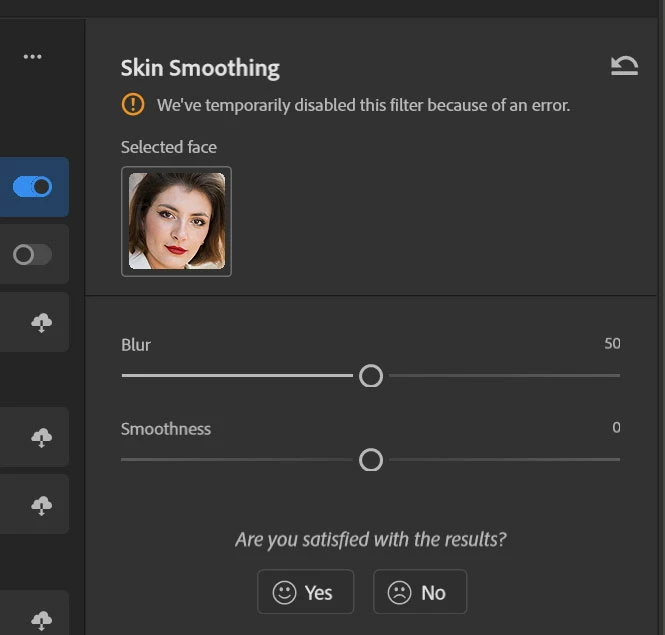
 

Running Windows 11 25H2 build 26200.7019

AMD Ryzen 7 7000
AMD 6600X 8G (latest drivers)

61 replies

Known Participant
November 14, 2025

If you´re finally fixing Skin Smoothing, you should also adress the problem that "skin" is not only in the face, but also the rest of the body. Skin doesn´t end at the blue box in my screenshot! For this kind of image, which is not something uncommon, you just cannot use the filter.

And btw. if both sliders are set to have the least possible effect, the filter should not smooth anything at all. It´s really bad that it always smoothes, not matter, how low you set the sliders. And that also not in line with how actually every other PS filter works.

precise_knowledge1507
Participant
November 14, 2025

It works on version 26.11. 😉

Participant
November 13, 2025

It is very dissapointing that skin smoothing still dont work already two weeks Im waiting... 

It is a very useful tool and its a shame we cannot use it...

Please Adobe try to make something !

Participating Frequently
November 13, 2025

What is blocking point here? Any update?

Known Participant
November 13, 2025

I tried using the Smart Portrait Neural Filter to change the angle of a face (see image 3) in order to recreate the look of the Chicago Blackhawks' 2000-01 player portraits (see image 4), but the first time around, I get this error (see image 1):

"We've temporarily disabled this filter because of an error"


This message is not helpful because it doesn't tell me what went wrong. The second time, the face moves, but on top of that, some hair is automatically created around the head. (see image 2)


The intended result is simply for the angle of the head to move. This issue exists on Photoshop 27.0.0 for Windows 11 25H2. All you need to do is change the angle of the head in Smart Portrait for both of these bugs to occur.

Participant
November 13, 2025

for me also  photoshop 27.0 especially skin smoothing filter is not working

Participant
November 13, 2025

We've temporarily disabled this filter because of an error.

Participant
November 12, 2025

I'm in 27.00 and it's giving me the same "we've temporarily disabled this filter because of an error " I think this started two updates ago. Same problem on both regular and beta

Jeffshootsphotos
Claire H.
Community Manager
Community Manager
November 12, 2025

Thanks for letting us know @jeffshootsphotos! Can you send us your system information? You can find your system info by going to Help > System Info, copying and pasting it into a text file, and attaching it here. Thanks! ^CH

Participating Frequently
November 12, 2025

for now  i have reverted back to PhotoShop 26 , I will only upgrade to 27 once this is fixed 
I am holding on my plans to buy AI credits  for now , as i cant use partner models in old version 

Claire H.
Community Manager
Community Manager
November 12, 2025

Thanks for the update @Ashish26726394wfn9! Keep an eye on this thread for updates on this bug while the team works on a fix. Thanks! ^CH

Known Participant
November 12, 2025

When can we expect a bug fix update?