


Known Participant
October 25, 2025

P: Photoshop 27 neural filter skin smoothing We've temporarily disable this feature because of error

  • October 25, 2025
  • 61 replies
  • 5500 views

Tried to use this feature today (worked fin in previous version of PS) and today, after upgrading to ver 27, I get the "We've temporarily disable this feature because of an error" message. Of course I don't know what that error is, but pretty sure it's an error. 
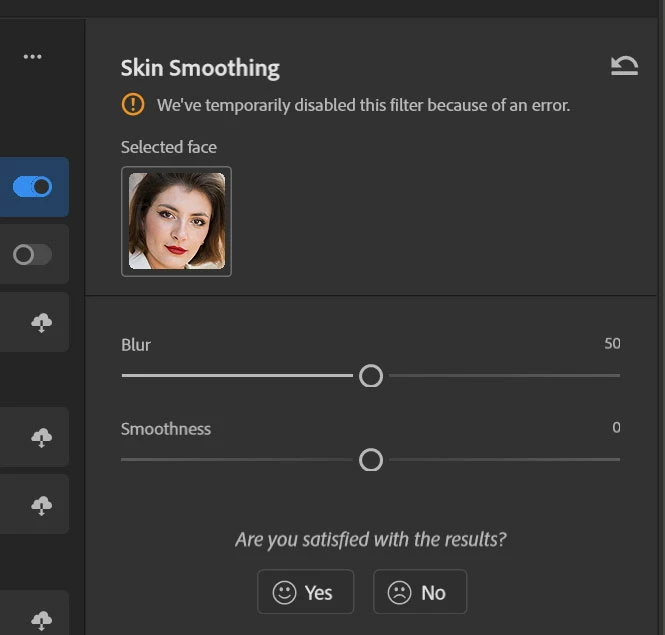
 

Running Windows 11 25H2 build 26200.7019

AMD Ryzen 7 7000
AMD 6600X 8G (latest drivers)

61 replies

Known Participant
November 12, 2025

Skin smoothing>not working
Smart Portrait>not working

Landscape Mixer>first 4 presets not working

Photo Restauration>not working

depth map>very bad, just compare it to ACR´s depth map!

...and if I´d really try, I would find many more bugs!

Waitlist>what for? Nothing on that list ever got realized.....

Known Participant
November 12, 2025

Yes, with the older version only the "skin smoothing" filter works, unfortunately the "smart portrait" filter does not work.

Known Participant
November 12, 2025

Just updated Photoshop (beta) to 27.2. Still has this bug. 

Participant
November 12, 2025

confirmed rolling back to 26.11 corrected issue


TerryGee
Participant
November 10, 2025

Me too. I have tried installing 27.1 several times over a couple of weeks and I get the same message on Skin Smoothing.

I uninstall and reinstall 27.0.1 and it works fine. Is anyone trying to fix this?

Participant
November 10, 2025

My Neural filters says "we've temporarily disabled this filter due to error"
Photoshop 27.0.0.

onazole
Inspiring
November 10, 2025

This bug appeared in the beta several weeks ago; it appeared in the official version when it was updated to 27.0.

twphotoqc
Participant
November 9, 2025

Not that I have seen

Participant
November 9, 2025

Have there been any updates to this issue? 

marcelv52347143
Participant
November 8, 2025

if i want to use the neural filter skin smoothin i get a notic that it was stopped beacause of a fault


bug?  

photoshop 27.0

Windows 11

11th Gen Intel(R) Core(TM) i7-1165G7 @ 2.80GHz (2.80 GHz)

32gb ram

Participating Frequently
November 10, 2025

Same error here with Windows 11 and Photoshop 27.0.

I already tried all the proposed solutions (like restating photoshop, rebooting the PC, deleting the PluginData under C:\Users\[Benutzername]\AppData\Roaming\Adobe\UXP\PluginsStorage\PHSP\27\Internal\com.adobe.nfp.gallery\ and downloaded the filters again) but nothing worked.