


Inspiring
October 21, 2020

P: Selection marquee off by 1px

  • October 21, 2020
  • 37 replies
  • 2514 views

A quite annoying "feature" in the new Photoshop is the inaccurate selection marquee. It's off by 1 px to left and to bottom.

To reproduce:

1. Create an 500x500 px image

2. Hit Ctrl+A

Result: while the whole image is selected, the marquee is inside the image on the top and left.

Another selection touching the sides of the image:
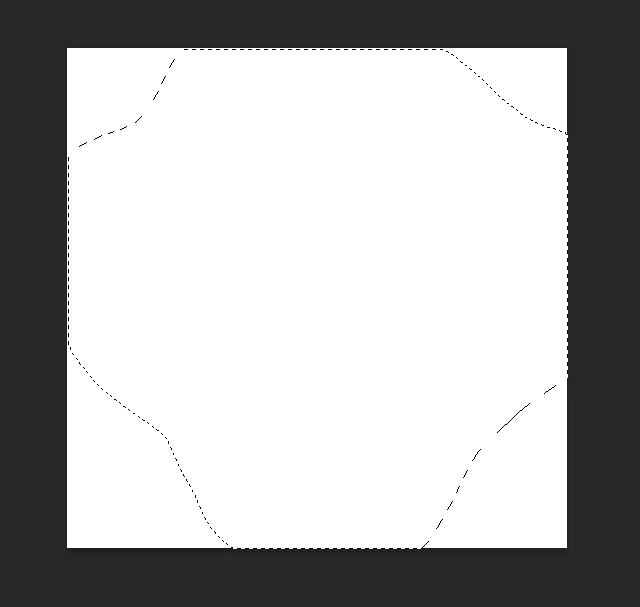
Edit:
Tested on 2 computers, the same behavior.
1. i7 7700K, 16 Gb RAM, NVIDIA GTX 1060
2. Laptop Lenovo Legion 5, i7 10750H, 16 Gb RAM, NVIDIA GTX 1650
This topic has been closed for replies.

37 replies

NetPixel Studio
Known Participant
February 28, 2021

A lot of time passed since this bug was reported. This is getting really annoying. I had to stop using PS 22 and return to the previous version. Working a lot with precise selections, this is unacceptable.

Is PS tested before releasing? It's unbelievable, all testers are blind enough to miss this bug... 21 versions in the past were ok, how can be the 22nd version be released with such an amateur bug?

As a side note, developers are releasing more and more lower quality software/websites in every domain. It seems that attention to details is not important anymore.

Inspiring
January 25, 2021

@JeffreyTranberry it would be good to remove the "Official solution" label from your reply. The bug has been reported more than 3 months ago, since then I received more PS updates, but the bug wasn't fixed yet, so there is no solution yet...

It's quite important to see the correct selection marquee, Adobe should treat this apparently minor issue with care.

Inspiring
January 24, 2021


Any Selection, at any zoom level, the offset displays as 1 pixel Right, 1 pixel down.

System info...

Adobe Photoshop Version: 22.1.1 20210104.r.138 2021/01/04: 852879028a7  x64
Number of Launches: 193
Operating System: Windows 10 64-bit
Version: 10 or greater 10.0.19041.662
System architecture: Intel CPU Family:6, Model:10, Stepping:5 with MMX, SSE Integer, SSE FP, SSE2, SSE3, SSE4.1, SSE4.2, HyperThreading
Physical processor count: 8
Logical processor count: 16
Processor speed: 2394 MHz
Built-in memory: 29687 MB
Free memory: 16310 MB
Memory available to Photoshop: 27183 MB
Memory used by Photoshop: 60 %
ACP.local Status:
 - SDK Version: 1.34.1
 - Core Sync Status: Reachable and compatible
 - Core Sync Running: 4.3.71.1
 - Min Core Sync Required: 4.3.28.24
ACPL Cache Config: 
 - Time to Live: 5184000 seconds
 - Max Size: 20480 MB
 - Purge Percentage: 50%
 - Threshold Percentage: 85%
 - Purge Interval: 60 seconds
Live Edit Client SDK Version: 3.77.11
Native GPU: Disabled.
Manta Canvas: Enabled.
Alias Layers: Disabled.
Modifier Palette: Enabled.
Highbeam: Enabled.
Wintab Digitizer Services
    Spec Version 1.4
    Impl Version 1.39
    Num Devices 0
Image tile size: 1024K
Image cache levels: 4
Font Preview: Medium
TextComposer: Latin
"2.1"
glgpu[0].IsIntegratedGLGPU=0
glgpu[0].GLMemoryMB=1998
glgpu[0].GLName="GeForce GTX 660 Ti/PCIe/SSE2"
glgpu[0].GLVendor="NVIDIA"
glgpu[0].GLDriverVersion="27.21.14.6089"
glgpu[0].GLDriver="C:\WINDOWS\System32\DriverStore


Participating Frequently
January 13, 2021

When working on the Background layer, a rectangular selection appears to shift one pixel to the right and one pixel down when created. The selection appears to not include the pixels to the top and left while also appearing to select one pixel past the intended bottom and right. Moving the selection seems normal until the mouse button is released, at which point the shift occurs.

When deleting the selected pixels, the intended area is removed. 

Also, any part of the marquee moved outside of the image disappears. I'm not sure if that's intended, but I find it disconcerting.

This behavior occurred after the December 2020 update.

Running Windows 10 on an almost ten year old PC.

Participant
January 5, 2021

@JeffreyTranberry  I have the same issue. Your reply indicates "Official Solution" but I see no solution. Is there an update on this?

Inspiring
December 23, 2020

When I select a range with the selection tool, the top and left sides of the blinking frame are off by one pixel.

However, the actual work is one pixel outside the frame.

Legend
October 21, 2020

Thanks. I've asked engineering to take a look.