


Participating Frequently
November 19, 2019

P: Spherical panoramas 3D view low quality

  • November 19, 2019
  • 72 replies
  • 4317 views

i work with 360 panorama images taken with dedicated cameras
and sometimes i need to edit the pictures (remove tripod, fix other parts)

all worked fine with this workflow:
3D - spherical panorama from layer - making the needed changes on a new layer - merge down the new layer - export panorama.

but recently i noticed that when opening the panorama image in 3D view, the details become pixelated horribly.
and so if i make a change (healing brush), that part of the image will not be the same quality as the rest.

strange thing is that if i just export the image without changing anything, the quality is still perfect!

see the attached image, all i did was copying my head next to the original, using the workflow above, and exported the pano.
as you can see, the left is sharp (even though in 3D view it LOOKED pixelated!) and the copied one on the right IS pixelated.
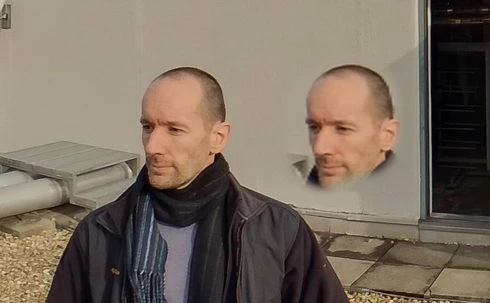
so it seems to me that the 3D view is the problem.

noticed after installing PS 2020.
but even when i try it in 2019 (which worked fine before) now it's the same issue there as well.

72 replies

kerenyizAuthor
Participating Frequently
April 15, 2020

21.1.2


issue NOT fixed.

Inspiring
April 6, 2020
Since it hasn't been solved, here's a workaround: Use DAZ studio (free) and set the pano as an Iray HDRI map (environment map).

Inspiring
March 29, 2020
I found this link. https://www.youtube.com/watch?v=rzL3vTYU-bQ

it helped me.

So basic. I do my edit it Spherical panorama mode then double click on the SphericalMap tab under the layer. It opens back to and equirectangular image and the quality isnt lost when I save from this new layer.

I also have to switch Images Mode view from 16bit to 32bit or 8 bit or whatever works to get the right colors.

Hopes this helps.


Roei Tzoref
Legend
March 21, 2020
Bummer 😞 
kerenyizAuthor
Participating Frequently
March 20, 2020

new update just arrived

21.1.1


issue NOT fixed.
Roei Tzoref
Legend
March 2, 2020
I'd say in the meantime don't make spherical panorama out of your images. if you can hack it work directly on the equirectangular image (for color correction) and view your as 360 in another app. or use Flexify 2 plugin for photoshop. or do it in after effects with VR Comp Editor workflow or other methods like converting it to cubemap, then to photoshop, then back and revert to equirectanguler (basically same as flexify 2)
Inspiring
March 2, 2020
I am having the same problem with everyone on here. I shot 8K 360 Photos on the Insta360 Pro 2 and when I export them from Photoshop 2020 they come out with terrible quality. 

I've had better exporting with a GoPro App but does anyone have any other Apps or workflows that export with the sharp, clear quality we all desire!?

Nick Roth
Clockwork 9 - Cleveland, OH
Roei Tzoref
Legend
March 2, 2020
thanks for posting this issue. I hope this is fixed soon, I am teaching 360 manipulation and for showing this the first time to students I'd hate to teach workflows that are destructive.  in the meantime a possible alternate workflow is to use After effects. if you need edits you can use VR Comp editor. 
kerenyizAuthor
Participating Frequently
February 29, 2020
Gerard, adobe support is a waste of time, they barely understand english, and have no clue what the problem really is.
I was also told to update my graphics drivers, some other support person wanted to connect to my computer (?!), they promise that it will be fixed in future update and so on.
they are worthless.

Andrew (see above) says he is photoshop engineering team member, and managed to reproduce our issue on the 2nd try... no comment there... 
you know, i'm really grateful if anybody looks into the issue, but seems like adobe does not have the sharpest knives in the drawer... 

the issue still not fixed, for 3-4 months now!

i have the latest PS version - 3d is not sharp.
i also have 2018.v19.1.2 installed - 3d is sharp, no problems!
(i checked many versions in between, and this is the one that works...)

so my suggestion to you: find 2018.v19.1.2 and use that to edit 360 photos.
Inspiring
February 29, 2020
I have been communicating with Adobe today who claim that my problem is that my Graphics card drivers??? need updating. I have done the latest Mac OS Catalina 10.15.3 and running Ps 21.1.0 but my Spherical Panoramas are still pixelated. I am shooting on a Spheron HDRi VR camera and the images are pin sharp before I import them into Ps 3D. Is this the same issue discussed in this forum?