


Participating Frequently
November 19, 2019

P: Spherical panoramas 3D view low quality

  • November 19, 2019
  • 72 replies
  • 4318 views

i work with 360 panorama images taken with dedicated cameras
and sometimes i need to edit the pictures (remove tripod, fix other parts)

all worked fine with this workflow:
3D - spherical panorama from layer - making the needed changes on a new layer - merge down the new layer - export panorama.

but recently i noticed that when opening the panorama image in 3D view, the details become pixelated horribly.
and so if i make a change (healing brush), that part of the image will not be the same quality as the rest.

strange thing is that if i just export the image without changing anything, the quality is still perfect!

see the attached image, all i did was copying my head next to the original, using the workflow above, and exported the pano.
as you can see, the left is sharp (even though in 3D view it LOOKED pixelated!) and the copied one on the right IS pixelated.
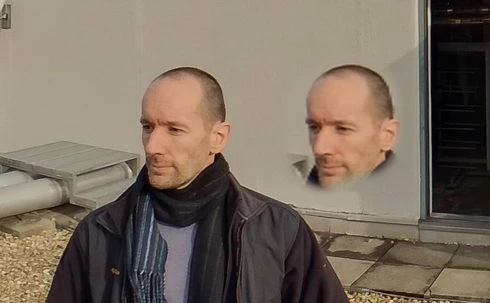
so it seems to me that the 3D view is the problem.

noticed after installing PS 2020.
but even when i try it in 2019 (which worked fine before) now it's the same issue there as well.

72 replies

kerenyizAuthor
Participating Frequently
February 20, 2020
new update just arrived
21.1.0

issue NOT fixed!
Known Participant
February 12, 2020
That's fantastic!  Finally, some progress.  
Participating Frequently
February 12, 2020
Hi Everyone,
I think I was able to reproduce the problem with Z's steps.  It looks like the canvas loses resoluation after the making the layer 3D -> Spherical Panorama -> New Panorama Layer From Selected Layer(s).  Once that happens, the healing brush tool (replace mode) picks up this low resolution.  I'll inform the engineering team and have them investigate this further.  Thank you everyone for your posts and efforts!

Sincerely,
Andrew
kerenyizAuthor
Participating Frequently
February 12, 2020
hi Andrew,
what exactly were your steps before exporting the image?
did you try to copy parts of it (especially the roofline) with the healing brush?

if you just opened the image in 3D, and exported - sure you won't see any difference.

can you please copy the same parts as I did, right next to the original, in red circles, so that we can compare the "healed" parts on the same image?

i do use English PS.

z
Participating Frequently
February 12, 2020
Thanks Z!
I tried reproducing the issue with your steps on Ps 21.0.3 but was unsuccessful in seeing the issue.  I emailed three attachments. The PSD before and after, and the exported jpg.

Now that I have been reading up on more 3D related issues.  There has been a number of workaround solutions of changing the Ps language to English.  By any chance are you using a non-English language in Photoshop?  If so, can you try in English and see if that resolves the issue.  Our engineering team is looking into this language affecting 3D layers issue.

Andrew
Inspiring
February 11, 2020
You can do it in AE if you have Mocha Pro
kerenyizAuthor
Participating Frequently
February 7, 2020
hi Andrew,
thanks for contacting me.

why do you need a PSD, though?

did you try the method i described above (2 months ago), to see the issue?

in case you missed it, here it goes again:

--------------------
method:
open equirectangular panorama image - 3D - Spherical Panorama - New Panorama Layer From Selected Layer(s) --- (at this point i can only see the pixelated image) --- create new layer - Healing brush tool (replace mode) - (copying the roof line, the cupola, etc) - merge down - Export Panorama.

Now. As for the resolution question:
imported image size: 6720x3360 px
exported image size: 6720x3360 px

so no issue there!

As for the quality though:
the copied parts are blurry, pixelated (as copied from the 3D view), the rest of the image is just like the imported image, sharp.
--------------------

i really can not be more specific.
hope my english is good enough for you to understand every step.

anyway, i'll email you the original picture (it's 3MB so can not attach here due to the 2MB max upload image size)
and the method description,
so you can check the same roof line if it gets pixelated for you as well in the 3D view.

you could have already tried long time ago with any picture though...

hope that helps...

br, Z
Participating Frequently
February 6, 2020
Hi Zoltan,
I work for the Photoshop engineering team.  Could you email me (sender@adobe.com) PSD displaying the pixelation issue?

Andrew
kerenyizAuthor
Participating Frequently
January 22, 2020
funny enough, i contacted adobe support to open the case again, because it is not resolved,
and they told me that this PS update was just a normal update.
- okay, so what kind of update shall we wait for? - i asked.
- a future update.

it would be funny if it wasn't sad.
kerenyizAuthor
Participating Frequently
January 22, 2020
new update just arrived
21.0.3

issue NOT fixed!