


Participant
December 11, 2019

P: Starting in v 23.1.1 - keeps nagging me to save to Creative Cloud

  • December 11, 2019
  • 81 replies
  • 34537 views

I've been paying for / using Photoshop for many years (since way back to version 3 in 1996).


I don't use the Creative Cloud for saving files, and don't want to.


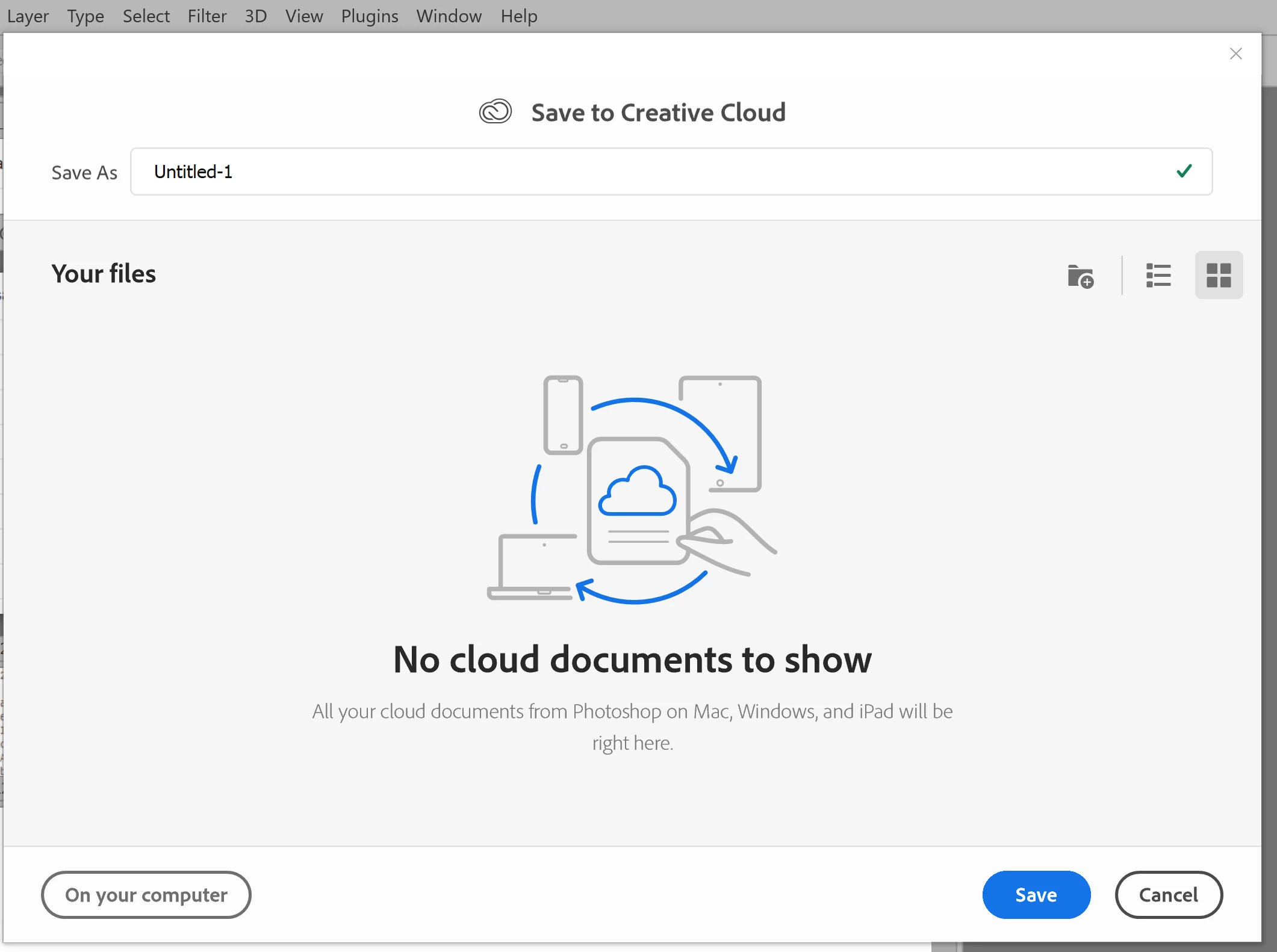
However, starting with version 23.1.1 whenever I create new file from an image I've copied to the PC's clipboard and then paste it into the blank PSD and Save, it now prompts me to save the file to the Creative Cloud.


The first time it popped-up (today) I made sure to put a check mark in the "Dont Show Again" box and chose "Save to your computer".


Yet it's still popping-up the "Save to Creative Cloud" prompt every time and still forcing me to make the extra step of choosing "On your computer" , every time. (Screenshot attached).


This is insanely annoying.


At first I thought hmmm... OK maybe just a glitch, so I shut down PhotoShop and restarted my PC. Problem still happens. I can't seem to find any way to change it in the settings.


Has anyone else encountering this bug? Know of a solution?

Many thanks for any input!


81 replies

jane-e
Community Expert
Community Expert
July 3, 2022


@whcressall 

Could Adobe perhaps make local storage option a macro setting in our user profiles?


Hi


You can start a new thread and tag it as an "Idea" if you want the engineers to consider it.


One thing you can do right now is to make a copy of your Preferences files when it is good. Give it a slightly different name, such as change the extension to ".backup" or whatever. Then when needed, delete the preferences file and rename your backup.


When you delete the Preferences file, PS will create a new one with the system defaults. When you restore a good backup, it will use that.


https://helpx.adobe.com/photoshop/using/preferences.html


~ Jane


whcressall
Known Participant
July 3, 2022

Audrey, thank you for the detailed reply. I agree this works but the option has since been changed again and the default now seems to be reset with some updates. I have set this default three times now. Could Adobe perhaps make local storage option a macro setting in our user profiles? I will keep setting this default to "local" and honestly it's a minor inconvenience but life dictates that minor inconveniences always seem to come during crushing deadlines.

Mz Creative
Known Participant
June 21, 2022

I think (at least for me) you missed the mark on this.


I prefer saving my files to the cloud. However since it's a subscription service it's obvious I give up control over my files by doing so.


IMO this should be the resolution.


1. Allow us to save BOTH to the cloud and locally, syncing the files. it doesn't make sense to have to choose one or the other

2. I can live with managing my own files locally, like I've done since I first used Adobe decades ago, but what I dislike greatly is the "AUTO SAVE". Am I th only person that uses Creative Cloud that own a cat? they have a tendency to intentionally smash all the buttons on the keyboard, including making all kinds of  changes to a file that aren't easily figured out so 'undoing' them isn't 'just that easy'. I  just can see who in their right mind would want to automatically save their progress without confirming it. 

Bums me out to be honest. Hated it when office 365 started doing it, but at least with that suite it's possible to disable the auto save.


Can't we get the best of both worlds instead of half?

Known Participant
June 21, 2022

"They foot the bills"... Really Nancy?   I think not.  
"They could shut down community support"...  Sure, and end up with ACTUAL support calls that they would need to employ ACTUAL support personnel for.
This is a cost-offset Nancy... please don't forget that.

Known Participant
June 21, 2022

We know how to work - we are not idiots.
PLEASE KEEP YOUR [cursing removed] HANDS OFF OUR FILING.
If we wanted to use cloud - then we would use cloud.
Why annoy the VAST MAJORITY of your audience - just because you think you can squeeze another $5 a month out of people?

Inspiring
June 21, 2022

Yes, I was having the same problem.  Thanks for showing how to fix it!

Sameer K
Community Manager
Community Manager
June 20, 2022

Hi everyone, thanks for reaching out. This experience is updated now in version 23.4 & above.


Go to Photoshop > Preferences > File Handling > Default File Location > Set to 'On your computer' and restart Photoshop.


To update Photoshop to 23.4, click "Update" in the Creative Cloud desktop app next to Photoshop. More detailed instructions for updating


Thanks!

Sameer K

gener7
Community Expert
Community Expert
June 17, 2022

Indeed it has, Thank you. It's just going to take a while to get the word out.

Nancy OShea
Community Expert
Community Expert
May 22, 2022
quote

"LOL! Of course they are! People have even been told to stop using Photoshop!!!"

============

😕😕  It never happened.  Not in 5 pages of posts since 2019, I checked.


[I think it's fair to say that this topic has run its course.  Nothing more can come from this that hasn't been said already.  I'm locking this to further posts.  If a forum moderator sees any reason for unlocking it, you know where to reach me.]


Nancy O'Shea— Product User & Community Expert
IanBrettCooper
Participating Frequently
May 22, 2022

"Nobody here is stifling anyone from leaving feedback."


LOL! Of course they are! People have even been told to stop using Photoshop!!!


There's none so blind as those who refuse to see.