


Participant
December 11, 2019

P: Starting in v 23.1.1 - keeps nagging me to save to Creative Cloud

  • December 11, 2019
  • 81 replies
  • 34537 views

I've been paying for / using Photoshop for many years (since way back to version 3 in 1996).


I don't use the Creative Cloud for saving files, and don't want to.


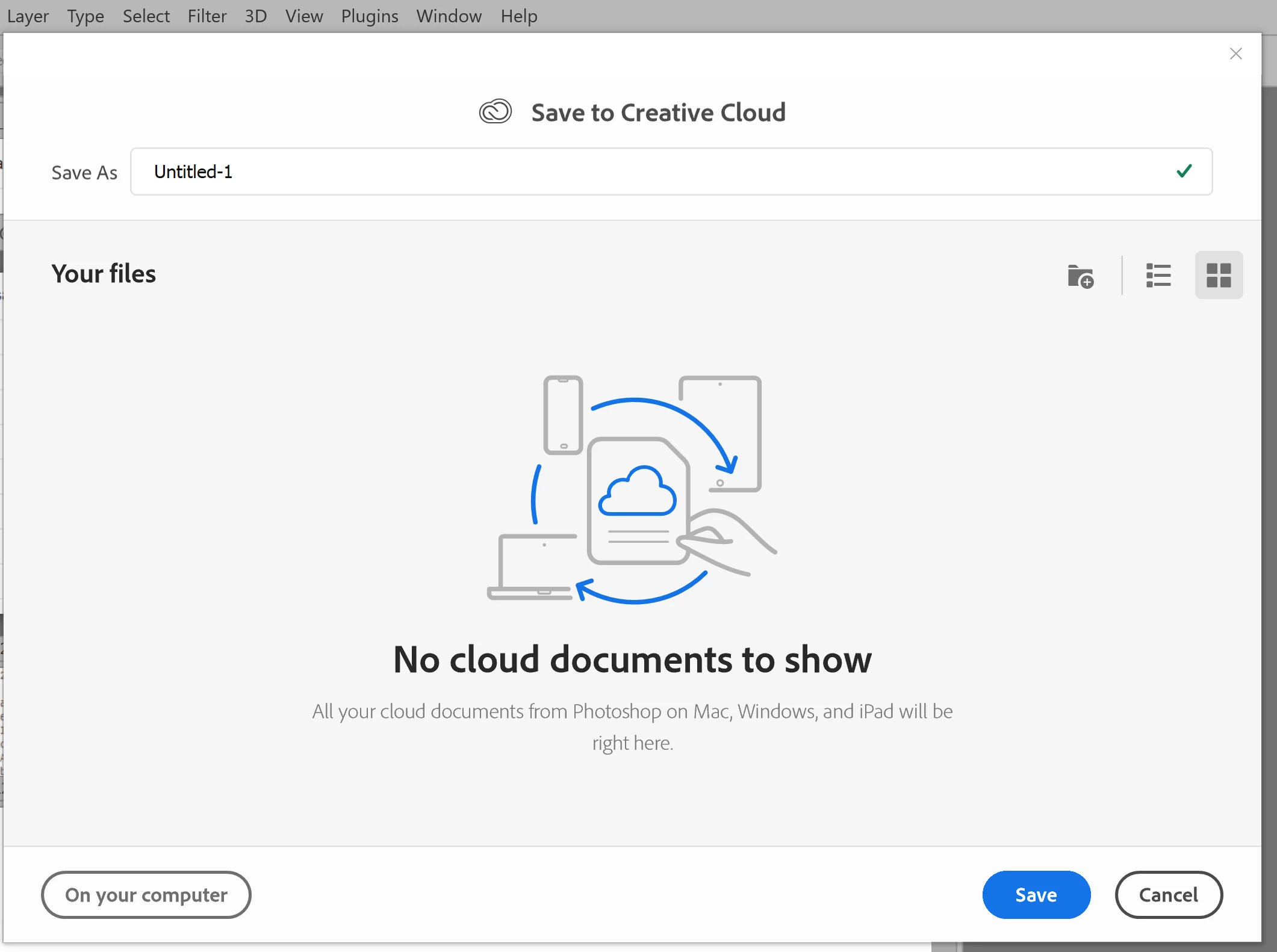
However, starting with version 23.1.1 whenever I create new file from an image I've copied to the PC's clipboard and then paste it into the blank PSD and Save, it now prompts me to save the file to the Creative Cloud.


The first time it popped-up (today) I made sure to put a check mark in the "Dont Show Again" box and chose "Save to your computer".


Yet it's still popping-up the "Save to Creative Cloud" prompt every time and still forcing me to make the extra step of choosing "On your computer" , every time. (Screenshot attached).


This is insanely annoying.


At first I thought hmmm... OK maybe just a glitch, so I shut down PhotoShop and restarted my PC. Problem still happens. I can't seem to find any way to change it in the settings.


Has anyone else encountering this bug? Know of a solution?

Many thanks for any input!


81 replies

Nancy OShea
Community Expert
Community Expert
May 22, 2022

Nobody here is stifling anyone from leaving feedback.  Quite the opposite. 


Just keep in mind that we are Adobe's guests, they foot the bills for this support community.  Likewise, they can shut it down if they choose to. 


Say what you have to say.  Keep it on topic. And be respectful.  


Nancy O'Shea— Product User & Community Expert
IanBrettCooper
Participating Frequently
May 22, 2022

Nancy, the problem here is that Photoshop is disrespecting its customers with this "default save to the Cloud" nonsense. You seem to misunderstand the dynamic in this situation. We are their paying customers, and the old adage "The customer is always right" applies. They need to be nice to us, in order to keep us as their customers. If they consistently do this kind of thing, it turns customers away. You may not like it, but by calling attention to these problems, we are actually trying to help the company stay in business.

[remarks removed by moderator]

more than happy
Participating Frequently
May 22, 2022

That's why we need an AI to moderate issues like this so that emotions and ego won't get in the way of solving the issue.

When multiple users complain and reason about a feature that shouldn't be there, a reasonable person will listen. 

I have raised several concerns about Adobe products and how the apps don't work with newer Intel hardware and drivers, and Intel will give you tools to diagnose the issues and the agent will closely work with their engineers and release updates that actually work.

Inspiring
May 21, 2022

I just want to mention, consistently breaking things for your loyal and passionate photoshop users is the opposite of "being kind and respectful"

Nancy OShea
Community Expert
Community Expert
May 21, 2022

@IanBrettCooper,

Constructive criticism is one thing.  Antagonistic disrespect towards Adobe and Adobe Community Professionals is quite another.  The software works as it does because operating systems have gone through radical changes in recent years.  And the OSs continue to change requiring software makers like Adobe to pivot and rapidly accommodate those changes the best way they can.  Are they perfect every time?  No, of course not. That's why your constructive feedback is welcomed but not when it's disrespectful to others.


I invite everyone to review Adobe's Support Community Guidelines:

https://community.adobe.com/t5/using-the-community-discussions/adobe-support-community-guidelines/m-p/4788157


Thank you.


Nancy O'Shea— Product User & Community Expert
djuncheg117156386
Inspiring
May 21, 2022

[abuse removed by moderator]


IanBrettCooper
Participating Frequently
May 19, 2022

"There is also a new preference setting that lets you set the default location to On Your Computer instead of Creative Cloud."


One of the issues I have with this is that I shouldn't have to go searching through the labyrinth of Photoshop's preference settings to switch off a setting I never selected in the first place. The program should remember all my settings and not make changes unless I specifically enable them.


I guess I'm one of the lucky ones, in that I actually do have the setting as an option, but that still doesn't make up for the fact that the folks behind Photoshop decided "for me" that I was going to be saving to the Cloud as a default setting. They need to leave my copy of the program alone. I should be the one deciding where I save my files to, not some guy at corporate who thinks he knows best.

Conrad_C
Community Expert
Community Expert
May 19, 2022
quote

I do not have that setting. Photoshop 23.3.2 on Windows 10 Pro.


By @Lumigraphics 


I see it in Windows 10 (see picture below), but the difference might be explained in the Adobe help article Feature summary | Photoshop desktop (April 2022 release) where, under the heading “Preference improvement for saving new documents” it says:

quote

Some of you will be able to see a potential update to the save workflow that you know today as we roll out the changes gradually to everyone. With this update, when you select Save As on a new document, you will see the cloud document picker dialog so you can save your files to Creative Cloud. Like today, you can still decide to save locally on your computer.


So it sounds like if you don’t see it yet, you will eventually…some day…


Legend
May 19, 2022

I do not have that setting. Photoshop 23.3.2 on Windows 10 Pro.


Known Participant
May 18, 2022

So please explain why Adobe thought it appropriate to change everybody's file save location preference without asking first?  I have zero interest in saving to the cloud.  Your solution is very simple (thanks!) but I shouldn't have been forced to waste my time fixing a problem that was basically forced on me...