Thank You for the response. I am using WINDOWS But my problem is different here :
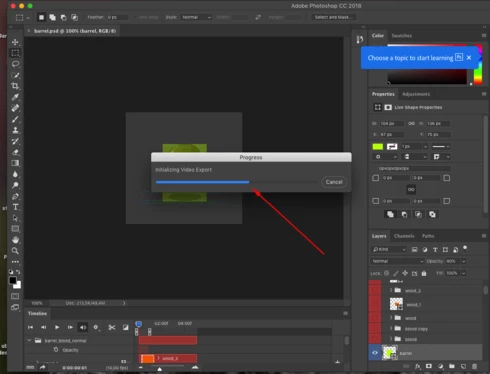
I am unable to export my files as png,jpg etc. The "Export As" option and "Quick Export " is not running and the above shared screenshot is while I am trying to export my files. Because of this I am unable to use Zeplin as well.
I am facing a problem with Adobe Photoshop 2018 cc Version-19.1, the option "Export As" is not showing up .Below is the attached Screenshot please let me know any solution if available.
Sorry for the frustration. If you have trouble exporting again, it's likely that one or both of those files that you deleted have been generated again (and therefore need to be deleted again). Per the instructions here you may need to delete those files again and restart Photoshop to get it working.
Chris, we are working on an update, but it won't be out for a while yet. We have identified two files in the preferences area that cause trouble for the Ps video system on Mac 10.13. Here are steps to try as a workaround:
1. Restart the machine. This is be sure the Ps/Lr/Br video system is shut down.
2. Delete these folders: /Library/Preferences/Adobe/amecommand /Library/Preferences/Adobe/dynamiclinkmediaserver
You can get to your user / home folder with Go > Home. If your Library folder is not visible, then (after choosing Go > Home) choose View > Show View Options, check Show Library Folder.
3. Launch Ps and continue.
We can also take a look at your system over Adobe Connect, if this isn't working. We've helped a few customers this way. You can email Hannah to arrange a meeting. Her email is below.
This has been an issue for some time. I'm teaching a Photoshop animation workshop today and STILL having this problem. Adobe has updated CC but not fixed this.
Hi, I deleted the file and it now seems to be working. Though the first time I was able to export gif second time it is saying it can not... spending hours and hours on this!! Very frustrating.



 AdChoices