January 23, 2018

P: Video Render Stalls at 50%

  • January 23, 2018
  • 69 replies
  • 1998 views

Problem is not solved with update 19.1

This topic has been closed for replies.

69 replies

Inspiring
May 2, 2018
Hi, I am having the same problem - happy to help if need. I am on a Mac book Pro High Sierra.
Legend
April 30, 2018
Inspiring
April 27, 2018
Hi, I am having the same problem, video render stalls at 50%. Kelly
Participant
April 5, 2018
Hi, I think I rendered out each frame as a png from Photoshop and then brought it into Quicktime and saved it out as a movie...
Hannah Nicollet
Community Manager
Community Manager
April 5, 2018
Hi Natasha,

I just sent you an email to see if we could set up a screen share ASAP. 

Thanks,
Hannah
Inspiring
April 5, 2018
Hi Hannah,

I seem to have the same issue. I've tried your step by step and it still doesn't work. Not sure what to do. Had I known that this was an issue, I never would have upgraded my software earlier this week... Now I'm stuck and my deadline is tomorrow. Any way that anyone can help? Thanks, Natasha
Hannah Nicollet
Community Manager
Community Manager
March 29, 2018
Hi Cailyn,

There is a fix coming, but this touches on a lot of areas so resolving the root issue will probably end up in the next major release (as opposed to one of the smaller updates.)

Are you having trouble rendering videos? If you want help, email me and I'd be happy to do a screen share with you to get you going again. 

Thanks,
Hannah

Inspiring
March 29, 2018
Hey Hannah,
Is there a fix going in for this or is it just going to be a work around moving forward? 
Hannah Nicollet
Community Manager
Community Manager
March 13, 2018
Hi,

It's likely that you have a null file preventing the render. Please follow the workaround in this thread and you should have no trouble rendering videos.

The instructions are here: https://helpx.adobe.com/photoshop/kb/video-stops-rendering-at-50-percent.html

Thanks,
Hannah
Participant
March 13, 2018


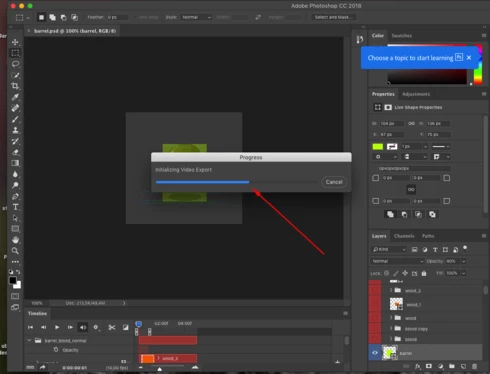
Export > Render video... brings not up a dialog for Settings but a message like the one in the image saying "Initializing Video Export" - and always get stuck in the middle no matter how simple the animation is. This is beeing reported already a lot around the internet. Please fix asap - we really need this feature. Thanks.