January 23, 2018

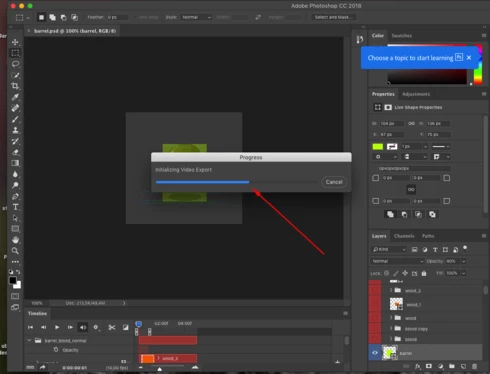
P: Video Render Stalls at 50%

  • January 23, 2018
  • 69 replies
  • 1998 views

Problem is not solved with update 19.1

This topic has been closed for replies.

69 replies

Inspiring
February 24, 2018
Mette, I'll contact you by email. Watch your inbox and spam folder.
Inspiring
February 24, 2018
Having the same issue and the work around does seem to work on my computer.
Hannah Nicollet
Community Manager
Community Manager
February 23, 2018
Hi Everyone,

Our engineers are investigating this issue.

To workaround the issue follow these instructions:

  1. Go to the macOS Finder
  2. Hold down the [option] key and select Go> Library...
  3. Navigate to /Library/Preferences/Adobe/amecommand/10.0.0/
  4. Locate the file called “Trace Database.txt”
    • If that file is present, and it is empty, delete it
  5. Then go to /Library/Preferences/Adobe/dynamiclinkmediaserver/10.0.0/
  6. Locate the file called “Trace Database.txt”
    If that file is present, and it is empty, delete it.
  7. Close all Adobe applications
  8. Restart Photoshop
Note: If your videos stop rendering, you may need to go through these steps again.

https://helpx.adobe.com/photoshop/kb/video-stops-rendering-at-50-percent.html

Thank you,


Hannah
tribambuka
Inspiring
February 22, 2018


Can't render videos in Photoshop because apparently the graphic card in MacBook Pro is not supported by Photoshop! (what??? it's a previous model of MacBookPro, couple years old, and it's already not supported?) Isn't it more or less an industry standard - Mac+Adobe? 
Hannah Nicollet
Community Manager
Community Manager
February 21, 2018
Hi Everyone,

We haven't been seeing this internally, so we could use your help.

If you are seeing this and you would be willing to do a screen share with the engineer working on this and me, please email me so we can set this up.

Thank you,
Hannah

February 19, 2018
19.1.1 Problem is still don`t fix
Inspiring
February 18, 2018
Hi Chris. I'm a developer on the Photoshop team. I have sent an email to your profile address. Please look for it (including in your junk / spam folder). Thanks.
Inspiring
February 17, 2018
Same issue - still happening in PS 19.0. Why isn't this fixed yet?
Inspiring
February 14, 2018
Hi Judith. I'm a developer on the Photoshop team. I have sent an email to your profile address. Please look for it (including in your junk / spam folder). Thanks.
Inspiring
February 14, 2018
Trent, I'm a developer on the PS team. I sent an email to your profile address on Monday. Maybe it went into your junk / spam folder. Please have a look. Thanks.