
Participating Frequently
October 19, 2018

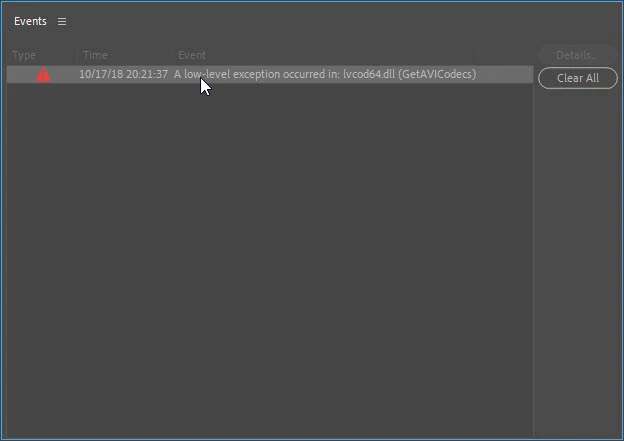
A low-level exception occurred in: lvcod64.dll (GetAVICodecs)

  • October 19, 2018
  • 64 replies
  • 49671 views

After upgrading to the 2019 version of Premiere Pro CC I'm getting this error when opening any project. I can edit the project but I don't know if any work that I'll be doing will be compromised by this error. I need a position about this problem to continue working in any project in the 2019 version.
This topic has been closed for replies.

64 replies

Participant
August 31, 2023

HELP ME!

akdestro
Participant
August 28, 2023

And to think this has been going on in EVERY UPDATE SINCE 2019 is completely UNACCEPTABLE!  Also, there is no way to downvote the "correct" answers.

adamt18510785
Inspiring
August 26, 2023

I know right. Image having the gall to tell people to uninstall their hardware to fix their bug. 

akdestro
Participant
August 16, 2023

To add to my last post, I also do not have the lvcode64.dll or lvcod64.dll files in my Windows/System32 folder. So none of the answers marked "correct" are actually correct.

akdestro
Participant
August 16, 2023

I appreciate that a correct answer has been marked. But I do not even have a Logitech webcam. I do, however, have a logitech wireless keyboard , but there are no updates for that keyboard. Bug still exists with no fix in sight.

Douglas_Dirks
Inspiring
August 15, 2023

The error still occurs with Premiere Pro 23.6.

jstrawn
Community Manager
Community Manager
August 9, 2023

I'm not sure you actually need to re-install. Try this:
Search for the lvcod64.dll file on your system and remove it. Or move it to a different location in case you want/need to move it back.
There is a win app called Everything that can find the absolute location of that dll on your system, and let you easily move or delete it.

Participating Frequently
August 8, 2023

Premiere Pro 23.5.0 (Build 54)

Participating Frequently
August 8, 2023

Yes, please fix Adobe Products.

I need my Logitech Cam every day for hours, cannot risk to uninstall and fail when installing again during an important remote session/interview ...

Douglas_Dirks
Inspiring
August 1, 2023

Rolling back to Premiere 23.3 (Build 61) appears to solve the problem.

Please let us know when it becomes safe to update again!