
Participating Frequently
October 19, 2018

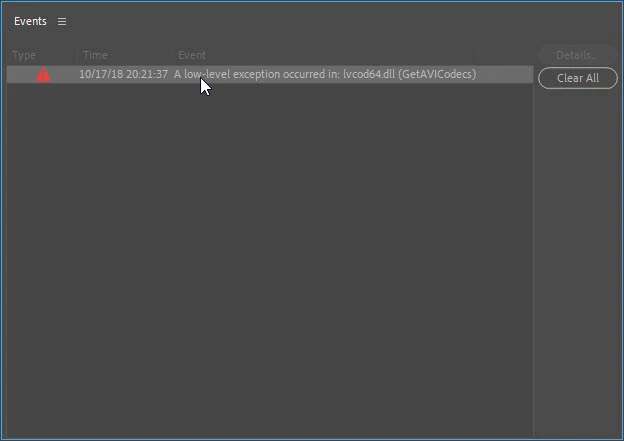
A low-level exception occurred in: lvcod64.dll (GetAVICodecs)

  • October 19, 2018
  • 64 replies
  • 49671 views

After upgrading to the 2019 version of Premiere Pro CC I'm getting this error when opening any project. I can edit the project but I don't know if any work that I'll be doing will be compromised by this error. I need a position about this problem to continue working in any project in the 2019 version.
This topic has been closed for replies.

64 replies

Douglas_Dirks
Inspiring
August 1, 2023

I have the same problem, with Premiere Pro 23.5.0. on Windows 10 Pro.

The Logitech webcam software reports that it is up to date.

Doug Dirks

Participant
July 27, 2023

This bug is back.  I'd like to keep using my mouse and webcam, thank you. 

JP-49
Inspiring
July 12, 2023

Thank you for the message, but it doesn't make sense. Doing so makes the warning "A low-level exception occured in: lvcod64.dll" vanished. But the issues are still there: I cannot insert the following effects:
-Basic 3D->Swivel,
-Adjust->levels,
So I keep working with CC2022 which is running well, with or without lvcod64.dll...!
All the best,
Jean-Paul

Kevin-Monahan
Community Manager
Community Manager
July 11, 2023

Hi @JP-49,

Sorry for the frustration.


quote

It's a pity but now I don't trust Adobe. Let me know if you find out a relevant solution.


JP, you can delete the .dll file or reinstall the software. The file is located here:

  • Please go to the folder C:/Windows/System32 and delete the file lvcode64.dll or lvcod64.dll.


Let us know if you need help with that. Sorry for this issue. Third-party conflicts occur from time to time.


Thanks,
Kevin

Kevin Monahan - Sr. Community & Engagement Strategist – Pro Video and Audio
BobGale57
Known Participant
July 10, 2023

I seem to have been able to make this go away. When I first tried to delete the .dll file and couldn't, I then right-clicked on it and found something in that menu that would delete the file when I restarted the PC. Sorry, I didn't write it down, as it happened quickly, but I may have clicked "What is locking this file?".

Anyway, it did go away when I restarted, and it has not appeared (for me) in the latest version of Premiere Pro. 

Participant
July 10, 2023

I also started having this problem after a 2023 Update (I don't recall which)

I wish they wouls stop saying it's Webcam driver fault when it did not error out this way in earlier versions.

JP-49
Inspiring
July 10, 2023

Hi, I no longer use Premiere CC2023, neither After Effects 2023 and Illustrator 2023. I reuse these tools in version CC2022 and everything is working well again without modifying any software. It's a pity but now I don't trust Adobe. Let me know if you find out a relevant solution.

Joao Vgs
Participant
July 9, 2023

Hiii every body!

How i solved the problem:

Delete the lvcod64.dll no impacts with that over the cam work. It still work after.

Reinstall the cam if wished.

Greetings

hideakit51769966
Participant
July 9, 2023

I updated the Logitech webcam software (Build 2.12.20.0), but the bug isn't fixed.

Kevin-Monahan
Community Manager
Community Manager
June 29, 2023

Thanks for the update, Holly. Hope this helps others!

Kevin

Kevin Monahan - Sr. Community & Engagement Strategist – Pro Video and Audio