
Participating Frequently
October 19, 2018

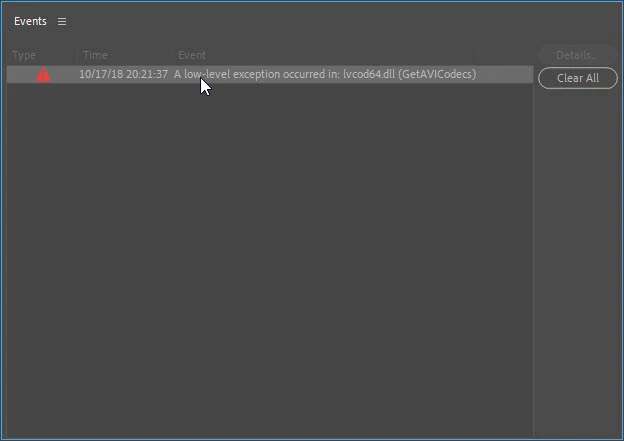
A low-level exception occurred in: lvcod64.dll (GetAVICodecs)

  • October 19, 2018
  • 64 replies
  • 49671 views

After upgrading to the 2019 version of Premiere Pro CC I'm getting this error when opening any project. I can edit the project but I don't know if any work that I'll be doing will be compromised by this error. I need a position about this problem to continue working in any project in the 2019 version.
This topic has been closed for replies.

64 replies

Participant
June 29, 2023

I had to replug in my logitech webcam then uninstall it and then I was able to delete the file from system 32 - I hope you get a solution!

BobGale57
Known Participant
June 29, 2023

I have the same issue as holly (not allowed to delete those dll files). I had previously uninstalled all Logitech software - before this issue had even appeared - and I'm not finding any Logitech drivers in the Device Manager. Thanks. 

Kevin-Monahan
Community Manager
Community Manager
June 28, 2023

Hi @holly3076895214u1,

Can you try updating the software for your Logitech Webcam?


Thanks,
Kevin

Kevin Monahan - Sr. Community & Engagement Strategist – Pro Video and Audio
Participant
June 28, 2023

My 'system' wouldnt allow me to delete this file in system32 and its a personla computer only I use and the remote technition couldnt solve this for me. 

JP-49
Inspiring
June 24, 2023

Hi all. I undergo the same issue with PrPro CC2023.

Maybe it is the reason why I cannot run the Effect : Basic 3D->Swivel.

Note : I had not this problem with PrPro CC2022.

Then I will be reluctant to upgrade PrPro next time!

Kevin-Monahan
Community Manager
Community Manager
June 22, 2023

Sorry @Joao Vgs,

Thanks for the note. Can you update your Logitec webcam software? That may hold the key to a solution. Please let me know after you test this out. Sorry for the problem.


Thanks,
Kevin

Kevin Monahan - Sr. Community & Engagement Strategist – Pro Video and Audio
Joao Vgs
Participant
June 22, 2023

The bug was fixed in CC 2019, but has returned in CC2023 (23.4).  .... Still in 23.5 !

Kevin-Monahan
Community Manager
Community Manager
June 15, 2023

Hello @Christiaan1@BobbyJayOTA@Jason28468667hu40, @MrHatmando@Inger123@jtjefferson@Atakan272067368rmv@Curry30101408x8fh@default96z335ka1b9d, and others on the thread,


The bug was fixed in CC 2019, but has returned in CC2023 (23.4).


Thanks for all your messages. I will relay them to the product team and will make sure the bug is refiled internally. I will move this into the Bugs Forum, as well, for more exposure. Please upvote the bug. I will do the same to advocate for the bug fix to happen ASAP. Sorry again for the frustration.


Thanks,
Kevin

Kevin Monahan - Sr. Community & Engagement Strategist – Pro Video and Audio
Kevin-Monahan
Community Manager
Community Manager
June 15, 2023

Hi @Thalesm,

I apologize for the frustration.

quote

I'm very frustrated with the support from Adobe.

We are not getting any response from Adobe technical people. Do they read any of those posts? Do they care?


Sorry, this is a user-to-user post and the Premiere Pro Assisted Support team does not typically respond to Discussions posts. You can always contact Adobe Support. Be sure to ask for the video queue. I will let the product team know about the bug and will move the post into the Bugs forum. I hope that's OK. Take care.


Thanks,

Kevin

Kevin Monahan - Sr. Community & Engagement Strategist – Pro Video and Audio
Participant
May 31, 2023

In version 23.4 I'm still having this issue again. What should I do exactly?

Known Participant
May 31, 2023

The engineer told me to use an older Version...im on 23.2 right now.


In general one of them told me to never use a current year Version of Premiere. So when Version 24 gets released, you better stay on Version 23 Till they Release Version 25.