
Known Participant
November 21, 2025

Effects Panel - All Drop-down-Menus empty

  • November 21, 2025
  • 13 replies
  • 536 views

I just updated to Premiere Pro 25.6.2. 

When I click on a drop-down-menu in the Effects Panel, it's empty. There are no entrys. I can't click anything. It's not only for Warp Stabilizer, as in this screenshot, but for all  entries. I tried resetting the workspace and the preferences. It did not help. Please fix.
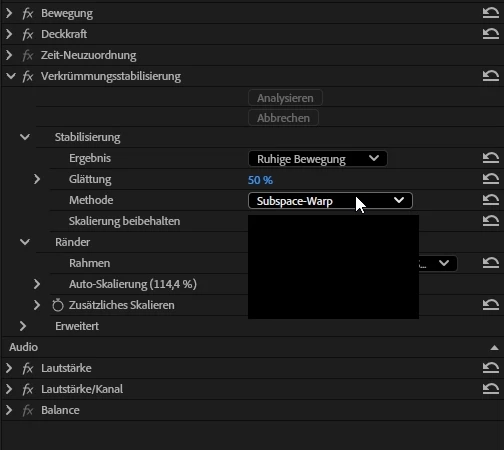


Windows 11 25H2, AMD Ryzen Threadripper 3970X, Nvidia RTX4090, 128 Gbyte RAM


13 replies

Known Participant
December 11, 2025

Installing Nvidia Studio Driver 591.44 fixed the issue in some places (Lumetri LUT-picker), but there are still emtpy drop-down-menus in other places (Preferences). 
@jamieclarke, can you please look into this? 

Aufzeichnung 2025-12-11 102627_1_2.gif

Known Participant
December 5, 2025

@jamieclarke, any news on this? 

Known Participant
December 3, 2025

@jamieclarke  Oh no, the bug is gone in the effects panel, but still persists in menus like "Render and Replace" 😞

Aufzeichnung 2025-12-03 104232.gif

Known Participant
December 3, 2025

Oh, there's an update to Premiere Pro 25.6.3 - that actually seems to solve the problem! 😄

@jamieclarke Much appreciated ❤️ Can you please have a Colleague from the Bridge-Team look into this one

Known Participant
December 3, 2025
  • With GPU accelerated UI: ON -- Empty dropdown-menus
  • With GPU accelerated UI: OFF -- No dropdown-menus at all

Aufzeichnung 2025-12-03 102811.gif

jamieclarke
Community Manager
Community Manager
November 26, 2025

Hi @pablo__0231 - In your preferences > general do you have "GPU accelerated UI rendering" checked or unchecked? Can you try both and let us know if it helps your issue.

Known Participant
November 25, 2025

@jamieclarke, yes, as is usual on a productivity system. 

Plugins: 

  • Maxon Red Giant
  • Maxon Universe

Background Tasks

  • Seer (File Previews)
  • Razr Synapse (Webcam)
  • Fontbase (Font Management)
  • Everything (File Search)
  • Microsoft Powertoys / Fancyzone (Window Management)
  • Microsoft Teams
  • Microsoft OneDrive Sync
  • Microsoft Sharepoint Sync
jamieclarke
Community Manager
Community Manager
November 25, 2025

Hi @pablo__0231 - Do you have any third party plugins or panels installed?


Do you have any background apps or utilities running? Some third party software (like antivirus tools, screen recorders, or system optimizers) can sometimes interfere with Premiere Pro. 

Known Participant
November 25, 2025

@jamieclarke, sure, here's the full report: 

  • Issue – Effects Panel: Drop-down-menus are not populated. The menus only show an empty box.
  • Steps to reproduce  Update to Premiere Pro 25.6.2, problem is immediately visible in all projects.
  • Expected result  The drop-down-menu should show the available commands when clicked
  • Actual result  The drop-down-menu is empty when clicked 
  • Screen recording – If you think it might be helpful, include a recording of your screen, showing the issue.  
  • Adobe Premiere Pro version – Premiere Pro 25.6.2
  • Operating system – Windows 11 Home, 25H2, Build 26200.7171
  • GPU driver version (Windows only) – Nvidia Studio Driver 581.57
  • Video format  //
  • Comparative information helps us understand more about when the issue occurs: 
    • Does it affect all projects or only some projects?  All projects
    • Does it affect new projects?  Yes
    • When did the problem begin? With the update to 25.6.2. Reverting to 25.5 solves the problem, but it's only a workaround.
jamieclarke
Community Manager
Community Manager
November 21, 2025

Hi @pablo__0231 - We need a few more details to try to help with the issue. Please see, How to Report a Problem.


Can you list your system specs from the link above.