

Micah Snacks
Inspiring
May 21, 2024

GPU Render Error (-1609629695) for Simple Caption Motion Graphic

  • May 21, 2024
  • 12 replies
  • 889 views

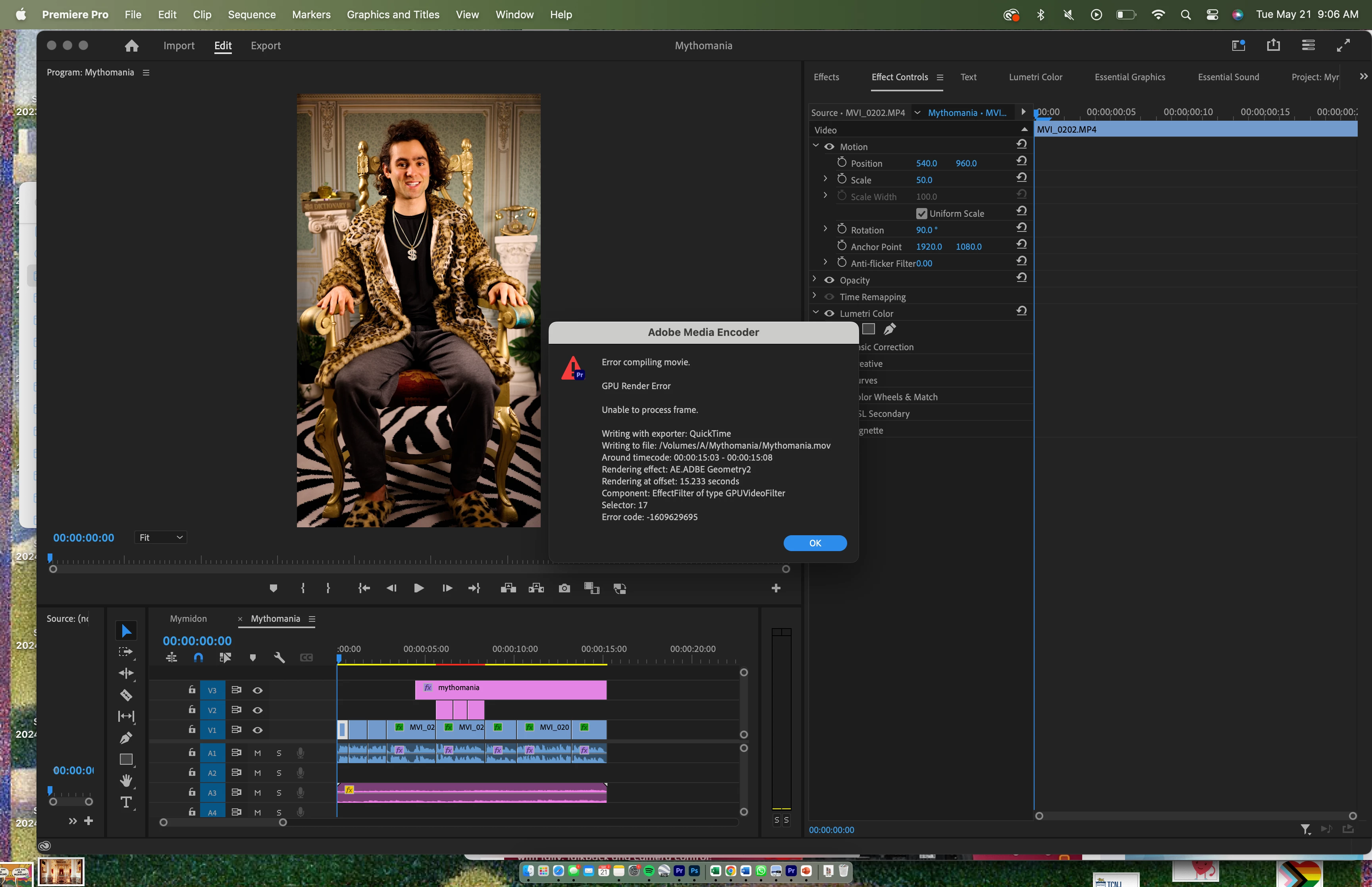
I am constantly getting the following error when I go to export. What is so strange is that I am not exactly exporting anything complicated - a simple caption that I upgraded to motion graphic is causing the dreaded export bug. The caption simply floats around slowly. How do I fix this error?? It has totally ruined my workflow and is making me late for deadliens as I type this . . . 


Tried doing QuickTime instead of 264, exporting timeline to a new projecrt, quiting out of Premiere and reopening it, reinstalling Premiere, etc and nothing works. On a Apple M1 Pro chip (so I cannot switch out of Metal renderer) and programs / os updated.


THANK YOU.


This topic has been closed for replies.

12 replies

ESSTLL3
Inspiring
May 27, 2024

Same issue here 😞 But it is wrap stabilizer effects that seem to be in cause. Any solution? :((((

Micah Snacks
Inspiring
May 23, 2024

@Kevin-Monahan Thank you! A good advocate on this matter sounds great! 🙂 

Kevin J. Monahan Jr.
Community Manager
Community Manager
May 23, 2024

Hello @Micah Snacks,

I am a mere moderator and not part of the product team. "When" questions are almost impossible for me to answer. I will stay on top of the issue and act as your advocate, though. Unfortunately, I have to ask for your patience. I hope soon, though!


Thanks,
Kevin

Kevin Monahan - Sr. Community and Engagement Strategist – Adobe Pro Video and Audio
Micah Snacks
Inspiring
May 23, 2024

Many thanks @Kevin-Monahan when can I expect a proposed solution?

Micah Snacks
Inspiring
May 23, 2024

Hi @Stan Jones I am exporting directly from Adobe Premiere. 


I tried Render In to Out for the first 14 seconds and did not get an error:


I then tried Render In to Out for the whole timeline and got the error:


Here is a link to the motion graphic which seems to be causing the error:


https://drive.google.com/file/d/1E0px1E-DtAuRhbMxXxVYIoQVuSuIuVJk/view?usp=share_link


Thank you so much for your help.

Kevin J. Monahan Jr.
Community Manager
Community Manager
May 23, 2024

Thank you, @Micah Snacks; I have informed the team and given them the file.


Cheers,
Kevin

Kevin Monahan - Sr. Community and Engagement Strategist – Adobe Pro Video and Audio
Micah Snacks
Inspiring
May 23, 2024

Hi @Kevin-Monahan here is a link to the .MOGRT thanks so much for your help: 


https://drive.google.com/file/d/1E0px1E-DtAuRhbMxXxVYIoQVuSuIuVJk/view?usp=share_link


This is causing the GPU Render Error and the last 20 frames of video to go black in Adobe Premiere playback. Here is a look at my simple timeline:


Stan Jones
Community Expert
Community Expert
May 23, 2024

Are you exporting directly from PR or queuing to Adobe Media Encoder?


If you export in to out, and set the out-point to 14 seconds, do you get the error?


Stan


Kevin J. Monahan Jr.
Community Manager
Community Manager
May 23, 2024

Hi @Micah Snacks,
Is it possible to share the .mogrt so the team can inspect it for issues? Let me know.


Thanks!
Kevin

Kevin Monahan - Sr. Community and Engagement Strategist – Adobe Pro Video and Audio
Micah Snacks
Inspiring
May 23, 2024

@Kevin-Monahan Please see completed bug report. Thank you!


  • Issue - Simple motion graphic of text causes GPU Render Error (-1609629695)
  • Adobe Premiere Pro version number: Version 24.3.0 (Build 59)
  • Operating system - macOS Ventura 13.6
  • System Info: CPU, GPU, RAM, HD:
  • Video format: MP4/MOV H.264 4:2:0 (Full Range); 3840 x 2160; 23.976 frame rate; 1.0 pixel aspect ratio; Rec. 709 color space; 48000 Hz 32 bit floating point stero 
  • Workflow details: One cam talking head
  • Steps to reproduce - Upgrade text to motion graphic of 10 seconds or longer. Use Transform and keyframes with Anchor Point, Position and Scale to move and change size of motion graphic (Please see attached screenshot)
  • Expected result - What should have happened after the last step? The video shown on the timeline should export.
  • Actual result -  What did happen after the previous step? The video shown on the timeline does not export because of the GPU Render Error. In addition, somtimes the blackback has one or two black frames. When the motion graphic described above is removed, then the video exports, but I need the motion graphic.