
Participating Frequently
June 11, 2026

MULTILANGUAGE TRANSCRIPTION, MANUAL TRANSCRIPTION,AUTOMATIC TRANSCRIPTION THAT WORKS
  • June 11, 2026
  • 2 replies
  • 64 views

I've been trying for over 3 hours to create a caption in this program. I've already exported it as TXT, but this thing won't import it. I've already exported it as JSON, but this thing makes it difficult to correct the text. You know what the difficulty is? I don't even need to explain it.

I've already transferred the Portuguese text, understood everything, and manually corrected the English part without success. I've already exported everything in English to copy and paste it, but the transcription in this thing doesn't work. 

Both Adobe Premiere and Adobe Photoshop, with their TOTALLY AWFUL artificial intelligence, block or prohibit almost everything you ask for. It interprets a photo of lingerie as adult content and prevents you from editing it. It's also IMPOSSIBLE to use the credits properly. You ask it to correct the position of a hand, recreate an image, or simply change a person's angle from facing forward to facing backward, and it fails.


https://community.adobe.com/questions-729/adobe-s-transcription-and-text-editing-is-a-disaster-1419467?postid=5515463#post5515463

CapCut, KineMaster, Edits by Instagram, DaVinci Resolve, and even InShot already have decent transcription tools. 


[Profanity removed and edited for content by moderator]

2 replies

KatieToo
Community Manager
Community Manager
June 15, 2026

@RonyDesign 

Welcome back to the Premiere Pro forums! We are glad to see you here. I see you’re encountering issues with captions. We need a few more details to try to help with the issue like if Mac/Windows, what version Premiere you’re in, and more. Please see, How do I write a bug report?

Can you walk us through your process of how you’re creating/correcting captions (Portuguese/English) and re-importing within Premiere or elsewhere? I see you mentioned you’d transferred the Portuguese text but unsuccessfully manually corrected the English part but more specifics will help.

In v26.2.2, there’s 3 ways captions from Premiere exports: text, csv, or srt. I’m not sure which version and build of Premiere you’re currently using though. You mention exporting as JSON file, have you converted it back to say, an .srt before importing?

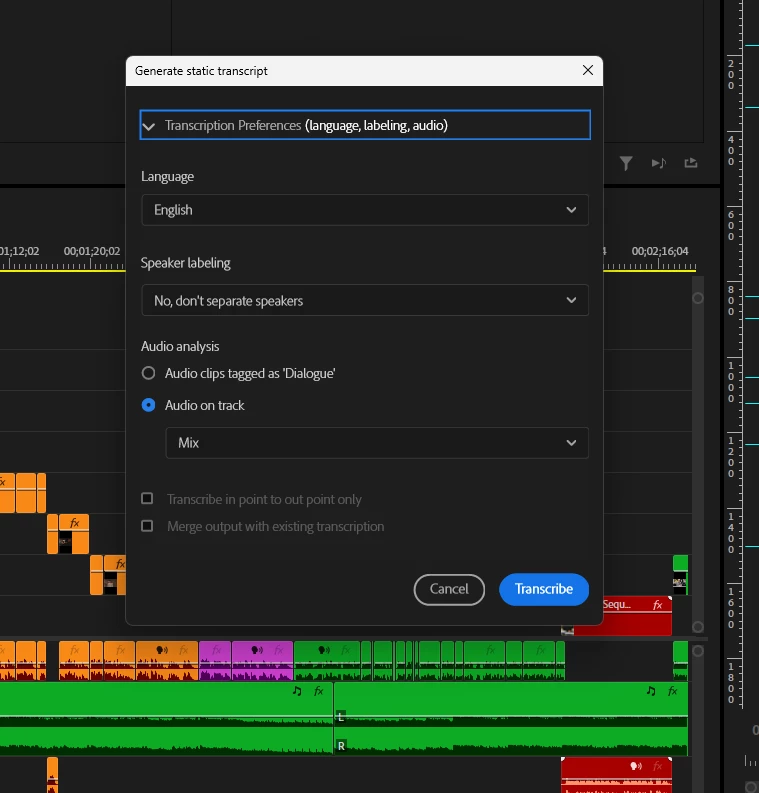
Also wanted to confirm that you see the option to Create Captions in the Text Panel, Create Captions from transcript or Import Captions from file as seen below.


As for the issue with Photoshop, here is the direct link to Photoshop forums.

Sorry for your frustration and we’d like to help!
Katie

Participating Frequently
June 11, 2026

I've been trying for over 3 hours to create a caption in this application. I've already exported it as TXT, but this thing won't import it. I've already exported it as JSON, but this thing makes it difficult to correct the text. You know what the difficulty is? I don't even need to explain it.


I've already transferred the Portuguese text, understood everything, and manually corrected the English part without success. I've already exported everything in English to copy and paste it, but the transcription in this thing doesn't work. 


In other words, once again I'm here to express my INDIGNATION and FRUSTRATION with this company that charges AN ARM AND A LEG and fails to deliver a DECENT service.


Both Adobe Premiere and Adobe Photoshop, with their artificial “INTELLIGENCE”, block or prohibit almost everything you ask for. It interprets a photo of lingerie as adult content and prevents you from editing it. It's also difficult to use the credits properly. You ask it to correct the position of a hand, recreate an image, or simply change a person's angle from facing forward to facing backward, and it fails.


R

Adobe’s Transcription and Text Editing is a Disaster


CapCut, KineMaster, Edits by Instagram, DaVinci Resolve, and even InShot already have decent transcription tools. 


[Profanity removed by moderator]