
Participant
August 17, 2024

No Dialogue Found

  • August 17, 2024
  • 20 replies
  • 2646 views

I have a video I shot on my iphone that I'm trying to create transcripts on.  I had no problems creating transcripts at one point, but then after updating Premiere it stopped working. 


I've searched the forums and tried multiple things, but didn't work.  Even went as far as uninstalling and reinstalling Adobe Premiere Pro 2024 and rebooting my computer multiple times and making sure there were no pending updates.


If I create a Project with the same clip in Adobe Premiere Pro 2023, then it gets transcribed without issue.
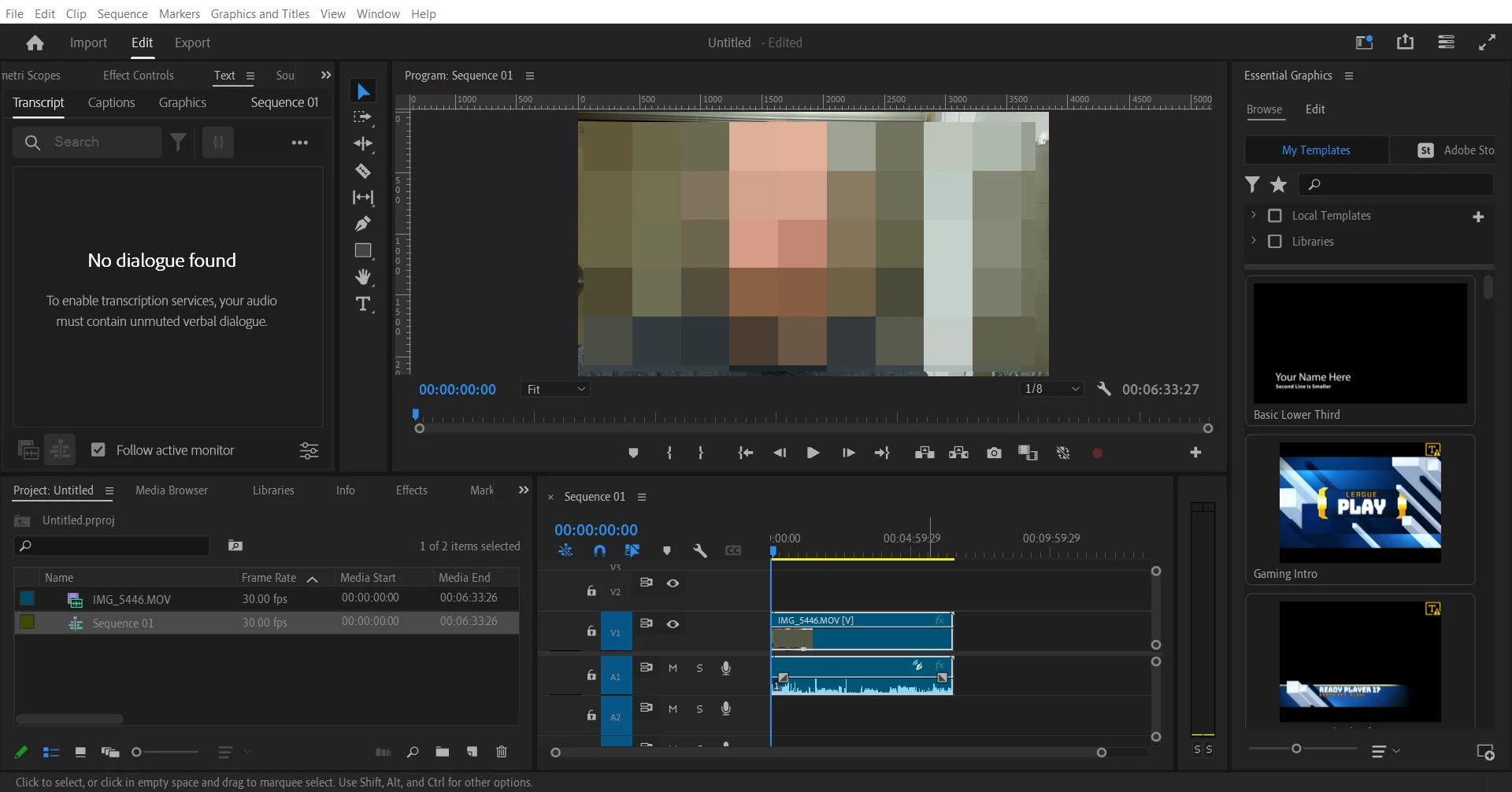
 

Premiere Pro Version 24.5.0 (Build 57)

Windows 10 Home 22H2 OS build 190545.4780

Acer Aspire E5-575 i3-7100U

This topic has been closed for replies.

20 replies

Participant
October 16, 2024

After all the attempts, this is what solved my issue in the latest Premiere 24.6.3 update. I changed the audio channel, both for L and R and it worked, on the R side. It depends on each audio, but that's what it's about, canceling the audio via phase. Thanks

Stan Jones
Community Expert
Community Expert
October 11, 2024
Thomas25856512hgtv
Participant
October 11, 2024
Hello everyone
I had the same problem with "no dialogue". This is how I solved the problem: My recording was done on an iPhone with a single wireless microphone.
I have in the past experienced that the phone records in both left and right channel, but out of phase.
My theory was that the out-of-phase problem caused the transcriber to hear a dead signal because the two channels cancel each other out. Quite right.
When I threw away one channel in my sequence, the transcription worked fine.
Have a try 🙂
Peregrina_I
Known Participant
September 14, 2024

Hi @Kerstin Ebert,


Thanks! It finally seems to be working now, though. I went back to the first Premiere version from 2024 and the transcripts loaded. Occasionally all or part of the transcript disappears, and I close and re-open the text window and the transcript reappears. I guess I'll try upgrading to the latest version again at some point and see what happens. But my current subscription expires in a few days anyway so I don't know what I'll have time to do.

Kerstin Ebert
Adobe Employee
Adobe Employee
September 10, 2024

Hi @Peregrina_I 


please try to reset your workspace to the default layout and check again.


Also, do you use the Reference monitor in your set up? 


It would be great if you could send me your project file (media can be offline if you can't send it) so I can take a closer look. It's hard to investigate from a distance since I can't reproduce your issue.


Thanks,

Kerstin

Peregrina_I
Known Participant
September 9, 2024

Hi @Kerstin Ebert,


It seems to happen now with everything, including projects that used to show transcripts. It doesn't work even when I import a fresh video with zero effects. The transcript is clearly there; Premiere just won't acknowledge its presence or that there is any dialogue at all.


Like I said, in build 23 I got a transcript that then showed up in 24, but in neither version did the transcript change to reflect what was currently happening on a timeline. It just showed the transcript of the entire video file, even if I deleted portions or moved them around. And in 24, if I started a new timeline with the same clip that had the transcript from 23, I got the same "no audio found" error.


Thank you!

Kerstin Ebert
Adobe Employee
Adobe Employee
September 9, 2024

Hi @Peregrina_I 


I'm still trying to understand why this is happening. Does this only happen to a specific video clip you are using, or does the "No dialogue found" screen show up for all the clips you are trying to transcribe? Do you have any audio effects or audio plugins applied to the clip? Is it possible to share the clips that's failing with me so I can try on my end?


Thanks,

Kerstin

Stan Jones
Community Expert
Community Expert
September 6, 2024

Got it.

Peregrina_I
Known Participant
September 6, 2024

Thanks, @Stan Jones. But no--I have a very simple project right now with a single input video. No productions. I tried going back and opening a project where the transcript used to work, in case that would help, but the transcript is no longer showing up there, either. I've uninstalled/reinstalled the latest version of Premiere. I just don't know what to do.

Stan Jones
Community Expert
Community Expert
September 5, 2024

@Peregrina_I,


Using the production workflow by any chance? More than one project open at a time?


One user in a productions setting thought they might have a workaround:

https://community.adobe.com/t5/premiere-pro-bugs/source-clip-transcriptions-disappeared/idc-p/14840191#M34789


Stan