
Participant
August 17, 2024

No Dialogue Found

  • August 17, 2024
  • 20 replies
  • 2646 views

I have a video I shot on my iphone that I'm trying to create transcripts on.  I had no problems creating transcripts at one point, but then after updating Premiere it stopped working. 


I've searched the forums and tried multiple things, but didn't work.  Even went as far as uninstalling and reinstalling Adobe Premiere Pro 2024 and rebooting my computer multiple times and making sure there were no pending updates.


If I create a Project with the same clip in Adobe Premiere Pro 2023, then it gets transcribed without issue.
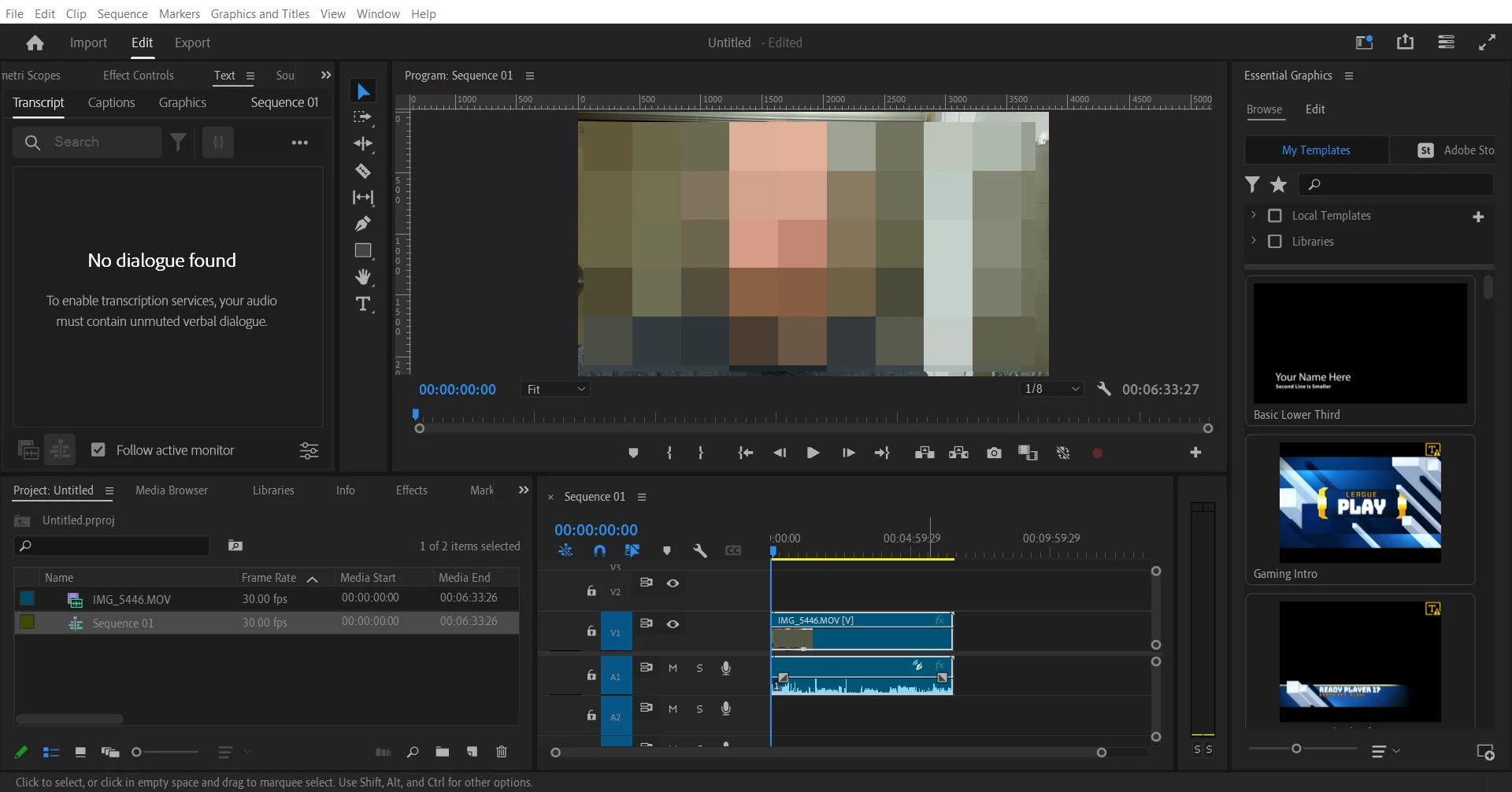
 

Premiere Pro Version 24.5.0 (Build 57)

Windows 10 Home 22H2 OS build 190545.4780

Acer Aspire E5-575 i3-7100U

This topic has been closed for replies.

20 replies

Peregrina_I
Known Participant
September 4, 2024

@Kerstin Ebert, can you please help? I've been struggling with this for two weeks (no one replied at all to my original post). I normally love Premiere, but am not going to be able to convince my employers to keep subscribing to it for me if it can't do what they want it to do. I need to make a transcript and captions and can't. I can't find any other way to contact Adobe. I don't know what to do at this point except switch to something else.

Peregrina_I
Known Participant
September 3, 2024

Thanks for your replies, @Kerstin Ebert and @Stan Jones.


Kerstin: No, it just says "No dialogue found."


I also checked the language packs, but that seems to be working:


I did go back to a version of build 23 and was able to create and view the transcript. I can even view that transcript in build 24. However, when I modify clips, it doesn't update the transcript in either version. And if I start a new sequence in 24, it reverts to "No dialogue found" for that sequence.


I really need this to work soon! Thanks for your help.

Kerstin Ebert
Adobe Employee
Adobe Employee
September 2, 2024

Hi @Peregrina_I ,


quick question, does the transcript show up when you open the source clip in the Text panel and not the sequence?

Stan Jones
Community Expert
Community Expert
September 2, 2024

@Peregrina_I, sorry you did not get a response.


And @WhyIsThisSoftwareSoBuggy,


See this other thread where a user is running the latest 24.6.1:

https://community.adobe.com/t5/premiere-pro-bugs/auto-transcript-not-working/idi-p/14832298


Seems like the same issue, and I referenced your thread there.


Stan


Peregrina_I
Known Participant
August 30, 2024

Hello,


I am having the same problem. Premiere has clearly created the transcript (when I right-click on the clip, it gives me an option to RE-transcribe). But I can't see the transcript or captions. I updated to the latest version of Premiere, but it didn't help. I followed Stan Jones's troubleshooting steps to no avail. What can I do next? I really need this to work.


Thanks so much!


Kevin J. Monahan Jr.
Community Manager
Community Manager
August 19, 2024

Hi @WhyIsThisSoftwareSoBuggym,

Please let us know if you are still having trouble after trying @Stan Jones troubleshooting steps.


Thanks,
Kevin

Kevin Monahan - Sr. Community and Engagement Strategist – Adobe Pro Video and Audio
Stan Jones
Community Expert
Community Expert
August 18, 2024

When it showed "Re-transcribe," it IS transcribed. The issue is not seeing it in the Text panel for the sequence. And it should be. FYI, reinstalling PR does not reset all settings.


From the Project Panel, open the .mov in the Source Monitor and then switch to the Text panel/transcript tab. Do you see the transcript? If not, what do you see when you click the 3 dots menu?


Go to Window -> Workspaces -> Reset to saved layout.


Go back to the sequence; do you see the transcript?


If that doesn't work, close PR, then reopen holding the Shift key down. Reset preferences and cache. Create a new project, add the one clip, right click and transcribe. Open it in the Source Monitor. Does the transcript show? If yes, drag the .mov to the new icon to create a matching sequence. Does the transcript show?


Stan


Participant
August 17, 2024

I followed these instructions and made a copy of my project and opened it in Premiere Pro 2023 and it transcribed just fine as well:

https://community.adobe.com/t5/premiere-pro-discussions/open-premiere-project-in-older-version-downgrade-project-version/td-p/10648544

Participant
August 17, 2024

Hi Stan,


Thank you for the reply.  I tried it from the project panel and still no luck.  Still getting the "No dialogue found" "To enable transcription services, your audio must contain unmuted verbal dialogue"

Stan Jones
Community Expert
Community Expert
August 17, 2024

@WhyIsThisSoftwareSoBuggy,


That is odd.


In the Project Panel, right-click on the .mov file and pick transcribe. Post a screenshot of the dialogue. Does it work from there?


Something is odd about the audio/no dialogue message.


Stan