



Stan Jones
Community Expert
Community Expert
November 22, 2025

P: 25.6.2 Missing Text Panel; Empty UXP Panels

  • November 22, 2025
  • 80 replies
  • 16179 views

Update 2, 12/13/25: See staff post indicating that this is fixed without updating the PR version:
https://community.adobe.com/t5/premiere-pro-bugs/p-25-6-2-missing-text-panel-empty-uxp-panels/idc-p/15630125#M59800


To test, you only need to open the stock panel: Window -> New Adobe stock. It should load with content. If it does not, and hangs with the spinning circle frozen, post back here. The workarounds should still be working if you have any issues.


Update 12/3/25: This update is based on my tests as of this morning. This does not appear fixed by updating to 25.6.3. This bug report focused on workspaces and the text panel. The list of symptoms is longer. There is another long thread that focuses on failure of export commands:
https://community.adobe.com/t5/premiere-pro-bugs/p-premiere-pro-won-t-export-ui-frozen-need-help/idi-p/15608051


Trigger: For some users, when the Adobe Stock panel is open, whether it is in focus or not, after 10-15 seconds, it fails to load and causes one or more of the symptoms identified. The Stock Panel is open by default in the Essentials, Learning, Editing, and Libraries workspaces, and perhaps others. Once the problem is triggered, you cannot recover without restarting PR. Reloading the project alone does not work.


Symptoms (Incomplete list):

  • The Export mode/dialogue window cannot be accessed using Ctrl+M; File -> Export -> Media; Quick Export; or clicking on the Export tab. File -> Export -> Send to media encoder still works.
  • Text panel is empty, shows as unchecked in the Window submenu.
  • Text panel is missing, shows as unchecked, and clicking it in the Window submenu does nothing.
  • Text panel transcript and captions become unresponsive.
  • “UXP Panel n” (where n is an increasing number as you change workspaces) appear instead of an actual panel (for me this has included the Text and the Adobe Stock panels).


Best Workaround:

  • The most effective and least limiting workaround is to avoid opening the stock panel by modifying your workspaces.
  • Set Window -> Workspace -> "Import Workspace from Projects" OFF. You can set it on, but then each project must be set up correctly.
  • Close the Adobe stock panel in any workspace you use. You can do this in PR even when the problems are present. Do not later use "reset to saved layout" unless you want to redo that process.
  • Or create custom workspaces once you close the stock panel.
  • Note that these workspace changes are in your preferences, so if you reset preferences you lose them.


Other Workarounds:

  • Resetting preferences, creating a new project, uninstalling/reinstalling 25.6.2, and other steps may result in PR “working,” but it may be because you have not loaded the Adobe Stock panel. As soon as you do, it fails.
  • Install PR 25.5.0. This works, but I believe it is not necessary to avoid this bug.
  • Open in the Captions and Graphics workspace and do not change workspace. This works because it does not open the stock panel, but it is unnecessarily limiting.


Original bug report 11/22/25:

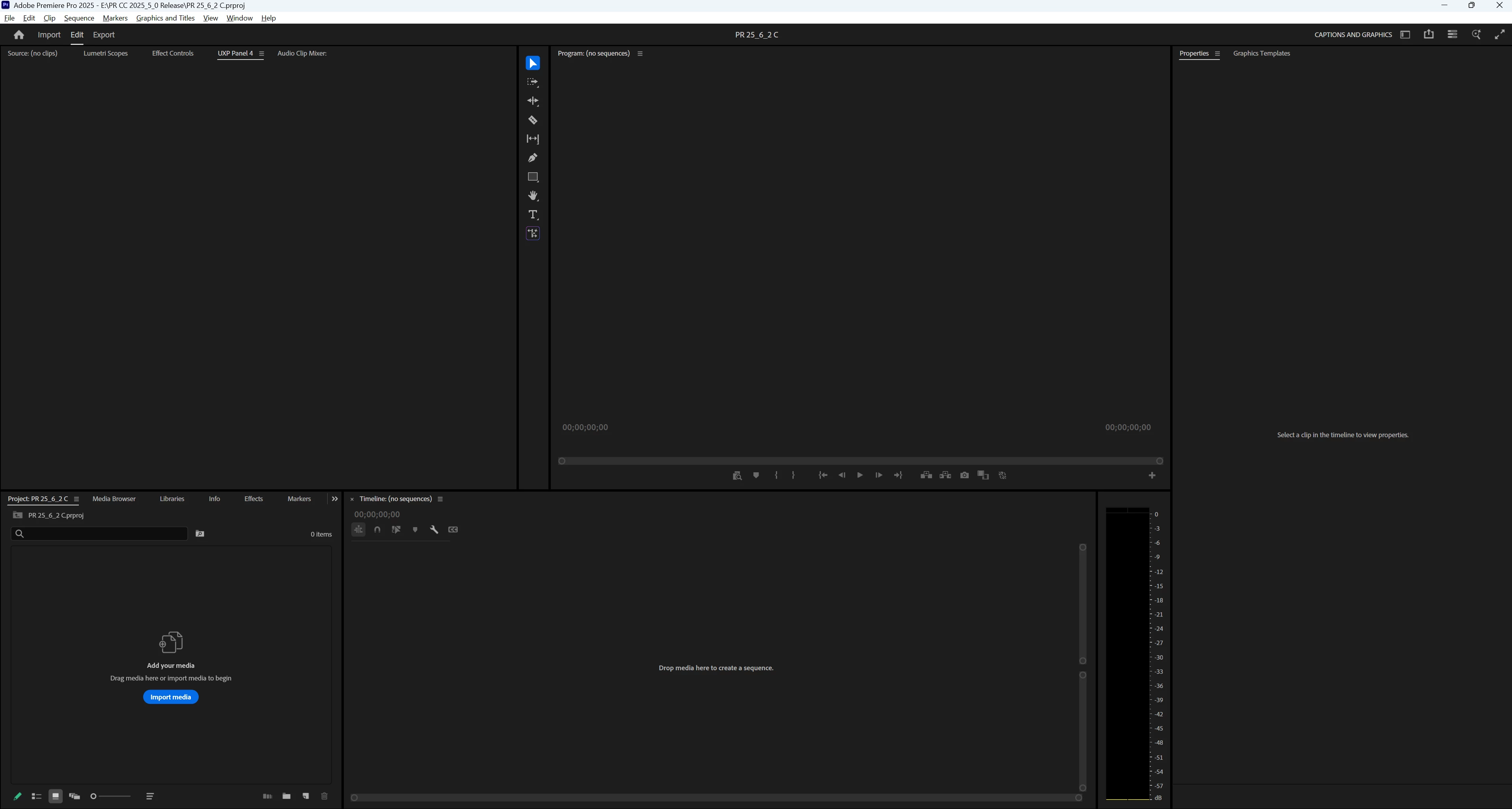
When changing workspaces, the Text panel no longer appears; various empty panels show, e.g. "UXP Panel 3," "UXP Panel 4," etc. I do not see the problem in Beta 26.0.0.36.


I updated to 25.6.2 from 25.6.1. As always, when opening the first time, I reset preferences, cache, and plugin loading cache, and I created a new project. After seeing this problem, I restarted my PC and reset preferences, cache, and plugin loading cache, disabled third-party plugins, and created a new project. Same result. I then repeated that a third time to get more details. I confirmed I am in 25.6.2 Build 1.


"Import workspace" is off. I note that even with disabling plugins, 5 plugins are still available. I will explore that further.


PR opens in the Learning workspace. The Text panel is present, and is checked in the Window menu. I switched to the Captions and Graphics workspace, and the Text panel is still present, unlike each of the previous 2 times. I now switched to the Editing menu. In the panel group with the Project Panel, there is an empty panel "UXP Panel 3." There is no Text panel visible, and the Text panel is not checked in the Window menu. When I switch back to the Captions and Graphics workspace, the Text panel is not present, there is an empty panel "UXP Panel 4" in the Source monitor group, and the Text panel is not checked in the Window menu. (See screenshot.) I switched to the Learning workspace, the Text panel is not present, there is an empty panel "UXP Panel 5" in the Source monitor group, an empty panel "UXP Panel 6" in the Project Panel group, and the Text panel is not checked in the Window menu. 


I closed and reopened PR, and opened the last project. It was (as expected) in the Learning workspace, and the Text panel was present. I changed to Captions and Graphics, then Editing, then Captions and Graphics, and then Learning. The same problems occurred with the exact results.


PR 25.6.2 PR Beta 26.0.0.36.

Win 11 Pro v11 25H2
i7-11700K, RAM: 640 GB. Single UHD monitor. NVIDIA GeForce RTX 3070, Driver: 566.36.


Stan
 

80 replies

November 30, 2025

This is happening on my machine as well.

Fresh install on new laptop.


Windows 11 25H2

Adobe Premier 25.6.2 Build 1


Clicking "Text" from the window menu does not do a thing.


November 29, 2025

¡Hola! ¿Alguién pudiera apoyarme a solucionar este problema? He utilizado ultimamente la venta Texto para transcribir audio y poner subtitulos. Pero le doy clic a la venta, no aparece, y si lo hace se queda congelado. He cambiado el espacio de trabajo, intentado con otros proyectos, abrir y cerrar el programa, borrar la cache del programa, pero sin éxito, tengo el mismo problema.  Y no he encontrado información o solución en internet. 


Muchas gracias de antemano. 


P.D: Tengo Premiere Pro 256.2 y estoy trabajando desde Windows 11. 

Stan Jones
Community Expert
Community Expert
November 29, 2025

@mitzi_1599,


See this bug report and discussion.

https://community.adobe.com/t5/premiere-pro-bugs/25-6-2-missing-text-panel-empty-uxp-panels/idi-p/15604156


As a workaround, try this. Change to the Captions and Graphics workspace. Close PR. Open and it should open in that workspace. The Text panel should be open and work. Do not change workspaces.


Does that work for  you?


Stan


November 29, 2025

Hello! First-time commenter here. I'm a graduate student and a relatively experienced Premiere Pro user. I'm having the same issues on my Premiere 25.6.2 Update as the others in this thread. I'm working off of a MacBook Air, with an M3 chip, 16GB memory, and Sonoma 14.5 macOS. 

Stan Jones
Community Expert
Community Expert
November 28, 2025

@HustonCMichael @Dani_V.,


>  was not able to make the already installed Adobe cloud installer fix the issue.

I noted failure of the regular cloud uninstaller, but believe that we need to ensure that it does not work for a non-educatonal license. So, I uninstalled 25.6.2, selecting the remove preferences/plugins option. The program files/PR 2025 folder is gone. I manually deleted the entire documents/Adobe folder and deleted the media cache folders. Restarted my PC.


I still have PR 2024 installed, but, as noted, preferences have been removed. All language packs show as removed.


Installed PR 2025.6.2 via the cloud desktop. Restarted PC. Opened and created a new project. Default is Learning was. Switched to Captions and Graphics and had an immediate UXP Panel 2 instead of the text panel. Other symptoms also present: the Text panel was not checked in the Window submenu and clicking it there did not open it. I added one clip, made a sequence and as not able to export it: Ctrl+M and File -> Export -> Media did nothing. Clicking on the Export mode tab did nothing, and I could not get the Edit mode tab active again.


I would next go to uninstall with the Cleaner tool, but I will wait for further instruction first.


Stan


Stan Jones
Community Expert
Community Expert
November 28, 2025

@Dani_V.,


I previously reported a) even with disabling plugins, 5 plugins were still loading and b) that I removed the plugins that still showed as active. However, I "removed" them by renaming their folders in 

C:/Program Files (x86)/Common Files/Adobe/CEP/extensions, and that did NOT remove them. I now moved those folders, and that prevented the extensions from loading. And the problem remains.


Stan


November 27, 2025

I'm currently using Adobe Premiere Pro 2025 , version 25.6.2 (build 1)


I'm editing a video for instagram, and at the time I was ready with the clips to make the transcription and subtitles, I noticed that the Text Pannel was missing. Then, I when several times in the Window menu to enable it. But it didn't worked. I tried everything I had, like changing trough all workspaces, for exemple, and still nothing changed.


I tried to desinstall the app and then install it again, but same happend. 


Also, the shortcut "crtl M" is not getting me to the Export pannel, and neighter are any other button on the menu. The only way I had it done was by sending to Media Encoder. 


Hope someone have any idea to help me out.

Stan Jones
Community Expert
Community Expert
November 28, 2025

@rafatouso,


I am on 25.6.2 on Win 11.


See this bug report and discussion:

https://community.adobe.com/t5/premiere-pro-bugs/25-6-2-missing-text-panel-empty-uxp-panels/idi-p/15604156


When I checked just now, I discovered, as you report, none of these open the Export window: Ctrl+M; File -> Export -> Media; click on the Export mode tab. 


A least temporarily, a workaround I describe in that thread works also for your export issue. I have Window -> Workspace -> "Import workspace from project" turned OFF. Select the Captions and Graphics workspace. Close PR (not just the project). 

Open PR and, for testing at least, create a new project. It will open in the Captions and Graphics workspace with the Text panel and Export modes working. I tested minimally now, but previously, as long as I did not change Workspace, the Text panel continued to work correctly.


This may also work in an existing project with "Import workspace from project" turned On.


Stan


Participating Frequently
November 27, 2025

In my computer labs we use Mac OSX Sequoia, with a few stations running Tahoe. The bug happend to every Adobe Premiere install ~50 computers. It also was reported by students using laptops.

I tried many ways to fix the issue by hand..  But this automated method I used was pretty simple.

In JAMF (MDM) I made a police to Delete the Application folder. (not the anything els)

rm -R /Applications/Adobe\ Premiere\ Pro\ 2025


Then I made a PKG (installer) to copy a working Premiere onto the effected computers.


  • I was not able to make the already installed Adobe cloud installer fix the issue.
  • The education version of cloud we use does not support backstepping to older versions; I also don't think it always deletes the applications before updating, so the thats how BUG's traveled up through versions.
Stan Jones
Community Expert
Community Expert
November 27, 2025

@Dani_V.,


Only 25.6.2. As I said to @HustonCMichael, I think this may be a reinstall issue. Partly related to another issue, I shared some preferences info offline with @jamieclarke. He cannot replicate.


I created the test workspace intentionally as a duplicate of CG. And I think that is why I can switch back and forth. As soon as I switch from the Test CG to Editing (which has Text off by default), Text is not present and is not checked in the Window submenu, and when I click it there, it does NOT open. 


I created the project file I am sending you with "Import workspace from project" OFF. I closed/reopened PR without resetting preferences and created a new project with no assets. I was in the Editing workspace before closing, so it opens in that one. The Text panel is not present (default), and, when I click it in the Window submenu, it opens in the Source Monitor panel group, and is checked in the Window submenu. If I switch to the CG workspace, the Text panel remains, but is no longer checked in the Window submenu. If I switch to the Learning workspace, I get a UXP Panel 4 in the project panel group. I saved it in that state.


Stan


Stan Jones
Community Expert
Community Expert
November 27, 2025

@HustonCMichael,


Thanks for that. Windows or PC? How did you uninstall? Did you use the cleaner at all or just via the cloud desktop or ?


And you were getting this specific bug?


I have a couple more tests to run, but I was reaching your conclusion: something in the install, not just my preferences or projects.


Stan


Participating Frequently
November 27, 2025

To fix my Install, I had to remove Adobe Premier ... then do a new install.   Somthing broken in one the updates was still causing issues, if I just updated or overlayed with a diffrent version, the bug kept happening.