


Inspiring
Oct 21, 2024 7:49 AM UTC
Open for Voting

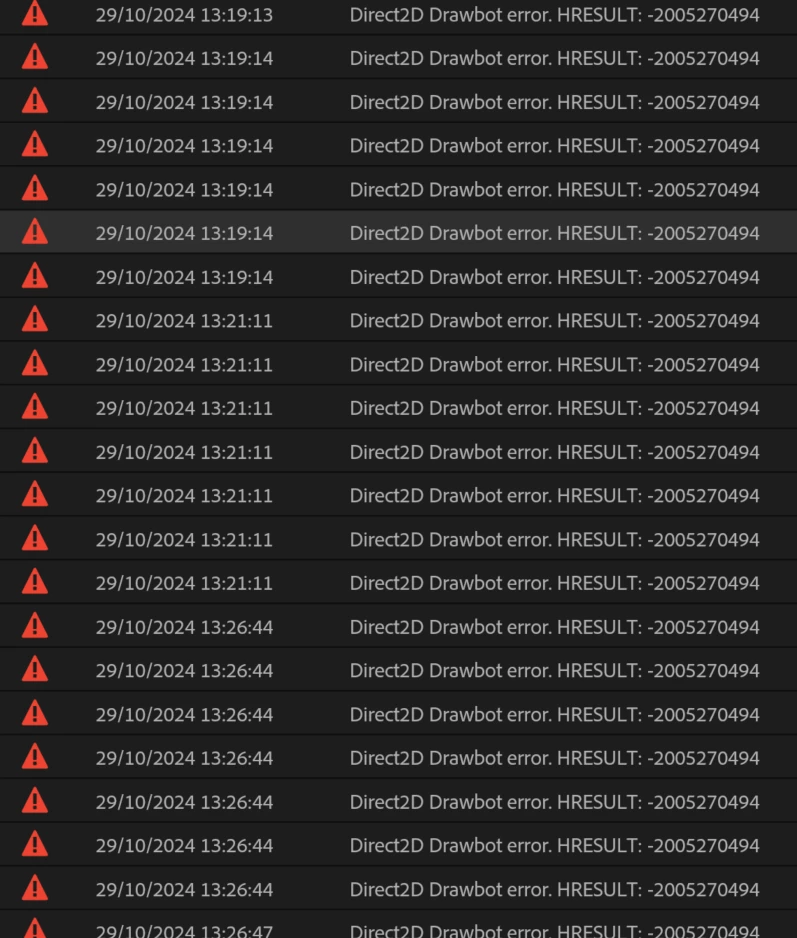
P: Hundreds of Direct2D Drawbot error. HRESULT: -2005270494

I'm getting hundreds of these errors, and every time they happen the UI freezes for a second or two.
 

Not entirely sure what build I'm running but it's 25.0. Here is the extremely useful about box:


Any ideas? Thanks!


59 replies

jamieclarke
Community Manager
Community Manager
Nov 7, 2024 6:59 PM UTC

We believe we have addressed some of these crashes in version 25.1 and beta 25.2. 

If you’d like to confirm, please try installing the beta version and let us know if it resolves the issue. If not, these fixes will be included in the next dot release of Premiere Pro.

If you have tried the beta and this did not help your issue please provide detailed steps to reproduce this error on your system? This will help us better understand and address the issue.  If you need to get a project out without it crashing you can go to  Preferences > General > "GPU accelerated UI rendering" checked off

Translate
Participating Frequently
Nov 6, 2024 3:22 PM UTC

I can't even open my previous projects in Beta 25.2 - it keeps crashing once the project loads.

Translate
jamieclarke
Community Manager
Community Manager
Nov 4, 2024 2:25 PM UTC

Hi @neilgdabc @Chrisanthi Pel @Max291794530wtx - Can you try installing Premiere Pro beta version 25.2.0 build 3 or higher and let us know if it helps your issue?

Translate
Participating Frequently
Oct 30, 2024 4:30 PM UTC

Exact same issue for me. This has been going on with my system for months at this point - should also be noted that the error used to read "Premiere Pro is running low on system memory. Please save your project and proceed with caution." on earlier versions (every iteration of 24). But now since I upgraded to version 25 I get the drawbot error.

Translate
Known Participant
Oct 30, 2024 1:33 PM UTC

guys, I don't know what is happening, but the worst part is that after I started getting those event messages, Generating peaks is taking forever!! The other day, I was waiting for almost 3,5 hours to generate peaks for 2cam podcast of 1h length. And on top of that, when I added Podcast voice effect from Essential Sound, I waited another 1,5 hours and still nothing! So I ended up editing the podcast at Premiere Pro 24 version and in everything was smooth. Generating Peaks and Essential sound almost in no time. I wasted all my day for nothing. I should stay at Premiere Pro 24 from the begining. 

Translate
neilgdabcAuthor
Inspiring
Oct 30, 2024 12:33 PM UTC

@jamieclarke Actually, I am still getting them in 25.1

Translate
neilgdabcAuthor
Inspiring
Oct 29, 2024 3:42 PM UTC

@jamieclarkeThanks for the reply! In 25.1, half the UI just doesn't render - blank boxes everywhere! I've changed that setting, and it seems to have fixed the issue. Although obviously I don't have GPU accelerated UI any more.


And the 'about' box is still empty.


Translate
Inspiring
Oct 21, 2024 1:58 PM UTC

During editing: 

Many interface items of premiere pro not visible anymore.
Many panels have no text.


I have 128 Gb of Ram and 11Gb of video ram. (GTX3080)


Translate
IanB_360
Community Manager
Community Manager
Oct 23, 2024 5:46 PM UTC

Hi @Christiaan1 

Welcome to the Premiere Pro forums! We are glad to see you here. We need a few more details to try to help with the issue. Please see, How do I write a bug report ?

Thanks for submitting your bug report. I hope we can help you soon. Sorry for the frustration!

Thanks,

Ian

Translate
Known Participant
Oct 21, 2024 7:49 AM UTC

hello everyone! 

i updated my premiere to the latest version last week, and this morning, while i am trying to edit a very simple 2 multicam project, i get delay on conforming, on essential sound filter and on top of that, i just got that error message from the events that I never saw before! 


any ideas?


Translate
Participant
Oct 20, 2026 1:44 PM UTC

Premiere Pro 2025 – Severe memory exhaustion, Direct2D Drawbot errors and black screens: a successful workaround

I would like to share a troubleshooting experience that may help other Premiere Pro users experiencing unexplained memory exhaustion, black Program Monitor screens, freezing, and Direct2D Drawbot errors.

System and project

  • Windows 10

  • Adobe Premiere Pro 2025

  • 32 GB RAM

  • NVIDIA GeForce RTX GPU

  • Sony camera footage (mostly 4K H.264, 25 fps)

  • Google Pixel 7 Pro footage (4K, HEVC, approximately 60 fps)

  • Large documentary/travel project containing approximately 450 media items

The problem

Premiere Pro repeatedly became extremely slow or unresponsive. Timeline scrubbing was delayed, the Program Monitor sometimes went black, and Premiere occasionally crashed.

Memory usage climbed rapidly to 99% of the available 32 GB. Windows also experienced instability.

The Premiere Events panel reported:

  • Direct 2D Drawbot Error – Out of Memory

  • HRESULT: -2147024882

  • Frame substitution recursion attempt aborting after multiple attempts

  • ImporterMPEG errors

  • Premiere Pro is running very low on system memory

Initially, I suspected corrupted footage or problems caused by mixing different cameras, codecs and frame rates.

Troubleshooting

We investigated the NVIDIA drivers, GPU rendering modes, Windows virtual memory, background utilities and media files.

Using FFmpeg, we batch-tested 379 original Sony video files. No decoding errors were reported.

Importantly, the memory exhaustion also occurred when working with Sony footage alone. This made the mixed-codec explanation less convincing.

What finally helped

Two changes were made in Premiere Pro 2025:

  1. Cleared all Media Cache files.

  2. Disabled Edit > Preferences > General > GPU accelerated UI rendering (restart required).

Premiere Pro was then restarted.

Please note that this is the GPU acceleration option for the user interface, not the Mercury Playback Engine GPU renderer.

Results

After these changes:

  • A small 4K timeline played smoothly.

  • Approximately 100 additional Sony clips were added successfully.

  • The full Sony timeline, approximately 2 hours and 10 minutes long, remained responsive.

  • Sony and Pixel 7 Pro footage were then combined in a timeline approximately 2 hours and 45 minutes long.

  • Rapid timeline scrubbing responded normally.

  • Full-resolution Program Monitor playback worked.

  • RAM usage remained within normal levels during the observed sessions, rather than climbing to 99%.

  • No further Direct2D memory errors were observed during these tests.

Important limitations

Because Media Cache was cleared and GPU accelerated UI rendering was disabled during the same troubleshooting session, I cannot conclusively establish which change was responsible.

However, considering the Direct2D errors and Adobe's previous discussions of GPU-accelerated UI resource issues, disabling GPU accelerated UI rendering appears to be a particularly relevant workaround.

One issue remains unresolved: using Save As has sometimes caused the entire Premiere workspace to turn black. Restarting Premiere and reopening the sequence restored the timeline. Regular saving with Ctrl+S is my current workaround.

Recommendation to users experiencing similar symptoms

Before replacing hardware, transcoding hundreds of video files, or repeatedly reinstalling Premiere Pro, consider testing:

Preferences > General > GPU accelerated UI rendering > OFF

Restart Premiere afterward. Clearing Media Cache may also help.

This workaround has made a previously almost unusable large project responsive again.

I hope this information helps other editors and gives Adobe additional evidence for investigating Direct2D resource-management problems in Premiere Pro 2025.

Translate