

rachelcenter
Legend
December 5, 2024

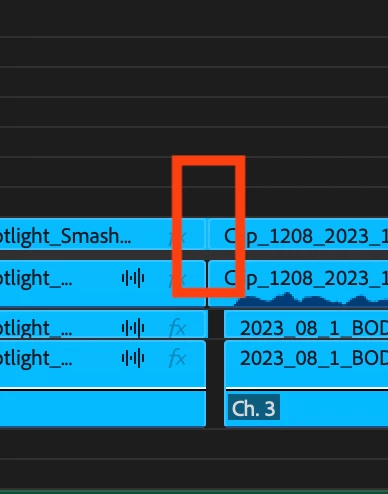
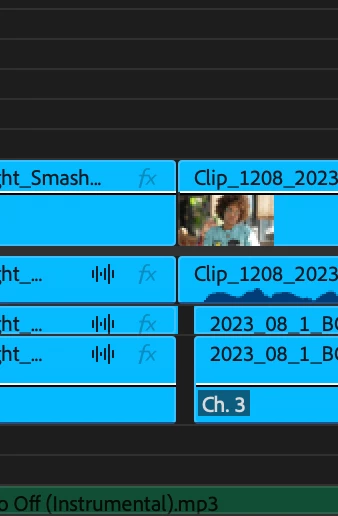
P: Premiere 2025.1.0 you cant see the cut mark any more on video tracks if track is too skinny

  • December 5, 2024
  • 21 replies
  • 4106 views

on premiere 2025.1.0 you cant see the cut mark any more on video tracks if track is too skinny. can you please fix this? yes issue occurs on new and old premiere projects.
21 replies

jamieclarke
Community Manager
Community Manager
April 1, 2025

Updating Status to Fixed in 25.2

Participant
February 18, 2025

Thank you for this well thought out explaination. It helps me to beter understand the purpose of the beta version and the intention to help flesh out other bugs by the community that may have been overlooked by the devs. Your professionalism is not overlooked and appreciated. Thanks, again. 

Fergus H
Community Manager
Community Manager
February 18, 2025

@HI, IT'S ME... I'm sorry if we've given you the wrong impression of what we're suggesting. To be clear: 


1. I want to acknowledge that it is frustrating to hit bugs and we're sorry that this one made it into the release version of the product.

2. We're aware of the issue and it will be fixed in the next version of Premiere Pro.

3. In the short term, the workaround is to improve the track height slightly - the issue occurs when track height is set to the minimum. 


We are not suggesting that you use the beta, only that if you'd like to confirm the issue is fixed, you can try out the beta version. 


Regards,

Fergus

MyerPj
Community Expert
Community Expert
February 18, 2025

Understood.

We've got to be close to a new release, it's seems like its been awhile since the last update 25.1 update. Hopefully it will be here pretty soon.

Participant
February 18, 2025

I'd like to express my frustration regarding this bug issue that has resurfaced here in 2025, similar to the same bugs discussed in 2024. It’s concerning that the proposed solution is simply to "download a beta app," rather than providing a direct fix.

As paying customers, we prefer not to engage with additional "beta" applications that seem unnecessary, other than to artificially inflate the beta downloads number. Clarity on this matter would be appreciated, as it appears more aligned with corporate interests than those of your users.

Hae Yun Jung
Participating Frequently
January 23, 2025

I know if I make the video line thicker, I can see the clip cut.

But I want to work at the thinnest thickness.

Is there a way to make this visible?

Is there a reason why it changed like this? I remember it wasn't like this before.


*Sorry my english is not good. I'm not a native speaker 😞

Fergus H
Community Manager
Community Manager
January 14, 2025

@edno_4235 The issue was introduced in v25.1 and it will be fixed in v25.2, which will be shipping this spring. There is no need for you to use the beta: the simple workaround to this issue is to make the track higher than the minimum. Our apologies for the inconvenience! 


Regards,

Fergus

Participant
January 14, 2025

Honestly, it's not feasible to keep using the beta, because the project you open in the beta, you can't open in the normal Premiere anymore, because it's an older version, and the beta still has other bugs. It's hard to use it. They said the next update would fix this. Will the next update be in 2026 by any chance? What a delay and we're still the same...

Participant
January 14, 2025

Sinceramente, não é viável continuar usando o beta, porque o projeto que você abre no beta, você não pode mais abrir no Premiere normal, porque é uma versão mais antiga, e o beta ainda tem outros bugs. É difícil usá-lo. Eles disseram que a próxima atualização corrigiria isso. A próxima atualização será em 2026 por acaso? Que atraso e ainda somos os mesmos...

Participant
January 13, 2025

Adobe please sort this out with the next update of Premiere!


The latest version is so far so good in my opinion but when I zoom out in the timeline the individual clips can no longer be seen clearly. It looks like one big clip. The lines are there but they are much too subtle. 


This is so frustrating as I have to zoom in just to see where one clip ends and the next clip starts. 

This has slowed my editing down to a completely unacceptible level. 


 I just want to add that I've been a professional editor for 22 years. A lot of things have bothered me with various software updates over the years (the new audio handle badges for one!) but this is truely the first one that has prompted me to reach out and report. I will have to look at other software if Adobe don't address this.


mattchristensen
Community Manager
Community Manager
January 13, 2025

@AndyOates I'm sorry about this, it was a mistake on our part. The bug has been fixed in the Beta version you can download today if you like, and the fix will be in the next release.