

amaluo
Participant
June 24, 2026

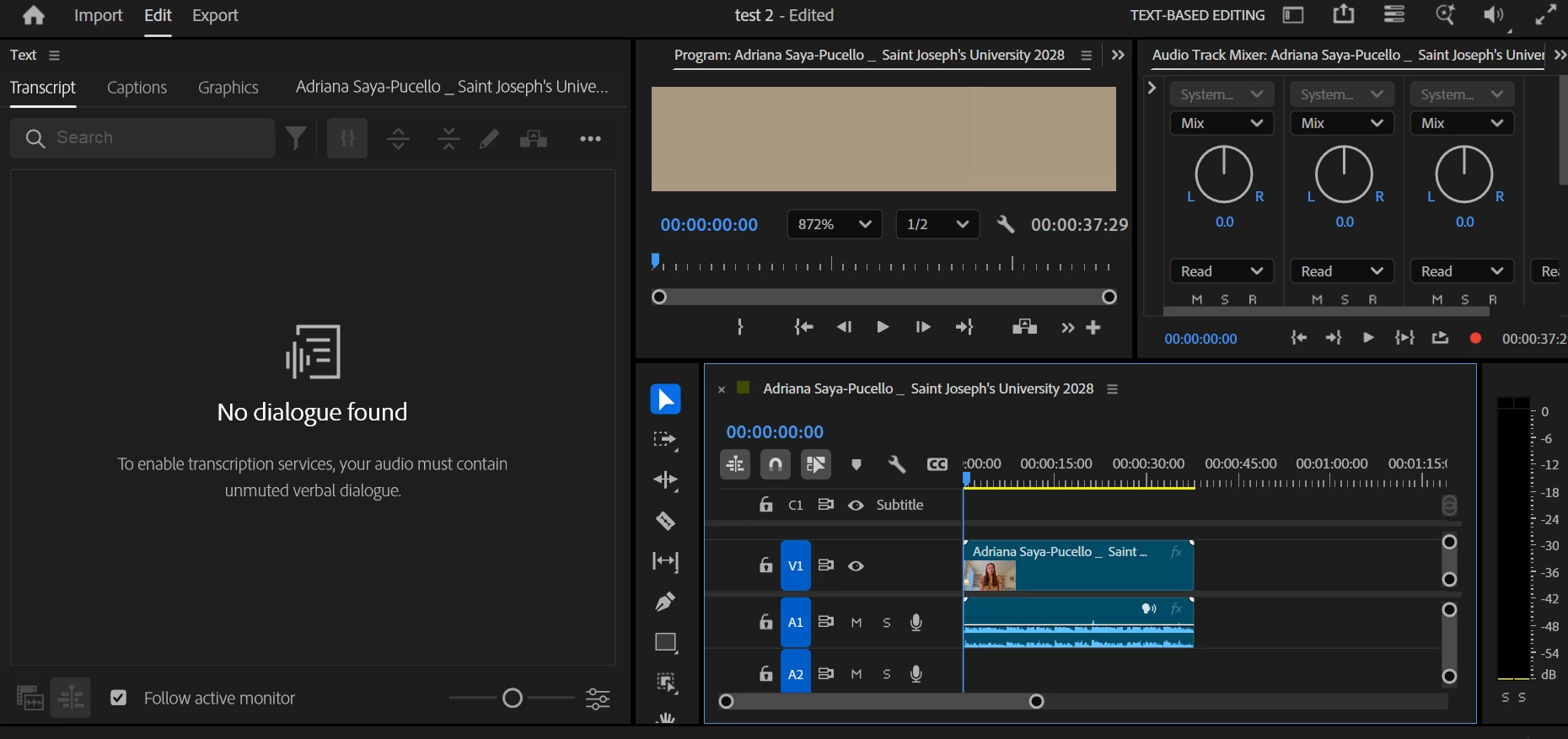
Transcribing sequence is not working. Video has audio, but it says no dialogue found.
  • June 24, 2026
  • 4 replies
  • 21 views

As seen above, the video has audio, but no dialogue can be found so no captions can be made. I’ve tried to do this with three separate videos of people speaking and putting them into new sequences as well, but they all say that the audio has no dialogue. I’ve tried logging in and logging out, and clearing my media cache. My Premiere Pro is up to date.

    4 replies

    KatieToo
    Community Manager
    Community Manager
    June 29, 2026

    @amaluo ​@MarekMularczyk Quick question (along with screen recording visual if helpful): When you have the source file that needs to be transcribed loaded, is there an option to "Transcribe Clip" within the 3 dot dropdown menu while in the text panel?


    MarekMularczyk
    Community Expert
    Community Expert
    June 28, 2026

    I’m having the same problem (and many others), there’s a glitch in latest versions of Premiere (26.1, 26.2) where it doesn’t work anymore and shows the same error message to many of us. The only way to make it work is to uninstall the current version and go back to 26.0 or 25

    Adobe Community ExpertAdobe Certified Professional
    KatieToo
    Community Manager
    Community Manager
    June 29, 2026

    @MarekMularczyk Are you experiencing this in the recent v26.3, as well? Curious if we can get more info from our How do I write a bug report? like computer specs, footage details, premiere version & build, driver if on Windows, etc.

    Would be most appreciated!
    Katie

    Stan Jones
    Community Expert
    Community Expert
    June 25, 2026

    @amaluo,

    What specific version of PR are you running? Are you using Intel graphics by any chance?


    There was a fix in the newly released 26.3 for a problem described as “Transcribing on Windows machines with Intel Arc GPU could fail.” Several users appeared to have confirmed that this was a primary cause for transcribing starting and then ending with “No Dialogue Found” primarily in versions 26.0.2 through 26.2.2. Roll back to 26.0.1 worked for several users who tried that. 


    Stan


    KatieToo
    Community Manager
    Community Manager
    June 24, 2026

    Hi ​@amaluo 

    Welcome to the Premiere forums! Glad you’re here, and thank you for including some details about your transcription issue along with the helpful screenshot. It would help us if you could use the link here, How to Report a Problem, which has steps to provide more information that can help us better identify the issue like your setup and what version/build of Premiere, etc.

    To note, some users have reported that rolling back to an earlier version like v26.0 helped with this.

    Sorry for your frustration and hope to help!
    Katie