


Participant
March 17, 2023
Open for Voting

allow creating custom font policy to activate fonts from adobe font library for users

  • March 17, 2023
  • 4 replies
  • 192 views


i would like to be able to create a custom font policy to pre-activate some fonts found in the Adobe Font Library so users dont need to do it themselves

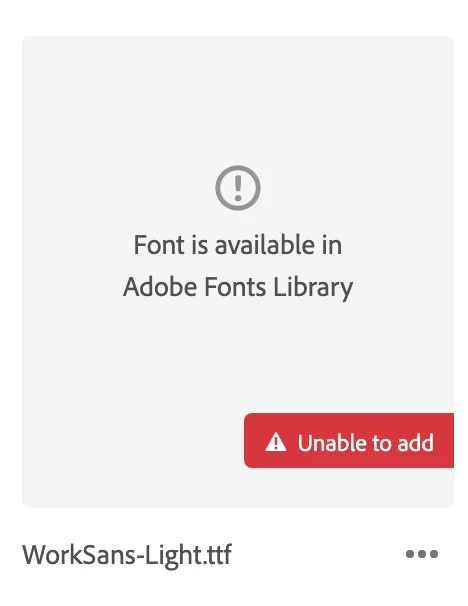
currently the custom fonts tool wants font files uploaded, and it is smart enough to know when an uploaded file already exists in the regular adobe font library. it doesnt seem to know how to select an existing font already in the adobe font library

oddly enough even though the custom font dashboard says "unable to add" you CAN build a policy to deploy these fonts as custom fonts and the uploaded fonts still seem to be in the list (along with the error messages)

it does seem that when you deploy them this way they show up on end users as "custom fonts" which they really aren't vs being listed in the regular activated fonts area

seems like there is need to create a cleaner way to set a policy to pre-activate fonts from the adobe fonts library on behalf of users so they dont individually need to to so

4 replies

kglad
Community Expert
Community Expert
April 30, 2024

ok

Participant
April 30, 2024

The issue is with Creative Cloud and the admin setting up access to fonts for a group.  Yes, it's related to fonts, but not specifically an issue with the fonts themselves.  We need help with how a CC admin can set it up correctly.  The help guides are limited and don't cover making Adobe fonts available to the group.  Currently, users have to use a web page we set up to guide them to the correct fonts (that we use).  Then there is not a way for them to access custom or third party fonts in CC even though the guides say we can.  Either it's broken or we are doing something wrong.  There is no help other that this forum. 

kglad
Community Expert
Community Expert
April 30, 2024

unless you're convinced there's no work-around, consider posting in the adobe fonts forum.

Participant
April 30, 2024

I have the same question.  No response from anyone in over a year?  Maybe Adobe doesn't care about this one?