


Inspiring
September 25, 2011
Open for Voting

P: Allow use of Drive Letters A: and B:

  • September 25, 2011
  • 72 replies
  • 4752 views

In the import dialogue in Lightroom 3 on Windows the drive letters A: and B: does not show up. I have A: assigned to an HDD and B: assigned to an SSD where I like to save my DNG files. (It was a VERY long time ago since those drive letters were reserved for floppy drives).
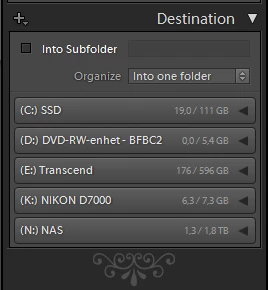


My suggestion is to make all drive letters assigned to an attached storage device visible as a destination in the import dialogue.

72 replies

Participant
July 7, 2022

Hi, I mounted a network share to drive letter B:\ (maybe not a good idea) -> However, within LR-Classic the drive was not shown as a possible target within the Import-Diaolog. The problem was fixed by assigning another drive letter above C:\ (e.g. O:\).


Legend
July 7, 2022

This is a known problem with drive letters A: and B:

johnrellis
Legend
July 8, 2022

It's a bug present from LR 1 that Adobe will almost certainly never fix:

https://community.adobe.com/t5/lightroom-classic-ideas/p-allow-use-of-drive-letters-a-and-b/idc-p/12906312/


But there are easy ways to specify the A and B drives as the source and target in Import:

https://community.adobe.com/t5/lightroom-classic-ideas/p-allow-use-of-drive-letters-a-and-b/idc-p/12906312/page/3#M15247

johnrellis
Legend
May 10, 2022

Moderators, @Rikk Flohr: Photography, please replace the second correct answer above:

https://community.adobe.com/t5/lightroom-classic-ideas/p-allow-use-of-drive-letters-a-and-b/idc-p/12262789#M4519


with this post, which is a much easier, more convenient solution for choosing an A or B drive as the Import destination:

https://community.adobe.com/t5/lightroom-classic-ideas/p-allow-use-of-drive-letters-a-and-b/idc-p/12906312/page/3#M15247


Then the two correct answers will provide simple and easy solutions for using an A or B drive for both the Import source and Import destinations:

https://community.adobe.com/t5/lightroom-classic-ideas/p-allow-use-of-drive-letters-a-and-b/idi-p/12249562/page/2#comments

https://community.adobe.com/t5/lightroom-classic-ideas/p-allow-use-of-drive-letters-a-and-b/idc-p/12906312#M15247

Participant
May 10, 2022

I added a new hard disk(A:) to my laptop mainboard to increase storage and improve performance. However, the lightroom class cannot recognize the new disk nor the holders within it. How can I add this new disk?

Legend
May 10, 2022

Old bug/feature, which probably has never been fixed and never will be fixed. Lightroom Classic will not any drive with letter A:, and so drive A: can't be used with Lightroom Classic.

johnrellis
Legend
May 10, 2022

See this post for how to import from an A or B drive:

https://community.adobe.com/t5/lightroom-classic-ideas/p-allow-use-of-drive-letters-a-and-b/idi-p/12249562/page/2#comments


See this post for how to choose an A or B drive as the import destination:

https://community.adobe.com/t5/lightroom-classic-ideas/p-allow-use-of-drive-letters-a-and-b/idc-p/12906312#M15247 


I agree with dj_paige that Adobe will likely never fix the problem.

johnrellis
Legend
April 27, 2022

"In Lr 1.x - Windows XP was still a valid OS... it would have broken things big time..."


Windows XP. the successor to Windows NT, provided the Win32 API, which has always allowed apps to query device properties. That would have allowed LR 1 to identify which drives were unsuitable (e.g. floppies) without making assumptions about the drive letter.  (After all, you could have a floppy assigned to D:)

Rikk Flohr_Photography
Community Manager
Community Manager
April 26, 2022

"Agreed, Adobe should have fixed this back in LR 1. "


In Lr 1.x - Windows XP was still a valid OS... it would have broken things big time...


Rikk Flohr: Adobe Photography Org
johnrellis
Legend
April 26, 2022

[This post contains formatting and embedded images that don't appear in email. View the post in your Web browser.]


Agreed, Adobe should have fixed this back in LR 1. 


As a workaround, click the To dropdown in the upper-right corner of the Import window, then Other Destination, and navigate to the parent folder on A: where you want imports to go:


Participating Frequently
April 24, 2022

This is super frustrating, my main and only built in hard drive is drive A, all the other letters are for external drives, raid arrays and so on. I just want to import to my local drive A which is also where ~150000 files in my local catalog are stored. You would think that Lightroom could deduce that with that many images on the drive, it's not a floppy. Never mind which there are APIs to see what type of device it is. No excuses Adobe, floppy disks aren't even manufactured any more. This is in  LR Classic 11.3.1.

johnrellis
Legend
March 10, 2022

32- and 64-bit versions of Windows haven't reserved A: and B: for floppies for at least the past two decades (perhaps ever), though it would assign those letters by default if a floppy was present.  Win32 (starting with Windows 95) provides API calls for enumerating connected volumes and discovering their type. It's purely an Adobe programming error that LR assumes A and B are floppy drives (a programming error that was more common 15 years ago).


There used to be a Microsoft support article explaining this (linked above), but it's long gone, as are the threads in various forums discussing it -- I can find just one, from 2015.


The disastrous redesign of the Import window in LR 6.2.1 removed this programming error, and for a brief glorious moment in time, LR treated drives assigned A or B just like those assigned any other letter.


The File > Add Photos command of Lightroom Desktop (Cloudy) does it correctly:


Here's what Windows 10 shows for a USB drive assigned A:


Participant
March 9, 2022

Light room does not allow importing from my memory cards onto either of my SSDs labeled A: and B:.


There are several discussions stating that this is due to legacy reasons (those drive letters being reserved for floppy drives) but that restriction is over two decades old. Stating that they won't bother to fix it is giving them a bad(worse) reputation that they only care about cloud customers. The effort to remove that restriction is minimal and would make the product more robust. Also, having customers relabel their drives just to fix their broken product is not a sufficient resolution either.

JP Hess
Inspiring
March 9, 2022

I don't believe that is an anomaly attributed to the Adobe software but rather one that is attributed to the operating system and is therefore not something that can be controlled.

Participating Frequently
February 22, 2022

It is completely insane that we still can't use the A and B designators. But thanks JohnRellis for the idea to add a mount point. That is a clean solution.