Participant
May 20, 2025
Answered

Adobe Acrobat Reader mobile Andriod App not connecting to OneDrive business account

  • May 20, 2025
  • 1 reply
  • 459 views

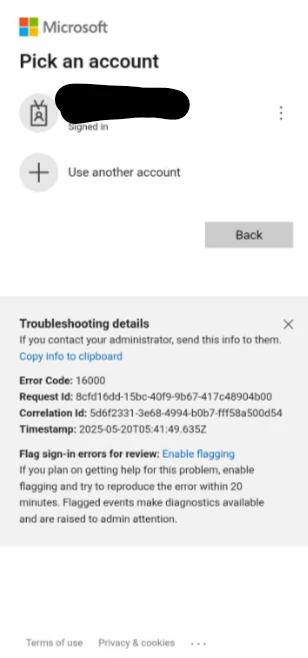
I have Adobe Acrobat Reader on my Android cellphone (with the newest Andriod version) and on my iPad. I can easily connect to my OneDrive Account on the iPad app, but I keep on getting these messages when trying to connect the Andriod App to my OneDrive. I have tried on more than one Andriod device, but the problem is the same (both Samsung phones). I have also contacted out IT department. 
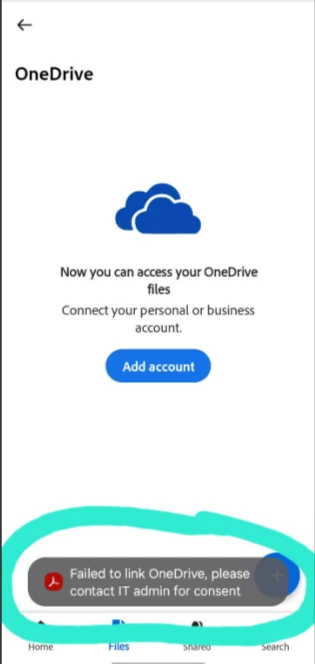
Can someone please give me an answer or guidance on how to solve this, please? 


Thank you.

 

Correct answer S_S

Hi @hd_user,


Hope you are doing well. Sorry for the trouble with connecting OneDrive to Acrobat.


Would you mind trying out the steps here: 

1. Open Google Play Store;

2. Search for "Intunes Company Portal";

3. Install the app;

4. Launch it once (no need to log in);

5. Try logging in to OneDrive on Acrobat again;


If the steps do not work, you can share the given link to your IT team and ask them to check the deployment steps for OneDrive to your account: https://adobe.ly/4jaz78c.


Hope this helps.


Regards,
Souvik.

1 reply

S_S
Community Manager
S_SCommunity ManagerCorrect answer
Community Manager
May 20, 2025

Hi @hd_user,


Hope you are doing well. Sorry for the trouble with connecting OneDrive to Acrobat.


Would you mind trying out the steps here: 

1. Open Google Play Store;

2. Search for "Intunes Company Portal";

3. Install the app;

4. Launch it once (no need to log in);

5. Try logging in to OneDrive on Acrobat again;


If the steps do not work, you can share the given link to your IT team and ask them to check the deployment steps for OneDrive to your account: https://adobe.ly/4jaz78c.


Hope this helps.


Regards,
Souvik.

hd_userAuthor
Participant
May 21, 2025

Hi @S. S ,


This worked! Thanks so much.