



Amitej S
Community Manager
Community Manager
April 19, 2024
Answered

Migrate my files to the new Adobe Express mobile app!

  • April 19, 2024
  • 37 replies
  • 12949 views

Hello, everyone!


With the new Adobe Express Mobile app launch, we'd like to help you migrate your projects.

File migration occurs at your discretion, allowing you to select the best moment to transfer your creations. This way, you can ensure that you have ample time to complete any pending tasks before transitioning everything to the new version.


Please refer to the diagram below to understand file migration on your mobile app:
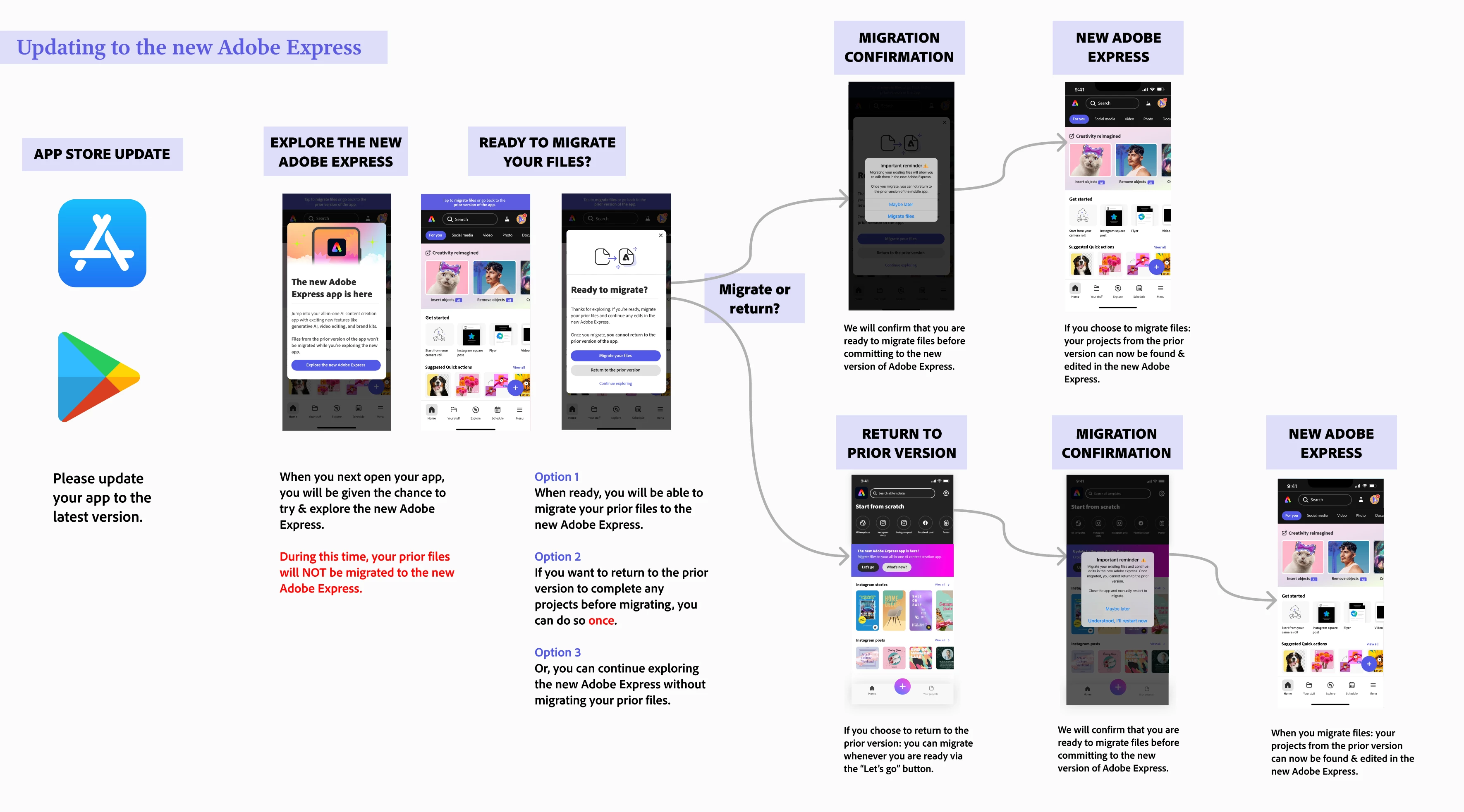
 

Note:

  • File migration generally takes 10 to 30 seconds, depending on the number of files you have.


To migrate files on your mobile app, please follow the diagram below. 
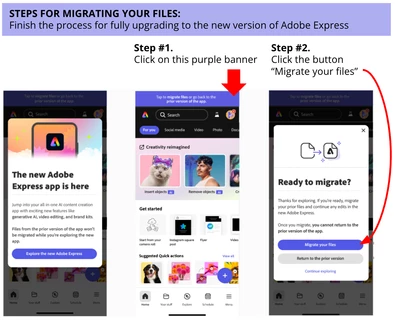


If you don't see your files after this, consider the following steps:

  • Restart your Adobe Express mobile app - sometimes a good refresh does the trick!
  • Check on desktop if you see any of your files on this link: https://express.adobe.com/sp/projects 
    • If you are redirected to https://new.express.adobe.com: then it means all your files were successfully migrated. Restart your mobile app and look for your files located in Your stuff
    • If you are not redirected: there is a button on the top right-hand corner called Move all folders and files where you can trigger file migration


If you have tried the steps above without success, please reach out and provide more details about your situation - attached screenshots/videos are always welcome too!


Learn more here: 


Correct answer Abhi.G @ ADBE

Hi @default36909725mhc83y 


Could you double-check the diagram posted by @Amitej S in the original post (https://community.adobe.com/t5/adobe-express-discussions/migrate-my-files-to-the-new-adobe-express-mobile-app/td-p/14571211)?

And these posts/resources also have some useful tips:

https://helpx.adobe.com/express/kb/migrate-files.html

https://community.adobe.com/t5/adobe-express-bugs/mobile-old-files-missing/idc-p/14568346#M15708


If you still can't trace your files, please let us know.


Thanks,

Abhi G


37 replies

Participant
May 9, 2024
I lost all my files. Very upset I had so many things I used.
Participant
May 9, 2024
Some of my files have been erased since the update
Participant
May 9, 2024
After clicking to upload my saved designs to the new version all of the most recent designs have disappeared! I am now starting from scratch I might as well use a different app as I am not finding the new version very easy to use
Participant
May 8, 2024

Tried this, and it has been unsuccessful at recovering my files. I also haven't been able to get in touch with support. It seems like I only have access to older versions of my files and not the most current saved versions.

Participant
May 7, 2024

Las imágenes que tenía en la versión anterior, no se migraron todas, me hicieron falta muchísimas más, ¿Cómo las puedo recuperar? O como puedo regresar a la versión anterior de adobe expréss?

Participant
May 5, 2024
Change my adobe back to the older version thank you.
Participant
May 2, 2024
Hallo, Wie kann es sein, dass all meine bisherigen Dateien verloren sind und nicht mehr angezeigt werden? Ich hatte die Premium Version, welche ich auch genutzt hatte. Jetzt ist jedoch alles weg, was für ich sehr sehr schlecht ist. Ich öffne die Browser App ca. eine Woche nicht und jetzt nach erneuter Anmeldung fehlt alles. Ich benötige diese Daten dringend wieder zurück! Ich bitte um schnelle Hilfe!
Participant
May 2, 2024
Estou tendo muitos problemas com o aplicativo novo e queria usar o antigo
Participant
May 1, 2024
Não consigo migrar os arquivos da versão anterior. Diz que é pra clicar no banner acima. Só que esse banner não aparece.
Participant
April 29, 2024
2 years worth of cards is gone. It transferred over when the new app 1st loaded, but today it's all gone. This will be catastrophic for me if we can't get them back. I need them all ASAP
Participant
April 30, 2024

Hej Kevin, I have a complain.

recently I was asked on my Mobil Device to update Adobe Express to the newest version available. After I did I lost my files on my Tablet Device. I tried to sync the devices but no luck. Is there any way to retrieve my files? I depend on my files much as I need them for my academic work. Please get back asap.

Amitej S
Community Manager
Amitej SCommunity ManagerAuthor
Community Manager
May 2, 2024

Hey @Arooj33121756gvgu, As of now the new Adobe Express app is available on Android and iOS mobile devices only (iPad/Tablets are coming soon). So the sync of projects would be across the webapp and the mobile app. Can you log in via a browser on a desktop and check  if you see your projects there? Please ensure using the correct adoibe ID to login. 


Thanks,

Amitej