



Amitej S
Community Manager
Community Manager
April 19, 2024
Answered

Migrate my files to the new Adobe Express mobile app!

  • April 19, 2024
  • 37 replies
  • 12949 views

Hello, everyone!


With the new Adobe Express Mobile app launch, we'd like to help you migrate your projects.

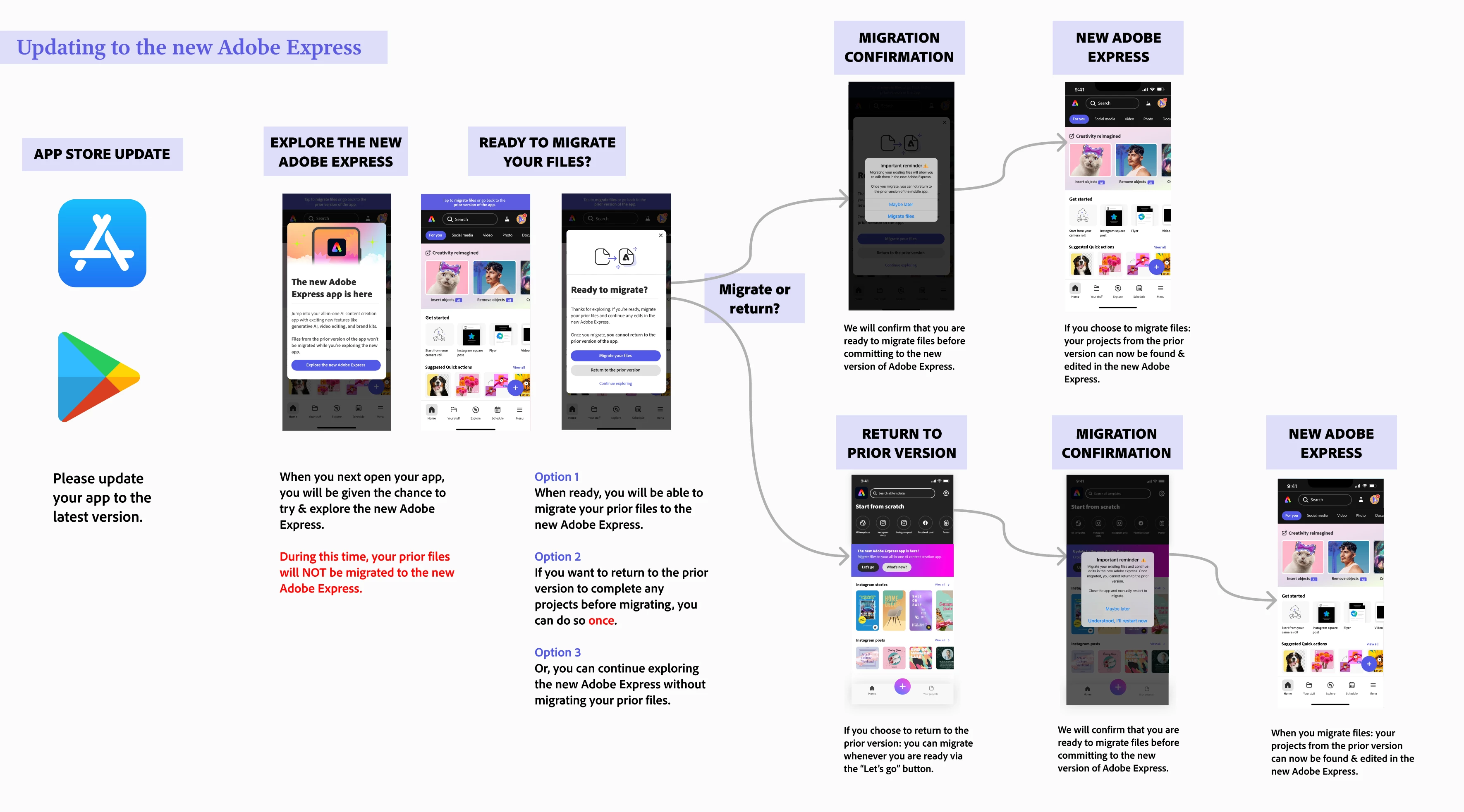
File migration occurs at your discretion, allowing you to select the best moment to transfer your creations. This way, you can ensure that you have ample time to complete any pending tasks before transitioning everything to the new version.


Please refer to the diagram below to understand file migration on your mobile app:
 

Note:

  • File migration generally takes 10 to 30 seconds, depending on the number of files you have.


To migrate files on your mobile app, please follow the diagram below. 
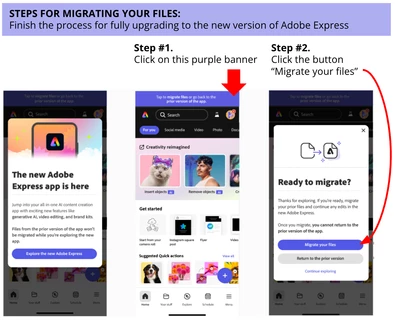


If you don't see your files after this, consider the following steps:

  • Restart your Adobe Express mobile app - sometimes a good refresh does the trick!
  • Check on desktop if you see any of your files on this link: https://express.adobe.com/sp/projects 
    • If you are redirected to https://new.express.adobe.com: then it means all your files were successfully migrated. Restart your mobile app and look for your files located in Your stuff
    • If you are not redirected: there is a button on the top right-hand corner called Move all folders and files where you can trigger file migration


If you have tried the steps above without success, please reach out and provide more details about your situation - attached screenshots/videos are always welcome too!


Learn more here: 


Correct answer Abhi.G @ ADBE

Hi @default36909725mhc83y 


Could you double-check the diagram posted by @Amitej S in the original post (https://community.adobe.com/t5/adobe-express-discussions/migrate-my-files-to-the-new-adobe-express-mobile-app/td-p/14571211)?

And these posts/resources also have some useful tips:

https://helpx.adobe.com/express/kb/migrate-files.html

https://community.adobe.com/t5/adobe-express-bugs/mobile-old-files-missing/idc-p/14568346#M15708


If you still can't trace your files, please let us know.


Thanks,

Abhi G


37 replies

Participant
October 1, 2025

Thanks for the clear steps! Just finished migrating my files—super smooth process. For anyone looking to explore creative tools beyond Adobe, I recently came across jenymod.com — worth checking out for some fun modded app options too!

Community Manager
October 1, 2025

Hi @sampaul953,


Great to hear that the migration went smoothly—glad the steps were helpful! We appreciate you sharing your experience and are happy you could transition your files without issues. Thanks for the feedback!


^MM

Participant
September 1, 2025

I don’t know how many years I’ve been asking for the ability to download my Sparks as PDFs—but now that it’s finally here, I can’t thank you enough! Before, I felt so trapped, stuck with the laborious task of copying and pasting while trying to preserve the paragraph breaks. You’ve hit it out of the park with this feature. THANK YOU! G ~

g~
Participant
August 23, 2025

Thanks for clarifying this, Amitej! Super helpful to know that the migration isn’t automatic and we can choose when to move our files. For anyone planning to switch, I’d suggest finishing up any ongoing edits first, then migrate so you don’t risk losing unsaved changes. Once moved, all your projects will be available in the new Adobe Express app, and you can continue working seamlessly.

Known Participant
February 7, 2025

Why do we have to migrate? Why can't the app just read them as they are. I'm terrified of this. I'm not up to possibility damaging 3000+ edits. 

Participant
July 2, 2024
Oggi ho aperto Adobe Express dal mio iPhone e mi chiedeva di passare alla nuova versione importando tutti i progetti presenti nella vecchia versione. Ho autorizzato il passaggio dei progetti dalla vecchia versione a quella nuova e alcuni sono andati persi e non li posso più recuperare
Lyn_D
Inspiring
July 16, 2024

@default383866468zrja2, I'm sorry you're having trouble. I've moved your post to this thread. Please follow the steps above: "If you don't see your files after this, consider the following steps."

^Lyn

Participant
June 22, 2024
Please return my old version.
Participant
June 18, 2024

Is there any way to go back to the old version. I can't do anything in the  new version! 

Participant
May 31, 2024
Se me han eliminado archivos y me gustaria recuperarlos
Participant
May 24, 2024

My files migrated just fine, but my notecards were changed from the portrait layout I used to squares. All of the card making features for which I originally bought the app are gone. Even trying to find where to create a card is very difficult. The templates I liked are gone. The ease of editing text is gone. I already canceled my subscription. Honestly, if I could get a refund that would be ideal. It seems to me that adobe express is now geared towards Instagram and other online content creations. There's a lot for videos,  too. Which I don't need.  The app is now useless to me as I was using it to create cards to print and sell. I know the younger generation does everything online, but at 60 I haven't fully made that transition and neither have millions of other "Seniors". We count, too. Shame on you, Adobe.

Participant
May 9, 2024
After the update i have loose my data and I can’t found like before