



Amitej S
Community Manager
Community Manager
April 19, 2024
Answered

Migrate my files to the new Adobe Express mobile app!

  • April 19, 2024
  • 37 replies
  • 12949 views

Hello, everyone!


With the new Adobe Express Mobile app launch, we'd like to help you migrate your projects.

File migration occurs at your discretion, allowing you to select the best moment to transfer your creations. This way, you can ensure that you have ample time to complete any pending tasks before transitioning everything to the new version.


Please refer to the diagram below to understand file migration on your mobile app:
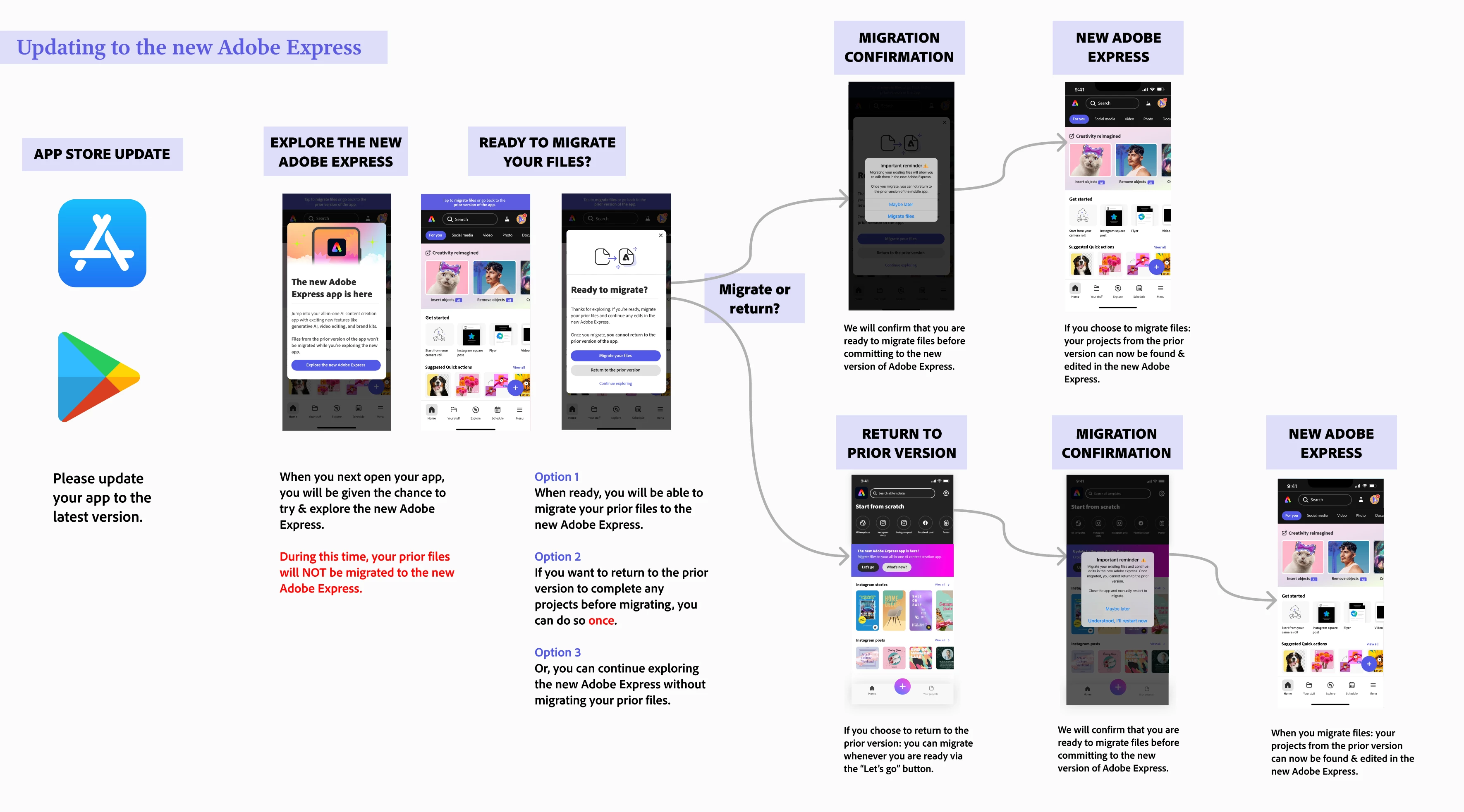
 

Note:

  • File migration generally takes 10 to 30 seconds, depending on the number of files you have.


To migrate files on your mobile app, please follow the diagram below. 
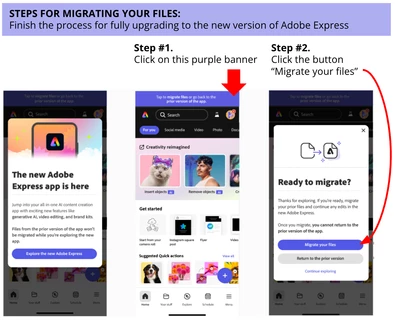


If you don't see your files after this, consider the following steps:

  • Restart your Adobe Express mobile app - sometimes a good refresh does the trick!
  • Check on desktop if you see any of your files on this link: https://express.adobe.com/sp/projects 
    • If you are redirected to https://new.express.adobe.com: then it means all your files were successfully migrated. Restart your mobile app and look for your files located in Your stuff
    • If you are not redirected: there is a button on the top right-hand corner called Move all folders and files where you can trigger file migration


If you have tried the steps above without success, please reach out and provide more details about your situation - attached screenshots/videos are always welcome too!


Learn more here: 


Correct answer Abhi.G @ ADBE

Hi @default36909725mhc83y 


Could you double-check the diagram posted by @Amitej S in the original post (https://community.adobe.com/t5/adobe-express-discussions/migrate-my-files-to-the-new-adobe-express-mobile-app/td-p/14571211)?

And these posts/resources also have some useful tips:

https://helpx.adobe.com/express/kb/migrate-files.html

https://community.adobe.com/t5/adobe-express-bugs/mobile-old-files-missing/idc-p/14568346#M15708


If you still can't trace your files, please let us know.


Thanks,

Abhi G


37 replies

Participant
April 29, 2024
I was working on my presentation paused for 1 day then went to keep on working on it and it was not there anymore. ALL MY WORK GOT DELETED
Neelamk
Legend
June 25, 2024

H @Jennifer37066041pwa0,


Apologies for the late response and also for the frustration & difficulties you faced with the new Adobe Express as you're having trouble finding your files. They should still be available in 'Your Stuff'.


Where did you make the project, the mobile version or the web version?


Please let me know if the below article helps you in any way:

https://adobe.ly/4cyfALP


Thank you,

Neelam

Participant
April 29, 2024
I can't find my files
ligab89347970
Participant
April 26, 2024
Hey, very important files are gone since the new upgrade! I have to have it back please.
Participant
April 26, 2024
Lost work back to original settings, can’t create
Participant
April 26, 2024
I worked hard on a few designs and now they’re not showing up. This happened after the new update…so inconvenient, and there’s no “Recently Deleted” section or a way to recover it.. please help, it’s my poster created for a huge event coming up.
Participant
April 26, 2024
Me apareció actualización y perdí todos mis archivos porque la migración no resulto
Participant
April 25, 2024
Olá. Com essa nova atualização, perdi meu acervo de criações no aplicativo ao longo desses anos, como menus, informativos, campanhas… como posso recuperar?
Neelamk
Legend
June 24, 2024

Hi @default36993032zfyh0j,


Could you please check the post below:

(https://adobe.ly/3RIVcjo...)?

And these posts/resources also have some useful tips:

https://adobe.ly/4cfQlOG

https://adobe.ly/4cfQmCe


If you still can't recover your files, please let us know.


Thanks,

Neelam


Participant
April 25, 2024
今天用未更新的app製作了一段時間後,想說很久沒更新,就更新了,結果剛剛製作的作品消失,也不知道怎麼辦,我的心血
Participant
April 25, 2024
Missing files from the past year, only happened when I updated
Adobe Employee
April 26, 2024

Hi @default36991233ov29gm ! Sorry to hear that you're having trouble finding your files. They should still be available in 'Your Stuff'.


Have you tried these troubleshooting steps here? https://helpx.adobe.com/express/kb/file-conversion-troubleshoot.html


You could try going on the desktop version and going to this URL to double check if that is easier: https://new.express.adobe.com/your-stuff/files 

Participant
April 25, 2024
How can I go back to the old app?? I’ve lost everything None of my projects allow me to work on them and the fonts I used before no longer exist so they look different now. I hate the new update it sucks how do I go back to the old version??