



Amitej S
Community Manager
Community Manager
April 19, 2024
Answered

Migrate my files to the new Adobe Express mobile app!

  • April 19, 2024
  • 37 replies
  • 12949 views

Hello, everyone!


With the new Adobe Express Mobile app launch, we'd like to help you migrate your projects.

File migration occurs at your discretion, allowing you to select the best moment to transfer your creations. This way, you can ensure that you have ample time to complete any pending tasks before transitioning everything to the new version.


Please refer to the diagram below to understand file migration on your mobile app:
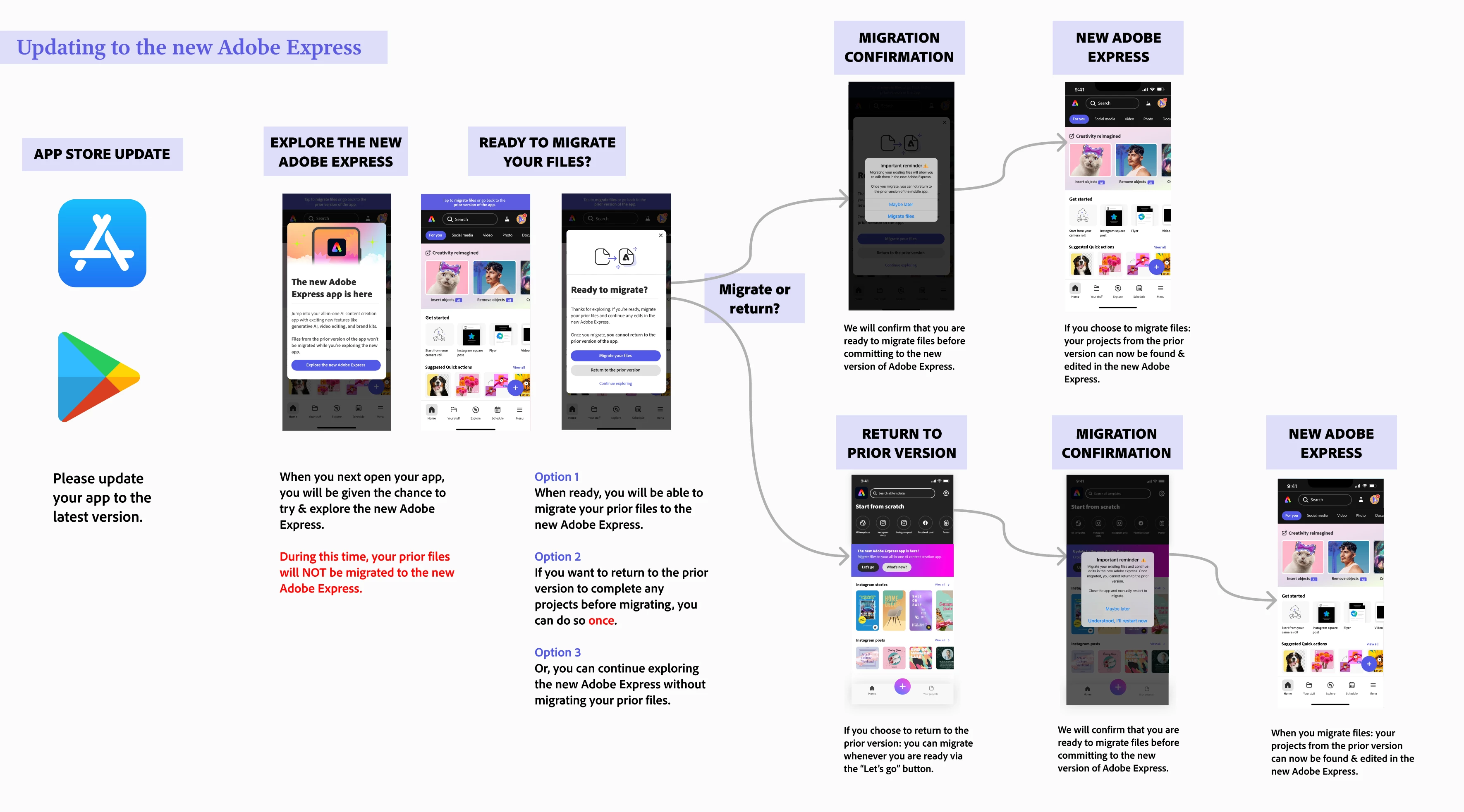
 

Note:

  • File migration generally takes 10 to 30 seconds, depending on the number of files you have.


To migrate files on your mobile app, please follow the diagram below. 
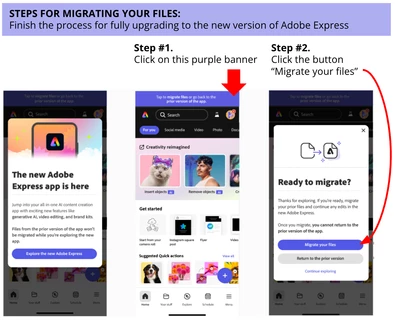


If you don't see your files after this, consider the following steps:

  • Restart your Adobe Express mobile app - sometimes a good refresh does the trick!
  • Check on desktop if you see any of your files on this link: https://express.adobe.com/sp/projects 
    • If you are redirected to https://new.express.adobe.com: then it means all your files were successfully migrated. Restart your mobile app and look for your files located in Your stuff
    • If you are not redirected: there is a button on the top right-hand corner called Move all folders and files where you can trigger file migration


If you have tried the steps above without success, please reach out and provide more details about your situation - attached screenshots/videos are always welcome too!


Learn more here: 


Correct answer Abhi.G @ ADBE

Hi @default36909725mhc83y 


Could you double-check the diagram posted by @Amitej S in the original post (https://community.adobe.com/t5/adobe-express-discussions/migrate-my-files-to-the-new-adobe-express-mobile-app/td-p/14571211)?

And these posts/resources also have some useful tips:

https://helpx.adobe.com/express/kb/migrate-files.html

https://community.adobe.com/t5/adobe-express-bugs/mobile-old-files-missing/idc-p/14568346#M15708


If you still can't trace your files, please let us know.


Thanks,

Abhi G


37 replies

Participant
April 25, 2024
Necesito volver a el formato movil no web, mis archivos antiguos no aparecen y retocar es mas lento
Participant
April 24, 2024
以前作ったデータを見つけられません。
Community Manager
April 25, 2024

@default36970454yk6se0


ご報告ありがとうございます。ご不便をおかけし申し訳ございません。

以下の投稿を参考にしていただけると幸いです。

※投稿内容は英語ですが、投稿したの「Translation」をクリックしていただくと日本語でご確認いただけます。

https://community.adobe.com/t5/adobe-express-discussions/migrate-my-files-to-the-new-adobe-express-m...


その他の詳細については以下のページもご参照ください。

https://helpx.adobe.com/jp/express/kb/file-conversion-troubleshoot.html

https://helpx.adobe.com/jp/express/using/new-express-mobile.html#basics


どうぞよろしくお願いいたします。

Participant
April 24, 2024
I do not see my recent files after this new version
Amitej S
Community Manager
Amitej SCommunity ManagerAuthor
Community Manager
April 25, 2024

Hey @default36967857og7zri, Please follow the steps provided in the above post to migrate to the new Express app, and let us know if it helps! 

Participant
May 3, 2024
hola yo tengo utilizando esta app desde hace algunos años, y eh venido acumulando diseños desde entonces, pero ahora que actualice a la nueva versión, los he perdido prácticamente todos y no se que hacer para recuperarlos, por favor darme una mano con este tema, de ante mano muchas gracias
Participant
April 22, 2024
I switched to the updated Express and all of my 500 files are GONE!
Abhi.G @ ADBECorrect answer
Adobe Employee
April 23, 2024

Hi @default36909725mhc83y 


Could you double-check the diagram posted by @Amitej S in the original post (https://community.adobe.com/t5/adobe-express-discussions/migrate-my-files-to-the-new-adobe-express-mobile-app/td-p/14571211)?

And these posts/resources also have some useful tips:

https://helpx.adobe.com/express/kb/migrate-files.html

https://community.adobe.com/t5/adobe-express-bugs/mobile-old-files-missing/idc-p/14568346#M15708


If you still can't trace your files, please let us know.


Thanks,

Abhi G


Participating Frequently
May 9, 2024
Hi Abhi!

I have attached a capture regarding our phone conversation yesterday. I was
able to find my old files under the older version but I cannot make changes
to them, nor can I save them, nor can I forward them. All I can do is look
at them. This issue all started when I updated to the new Adobe Express and
tried to migrate my old files. I wish I just had the old version back and
all my files. I've had the old version for 3 years and have a 1,000 or more
assets. I hope this gets fixed soon.

Thank you!

Nancy Creason
preacherlady5239@gmail.com
Participant
April 22, 2024

File migration does not work on mobile. There is an error any time I try to access old files through the app. I cannot edit anything I was previously working with. I can only download it to my phone. 

Adobe Employee
April 22, 2024

Hi @Jessi36903268llxa 


Sorry to hear you are running into this issue. Could you please include a screenshot of the errro?


Abhi G

Participant
April 24, 2024

Alte Inhalte wurden alle mit dem Update entfernt

Participant
April 20, 2024

Yes,. I can only see 5 old files. All of my recent files are missing and I cannot afford to lose them as they are my original files.

Amitej S
Community Manager
Amitej SCommunity ManagerAuthor
Community Manager
May 3, 2024

Hey @Gracie36001390ggiw, Please refer to this community post: https://adobe.ly/44ygrcU and let us know if it works for you.


Amitej

emilieb30858431
Participant
April 19, 2024

Help! I’m trying to convert files to the new app and it keeps saying there’s an error. For every single one.

David__B
Adobe Employee
Adobe Employee
April 19, 2024

Hi @emilieb30858431 


Sorry to hear about your difficulties. Would it be possible to share a screen shot of the error? Does restarting your mobile device make any difference or signing out and back into the app?


Thanks,
Dave