
Participant
June 15, 2020
Question

Date Stamp & Time Missing

  • June 15, 2020
  • 2 replies
  • 2551 views

Hi

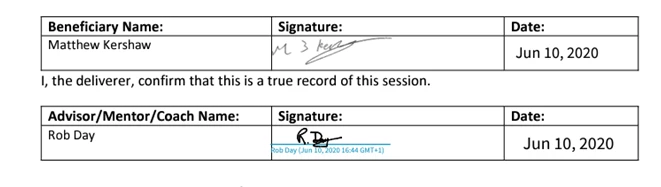
I have been sending documents for signature and they have been coming back fine.  Signed with date stamp and time.  However, on the odd ocassion, they come back with the signature only.  The Audit Report clearly shows the date stamp and time.
Please help.  Need this information for the Complicance Team.


Please see example below.


Thank you


2 replies

Participant
November 14, 2024

I'm having the same issue. Any resolution? 

Meenakshi Negi
Community Manager
Community Manager
February 20, 2025

Hi default67mossvoazhl,


Thank you for reaching out, and sorry about the delay in response.


Please let us know if this happens on the document you send for signature or the document you are signing.

It depends on the sender's settings and how the signature is required. More information would be helpful to investigate this behavior further. 


You may also refer to the information in the following help document: 

https://adobe.ly/41kTCcG

https://adobe.ly/4k3vy5n


Thanks,

Meenakshi

Participant
January 12, 2022

I have the same issue was this resolved? 

Meenakshi Negi
Community Manager
Community Manager
January 12, 2022

Hi Phil,


Thank you for reaching out and sorry about the trouble.


Could you please confirm if it happens with some documents with all?

If this is the case with all documents, then you might need to check your Signature preferences under the Account settings.

Ensure that the box for "User well-formatted signatures and initials" is marked. Check the screenshot below:


Let us know if you are referring to something else.


Thanks,

Meenakshi

Participant
January 13, 2022

Hi there, its never been their for me but it has for my colleagues. I can se no way to set it up. Phil