March 6, 2019
Answered

How get a transient document id from a new agreement based on a document library template via API?

  • March 6, 2019
  • 1 reply
  • 6947 views

Hi folks,

is it possible to pre-set / edit input field values of a agreement that is based on a document library template using the REST API?

My workflow could be like:

1. I create a document template with custom input fields (e.g. first name)

2. My own client calls the API method to create an agreement based on this template

3. My own client calls another API to prefill the first name input value

4. The agreement will be sent to the recipients.

For my understanding, the 3. point is only possible if I have a transient id which I only get if I upload a pdf file.

Is there anyway to achieve such a workflow that I described above?

Thanks for any helpful tip!

Kinds regards, Tobi
This topic has been closed for replies.
Correct answer ScottCarter

Hi Tobi!

You are close, the value you would use is "libraryDocumentId"

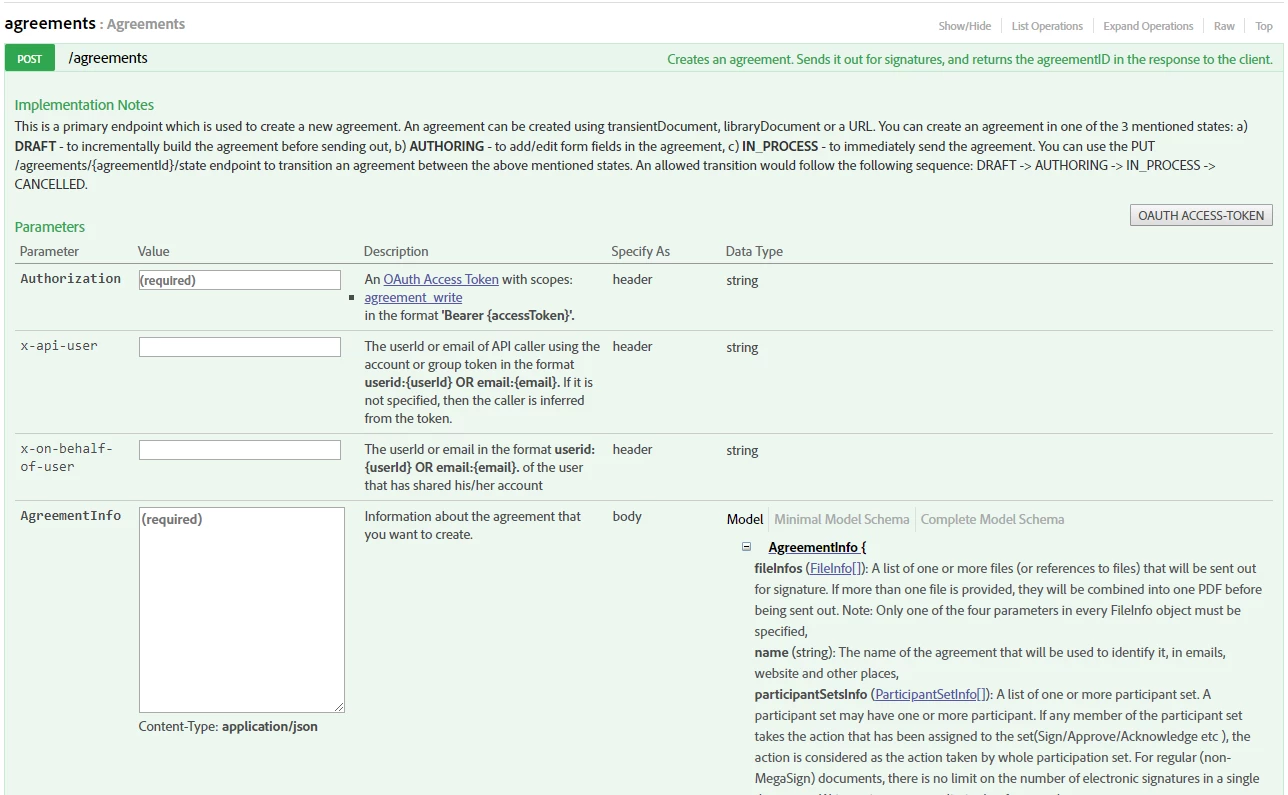
In the API documentation (in the application) you can explore all of the possible values by expanding the AgreementInfo object, and then clicking the links to the discrete sections (Sorry for the giant image, but in the interests of clarity, I thought this would be helpful)

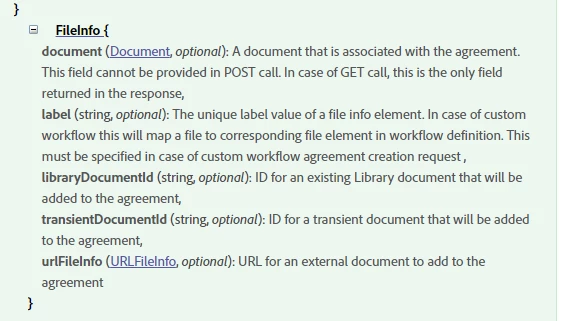
Then, within the subsection (FileInfo in this case), you will see all of the possible (optional) options for that element of the call:

FileInfo allows five different (all optional) methods to provide your document. Where some kind of doucment is required, how you deliver that document to the system is left pretty open.

In your specific example, you describe building a template (I assume in the Adobe Sign library), and that would require libraryDocumentId.

While you are getting familiar with the Adobe Sign objects and options, I would be careful of clicking the Minimal Model Schema link in the in-app documentation. That will produce an example schema, but omits the bulk of the options.

Look at the Complete Model Schema for now while you are ramping up.  It will present you with all of the options, and you can pretty easily delete the parts you don't want to use to get to your refined call.

Hope this helps!

-Scott

1 reply

Community Manager
March 6, 2019

Greetings!

If you have created a library template, then you want to call the library template ID, which would not be a transient ID.

The easiest way to get your template IDs would be to use Get /libraryDocuments

In the API documentation you can expose the template IDs readily by

  • Open the method Get /libraryDocuments
  • Click OAUTH ACCESS-TOKEN
  • Check the library_read:self scope
  • Click Authorize
  • Accept the oauth access request
  • Click Try it out!

find_librarydocid-w9oct2018

In the response body, you will get a listing of all your library templates, complete with the ID:

March 7, 2019

Hi ScottCarter​,

thanks for your fast reply! Great!

I'm very new to this. That's why my follow up question for clarification:

Does your answer mean, that I could use the following API example call (How to send an agreement with merge fields using API | Adobe Sign ) but instead of

"fileInfos": [

          {

              "transientDocumentId": "3AAABLxxx

          }

      ],

I would use ...

"fileInfos": [

          {

              "templateDocumentId": "<documentID>"

          }

      ],

.. to prefill my custom input fields in this template?

Thanks for your great work!

Kinds regards,

- Tobi

ScottCarterCommunity ManagerCorrect answer
Community Manager
March 7, 2019

Hi Tobi!

You are close, the value you would use is "libraryDocumentId"

In the API documentation (in the application) you can explore all of the possible values by expanding the AgreementInfo object, and then clicking the links to the discrete sections (Sorry for the giant image, but in the interests of clarity, I thought this would be helpful)

Then, within the subsection (FileInfo in this case), you will see all of the possible (optional) options for that element of the call:

FileInfo allows five different (all optional) methods to provide your document. Where some kind of doucment is required, how you deliver that document to the system is left pretty open.

In your specific example, you describe building a template (I assume in the Adobe Sign library), and that would require libraryDocumentId.

While you are getting familiar with the Adobe Sign objects and options, I would be careful of clicking the Minimal Model Schema link in the in-app documentation. That will produce an example schema, but omits the bulk of the options.

Look at the Complete Model Schema for now while you are ramping up.  It will present you with all of the options, and you can pretty easily delete the parts you don't want to use to get to your refined call.

Hope this helps!

-Scott