Participating Frequently
March 23, 2018
Answered

Requiring minimum and maximum digits

  • March 23, 2018
  • 1 reply
  • 1093 views

I am putting together a Direct Deposit form for a new hire. I have figured out how to require the signer to enter digits and I put a maximum # of digits allowed. How can I require a minimum amount of digits?

This topic has been closed for replies.
Correct answer ScottCarter

Greetings!

Currently, there is no directive in field validation that limits the minimum number of digits like the maxlen directive does.

For Enterprise users, the best alternative is to use a regular expression.  Below is an example showing where the validation is, and how to expose/configure it.
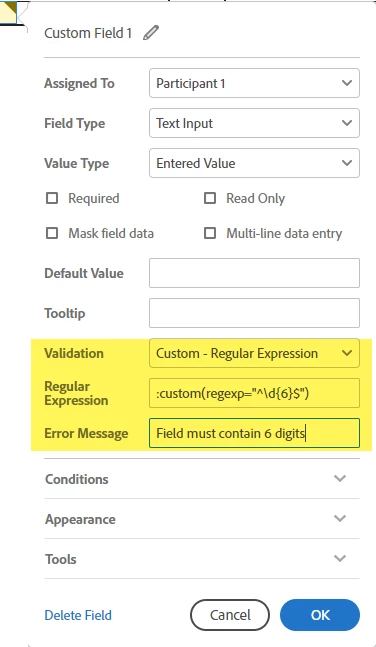
The actual regular expression will depend on how many characters you want to allow.

If you want to allow 4 digits, the expression would be:

^\d{4}$

The text tag directive would be:

:custom(regexp="^\d{4}$")

Quick breakdown:

^ - Identifies the beginning of the validation string. Prevents additional characters before the validation

\d - Identifies "digits" as acceptable characters in the validation

{4} - Indicates that four characters are expected. no more, no less

$ - Indicates the end of the string. Prevents additional characters after the validated string.

If you need a range, the expression can become complex (and confusing if you aren't accustomed to it).

If you can provide me with the constraints of your field, I'll try to work out what that expression would be.


1 reply

ScottCarterCommunity ManagerCorrect answer
Community Manager
March 23, 2018

Greetings!

Currently, there is no directive in field validation that limits the minimum number of digits like the maxlen directive does.

For Enterprise users, the best alternative is to use a regular expression.  Below is an example showing where the validation is, and how to expose/configure it.

The actual regular expression will depend on how many characters you want to allow.

If you want to allow 4 digits, the expression would be:

^\d{4}$

The text tag directive would be:

:custom(regexp="^\d{4}$")

Quick breakdown:

^ - Identifies the beginning of the validation string. Prevents additional characters before the validation

\d - Identifies "digits" as acceptable characters in the validation

{4} - Indicates that four characters are expected. no more, no less

$ - Indicates the end of the string. Prevents additional characters after the validated string.

If you need a range, the expression can become complex (and confusing if you aren't accustomed to it).

If you can provide me with the constraints of your field, I'll try to work out what that expression would be.
