

Participating Frequently
May 14, 2025
Answered

Quality issue

  • May 14, 2025
  • 5 replies
  • 2534 views

 Hello! Today, we are introducing Customize, an Adobe Stock feature that enables customers to search and discover unique, high-quality content and the...how can Quality issue 

Correct answer Abambo

Sir, could you kindly inform me if I have any other issues, and advise me on how I may resolve them?"


Not sharp:

Besides aliasing issues!


Your orange juice is too small to submit and has no colour profile embedded. It should be sRGB.


Street food: the asset is not sharp and your upscaling operation introduced artefacts:
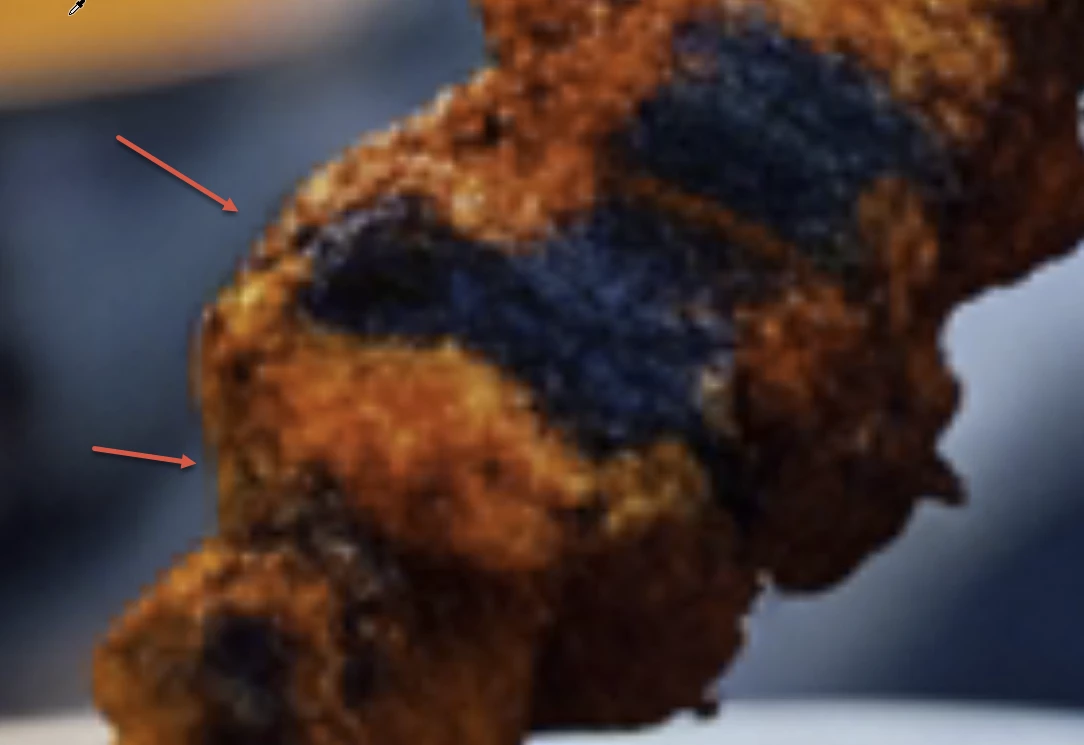
It looks to me that the upscale operation just consisted in duplicating pixels, creating these squares. It may also be that the upscale operation got interrupted after the very first pass of upscaling.


5 replies

Nancy OShea
Adobe Expert
May 25, 2025

Just curious which generative AI service are you using?

And which upscaler?


Everything looks synthetic and blurry. Not very appetizing.


Stock customers expect commercial quality assets for use in print, digital and merchandise.  The quality represented above won't reproduce well in professional projects.

Hope that helps.


Nancy O'Shea— Product User, Community Expert & Moderator
Jill_C
Adobe Expert
May 14, 2025

Leonardo_Phoenix_10_A_freshly_baked_Italianstyle_pizza_on_a_ru_0(1)_copy_8000x8000_1.jpg - this doesn't look like a real pizza at all, particularly the crust which is white. The smoke is also odd.

Jill C., Forum Volunteer
yamato713108855
Adobe Expert
May 14, 2025

The original image has been enlarged too much, making it blurry.
Please review the steps for creating the image.
You will need to enlarge the image to 100% on a PC screen and check it.


Participating Frequently
May 14, 2025

Sir, could you kindly inform me if I have any other issues, and advise me on how I may resolve them?"

yamato713108855
Adobe Expert
May 14, 2025

Zoom in to 100% and see for yourself👀
The quality has not improved.

daniellei4510
Adobe Expert
May 14, 2025

Same here.


Adobe Community Expert | If you can't fix it, hide it; if you can't hide it, delete it.
daniellei4510
Adobe Expert
May 14, 2025

Confused. What is your question exactly?

Adobe Community Expert | If you can't fix it, hide it; if you can't hide it, delete it.
Participating Frequently
May 14, 2025
Could you please help me understand what the issue is with my image? It
keeps getting flagged for quality problems."
daniellei4510
Adobe Expert
May 14, 2025

At 100%, they are out of focus. Or at least this one is.


Adobe Community Expert | If you can't fix it, hide it; if you can't hide it, delete it.
