Participant
October 8, 2018
Answered

How to add more pages to file? - Adobe Scan

  • October 8, 2018
  • 2 replies
  • 3577 views

I need your help to continue using Adobe Scan  .. can you explain how to ad more scanned files/pictures to existing Document File

Thank you


[Title renamed by the moderator]

This topic has been closed for replies.
Correct answer AkanchhaS8194121

Hi Constantins,

To add more images to the existing scanned document, you can follow the steps suggested below-

There are two methods:

  • Add images during a current capture: tap addphotoicon on the capture screen, or
  • Add images to an existing scan:
    1. Open a scan.
    2. Tap modifyicon > scanaddicon in the bottom menu.
    3. Take another Photo or Select from Photos.
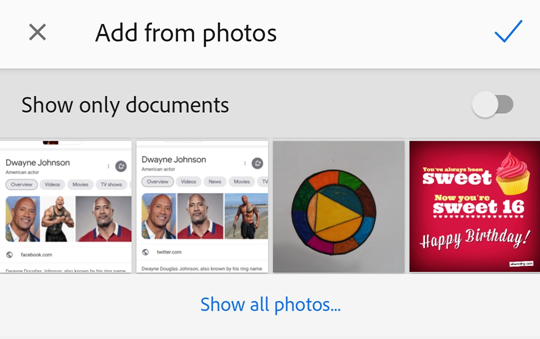
    NoteIf you select an image from your photos, to see only documents, enable Show Only Documents. Tap Show All Photos to view your entire gallery.
    1. Tap a thumbnail to select one or more files.
    2. Tap checkicon

../_images/addfromphotos.png

For detailed description, you may refer to- Working with Scanned Documents — Adobe Scan Help

Regards,

Akanchha

2 replies

Participant
November 15, 2019

How many pages scan 

Meenakshi Negi
Community Manager
Community Manager
November 15, 2019

Hi Nikhilkothari,


There no such limit for the documents that can be sacnned at a time in the Adobe Scan application. However, if you scan more than 25 pages, the text recognition feature will not work on the file. 

The text recognition feature will only work on 25 or less pages.


Let us know if you have any questions.


Regards,

Meenakshi

AkanchhaS8194121
AkanchhaS8194121Correct answer
Legend
October 9, 2018

Hi Constantins,

To add more images to the existing scanned document, you can follow the steps suggested below-

There are two methods:

  • Add images during a current capture: tap addphotoicon on the capture screen, or
  • Add images to an existing scan:
    1. Open a scan.
    2. Tap modifyicon > scanaddicon in the bottom menu.
    3. Take another Photo or Select from Photos.
    NoteIf you select an image from your photos, to see only documents, enable Show Only Documents. Tap Show All Photos to view your entire gallery.
    1. Tap a thumbnail to select one or more files.
    2. Tap checkicon

../_images/addfromphotos.png

For detailed description, you may refer to- Working with Scanned Documents — Adobe Scan Help

Regards,

Akanchha

Participant
October 30, 2018

Thank you.... at that time I was inpatience to finish my file.

Thanks again providing great apks products for us

On Tue, Oct 30, 2018, 2:49 AM meenakshin83966505 <forums_noreply@adobe.com>

AkanchhaS8194121
Legend
October 31, 2018

Thanks for sharing the update. This is great to get such feedback.

Appreciate It.

Let us know if there is any further assistance is required,

Regards,

Akanchha