

Correct answer S_S

@HAGEI776 


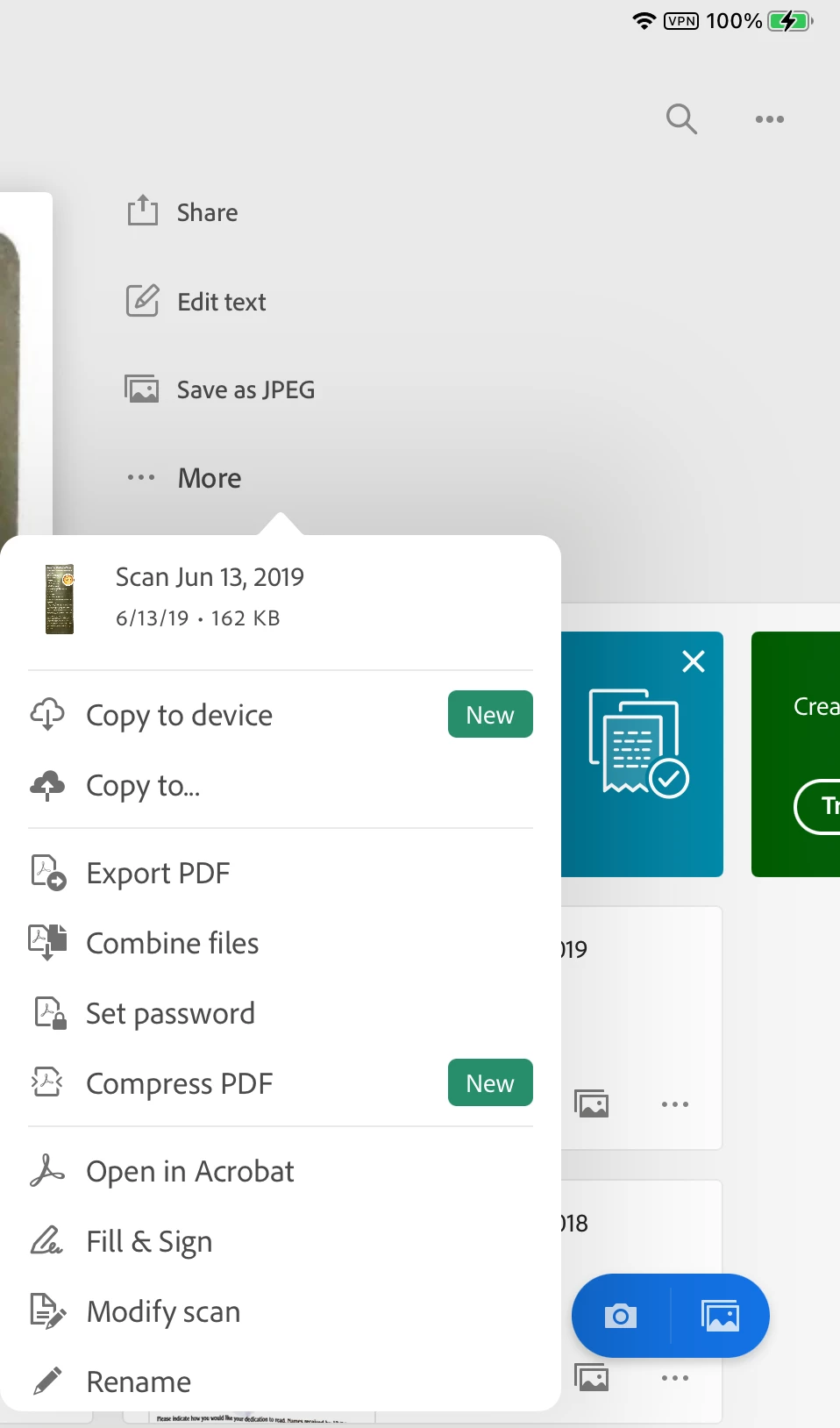
I did a bit of poking around and see that "Copy to Device" is new and will save to your device. You can also save as a jpeg, copy to DropBox, Set a PW, and more. Will any of these help?


Jane

Forum volunteer


Hi @HAGEI776,


Hope you are doing well. Sorry for your experience with Adobe Scan.


Concerning all the suggestions shared above, Adobe Scan is a cloud-based service, and you cannot use the application without it uploading the file to the cloud for OCR and storage.

This is in line with the fact that the application cannot access your files application to write files automatically unless you use the "Copy to device" option.


As a workaround, I suggest using the option "Copy to device," as suggested by Jane, and then deleting the file from Adobe Scan.


Note: You cannot modify or open the file through Adobe Scan again if you delete it from the application.


Hope this helps.


-Souvik

36 replies

Participant
August 16, 2019

I‘ve updated my app recently and noticed my scans aren’t visible. When I tried to sign out (& sign in again) it advised that I had scans pending upload. Any ideas what I can do to get the scans to upload or just get my app to work again? Thank you.

Meenakshi Negi
Community Manager
Community Manager
October 4, 2019

Hi Nikir,


Sorry for the delay in response.


Are you still experiencing the issue? 

Please check Document Cloud to confirm if the scanned files saved or not. Use the steps provied below:

- Open this link https://documentcloud.adobe.com/

- Sign in using the same credentilas that you use to log-in to the Adobe Scan application.

- Go to Files  >Adobe Scan folder.

- Check if you can locate the file in the list that shows as pending to upload.


Try once to sign ou of the application and reboot the device. 

Check if re-installation helps. Make sure you sing out fo the application before removing it.


Let us know if you need any help.


Regards,

Meenakshi


Participant
July 3, 2019

I had scanned some important files using adobe scan and now it displays "waiting to upload" below the scanned file.

I have no backup of the scanned file. They are of a very great importance to me, Please help me recover them.

Meenakshi Negi
Community Manager
Community Manager
July 5, 2019

Hi Bhavesh_Srivastava,

As the file shows as waiting to upload, please make sure that the device is connected to the Internet.

Make sure that the connection is not intermittent.

Try once to check online on Document Cloud if the file is uploaded or not. Refer to the steps provided below:

- Open the link Adobe Document Cloud 

- Sign in using the Adobe ID (email address) and password that you use for Adobe Scan application.

- Then go to File > Adobe Scan folder.

If the issue persists, please let us know the application and OS version on your device.

Did you check if there is no pending update for the application?

Let us know if you need any help.

Regards,

Meenakshi

Participant
April 26, 2021

Hello, I have the same problem


The issue here is that the internet connection WAS UNSTABLE and very weak, so the scanned document not was uploaded at that time, later on I was able to get internet, and the app was still running on the background, however once I checked on the acrobat cloud, the scanned file was nowhere to be found.


This scanned document is of great importance for me.


I need help with this.

Participant
October 16, 2018

Hi everyone

I just would like to know if it's possible to upload documents other than photos to the adobe scan app. I PDFs that I would like to upload so that the app's OCR function can convert the content on the pages to characters that other apps on my phone/ computer can recognize.

Thank you in advance for your help!

Meenakshi Negi
Community Manager
Community Manager
October 22, 2018

Hi Curtisw,

Sorry for the delay in response.

As the Adobe Scan application uses the camera feature to scan the documents, it is not possible to upload any other format files other than an image in the application.

You can either scan the document using the camera or upload the image from the photo gallery on your device.

Hope that answers your query.

Let us know if you have any questions.

Regards,

Meenakshi

Participant
September 10, 2018

I have started using Adobe Scan on my android phone. The resulting PDF files upload to my Adobe Cloud account. I would like to move or copy them from the cloud to my local storage. How do I do that easily?

Thanks

Meenakshi Negi
Community Manager
Community Manager
September 14, 2018

Hi Klipperflix,

Sorry for the delay in response.

There is no direct option to save the scanned PDF to the local storage.

However, you may use the workaround mentioned below to save the file locally.

a) Using browser

-Open this link https://cloud.acrobat.com/ on a browser on your device and Sign in with your Adobe ID.

- Then go to Files > Document Cloud > Adobe Scan folder.

- Select the file from the list and download it on your device.

b) Using Mail

- Open the PDF in Adobe Scan app.

- Then click on the Share icon at the bottom.

- Select "Share a copy" from the options provided.

- Select Mail and send an email to yourself.

- Then open your mail and download the document from there.

Hope that helps.

Let us know if you have any questions.

Regards,

Meenakshi

Participant
December 11, 2018

So i have to Upload every file to your cloud First? There is no other way? I dont want another Cloud. Guess i ve to uninstall this App again :/

frrekul
Participant
September 5, 2018

I'm having the same issue, have tested the advice solution and now can't sign in because it's stating there's no internet connection (when there is) and I've tried while connected to WiFi.

If an option is to delete the app access reinstall, will I lose the PDFs I've already saved?

Meenakshi Negi
Community Manager
Community Manager
September 14, 2018

Hi Frrekul,

Sorry for the delay in response.

Adobe Scan application saves all the documents in Document Cloud.

Uninstalling the application on the mobile device will not delete the files from the Document Cloud.

The files can only be deleted manually from the Document Cloud.

So, you may try uninstalling and re-installing the application on the mobile device.

To check your files on the Document Cloud, open this link https://cloud.acrobat.com/ on the browser.

Then sign in with the same Adobe ID and the password that you use for the Adobe Scan application.

After signing in, go to Files > Document Cloud > Adobe Scan folder.

There you can view all the files that you have scanned and saved to PDF.

Let us know if you still experience any issue or have any questions.

Regards,

Meenakshi

Participant
August 31, 2018

Scanned doc OK, can't find it on my S8 when I want to attach it to Outlook email.Recent scan says cant upload to cloud

Meenakshi Negi
Community Manager
Community Manager
September 17, 2018

Hi Edwardm,

Sorry for the delay in response.

As the scanned document is not uploading to the Document Cloud, please make sure that the internet connection is not intermittent.

Also, check if the "Allow cellular data usage" is enabled under the preferences of the application. Take help of the steps mentioned here App Settings — Adobe Scan Help.

Adobe Scan does not save the scanned PDF in the local storage of the device.

When you scan the document and click on Save to PDF, the PDF is uploaded and saves in the Document Cloud.

You can attach the scan only after it saves as the PDF in Document Cloud.

Once the scanned document is saved as PDF, open the document in the application.

Then click on the Share icon at the bottom and select "Share a copy".

Refer this help link Scanning Documents — Adobe Scan Help.

Let us know how it goes.

If you experience any issue, feel free to update this thread.

Regards,

Meenakshi

mikeotaylor
Participant
August 7, 2018

I am having this problem. I also can't email copies because AS seems to think I don't have a network, which I do.

Meenakshi Negi
Community Manager
Community Manager
August 14, 2018

Hi Mikeotaylor,

Sorry for the delay in response.

As the document does not upload when you try to email copies, try once to sign out of the application.

Reboot the device an try to sign-in again.

Also, go to Adobe Scan Preferences and enable the option for "Allow Cellular Data Usage".

Then try to send the document as email copies.

Check if that helps.

Let us know how it goes.

Regards,

Meenakshi

Participant
June 26, 2018

Does anyone know if they fixed this through he Adobe Scan app? My issue is they keep automatically uploading my Adobe Scans to the document.

Participant
August 31, 2018

Resit open

Participant
June 26, 2018

Does anyone know if you are able to turn off the automatic upload to the "Document Cloud"? I habe sensitive information that I do not want on the Adobe servers.

Meenakshi Negi
Community Manager
Community Manager
June 27, 2018

Hi Mattp,

There is no option to turn off the automatic upload of the scanned files to Document Cloud.

It is an as designed behavior.

If you wish you can download and save the scanned PDF file from the Document Cloud.

After that, you can delete the file from Document Cloud.

Once the file deleted from the Document Cloud account, you will not be able to recover it from there.

Hope the information helps.

Let us know if you have any questions.

Regards,

Meenakshi

tkbalt
Participant
April 24, 2018

For now the second time in recent weeks, I have a problem where a bunch of my scans are "waiting to upload" and are on my phone and not in the Adobe Cloud.

I have tried other advice from the forums to switch between Recent and All and pull down in Recent to force a sync, but it doesn't seem to work.

The first time I had this problem, it magically fixed itself after a few minutes and the scans that were sitting there did eventually upload.  However, now it's the second time, and I can't seem to get it to upload.

I'm on an iPhone X running the latest iOS version and Adobe Scan version 18.03.27.

When I look at My Account in the app, I get "Network Failure" next to "Adobe PDF Pack" in the Subscription section after it shows me "checking" for a moment.

I don't want to sign out and sign back in, which might be the final fix, because I'll lose the scans I already have in the app. Also, this seems to be a recurring and very new problem, which is distressing. Adobe Scan has been working pretty well for me up until this point.

Thanks for any help you can provide.

tkbalt
Participant
April 24, 2018

Hmmm... force quitting the app and restarting it seems to have helped.

Meenakshi Negi
Community Manager
Community Manager
May 14, 2018

Hi Tkbalt,

Sorry for the delay in response.

It seems that the issue is already resolved.

Let us know if you need any help or experience any issue.

Regards,

Meenakshi
