



TheArker
Participating Frequently
August 26, 2018
Answered

AE "Out of Memory" Error crashing other stuff

  • August 26, 2018
  • 14 replies
  • 66348 views

So just recently, I went from having a Hard Disk (4TB) to an SSD (1TB) and before then, AE was working perfectly, but for some reason, AE just keeps spamming me with this nonstop error :
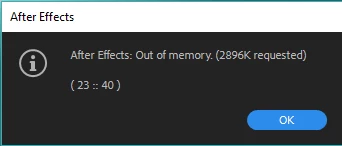
If I click on Ok a bunch of times, my monitor goes black for a few seconds and Firefox crashes, along with probably other applications, if I had some. I tried stuff with memory and I have 11GB of memory allocated for AE, yet I hardly do anything and it says out of memory (Like putting Mir on a solid and rotating it).

I have

- 16GB of RAM

- 4GB GTX 1050 TI SC

- 1000GB SSD

I hope anyone can help!

This topic has been closed for replies.
Correct answer Brandon Loshe

Hi alexcormier,

How often do you purge your memory and disk cache (Edit - Purge - All Memory & Disk Cache...)? I also get that message occasionally on my older computer with a smaller hard drive. Usually just doing that does the trick for me.

14 replies

dietrichs8320758
Participant
March 31, 2022

Hey @TheArker ... 

Exact same problem here, unfortunatelly i didn't find a solution yet but i would like to pile on to the rant a little bit, because working with AfterEffects became incredibly painfull in the last two years or so. I can not even work with simple JPG Sequnces anymore without this error message popping up and AE crashing my entire system.

I can not even tell what caused all of this, this never happend in earlier versions. Now i have to purge my Memory, Disc and Cache like every five minutes to be able to work for another 10 minutes befor this starts happening again.


I post as soon as i find a solution that works for me, but i really would like to hear from AE Dev that they at take a look at this. 

Participant
March 6, 2023

I don't use AE full time, once or twice a year. I recently started using it again after a year, and I'm running into this "out of memory" error frequently. I've read this post in full and tried everything that has been suggested - auto spage file, clearing cache, dumping memory, More Accurate Except Cached Preview.  It usually occurs when scrubbing the time line with <cntrl> and/or when the preview is at full res. I've since gone down to 1/2 res on the preview and this helps. My comp is HD (1920 x 1024) and I've watched my windows memory  used for AE climb up to about 8G.  I recently got this error and have suspeced all a long it is my graphics card. I have a NVIDIA CUDA card  (Quadro RTX 4000) and Windows 10 with 48G of ram installed (allocating 36G to AE and 11G to everything else.)

Does anyone using AE have a NVIDIA card or more specifically an RTX card? The driver for it is pretty recent, but I know that NVIDIA control panel has application specific settings...  

Any help would be appreciated.  I'm getting these out of memory errors pretty frequently and it is disrupting my ability to get my comp finish.


Thanks


Mark


Participant
March 6, 2023

BTW, this problem did not occur with AE 2021 a year ago, but then lots has changed with my win10 machine since then...

Participant
November 30, 2021

This happened to me as well and I found it was an OpenEXR issue, both in 2021 and 2022. If you are using EXRs this could help - Download the ProExr plugin from www.fnordware.com/ProEXR/ and replace the OpenExr plugins in the "Support Files\Plug-ins\Effects" folder with the ones downloaded. There are 3 files. EXtractoR.aex, IDentifier.aex and OpenEXR.aex.


This fixed it for me. Best of luck,
Krzys

Participant
December 16, 2021

Thanks a lot Krzys !

It tooks me a long time to fall on your post, but it fixed my headhache instantaneously !

Long life to you !

Participant
August 16, 2021

I tried to re-create the problem in an earlier version of After Effects (17.7) but there it worked just fine.


After a lot of testing back and forth and comparison of the settings between the versions it seems that the setting in Preferences - Previews - Viewer Quality - Color Management Quality set to More Accurate was the problem. I switched it to More Accurate Except Cached Preview and now it works. Makes no sense to me and the problem might re-appear, but it's been working all day since I changed that setting.

Participant
August 16, 2021

I encountered this error in the past, but it started showing up again last week, and this time nothing helps.


Before last week I used to preview render and if the memory ran out it would just stop caching and play what was able to be cached. Now it caches way less, shows the error message and crashes all other apps. Even when it's just a simple image sequence, exr files with dwab compression.


Disk Cache doesn't seem to be doing much anymore. I've set ut to 500GB but it stops writing after 99GB, then i starts filling up the pagefile.sys. I've run the Windows Memory Diagnostic app, but there is no problem with the memory, and no problem with my ssds.


Now it won't even render from the Render Queue.


Is this a problem with the latest AE release?


Any advice and help is appreciated!


My system and settings:

Windows 10 Pro (10.0.19041)

64 GB ram

Nvidia Geforce RTX 2080 ti (driver version 471.68)

AMD Ryzen Threadripper 3960X 24 cores 3793 Mhz


After Effects 18.4.0 build 41

Reserved memory for other applications: 12GB

Maximum disk cashe: 500GB (located on another ssd than system and work files)

Video rendering and effects: Mercury GPU Acceleration (CUDA)

LC_Design
Participant
August 13, 2021

I've literally tried every single suggestion in this thread and this issue keeps happening. I'm getting to the point where I'm gonna start using Fusion from now on. Its beyond annoying. 

Participant
August 8, 2021

If purging the memory doesnt fix your problem Ive found that switching your video rendering in "project settings" to "software only" helps.

Participant
January 29, 2021

Hi Alex! 

I used to have the same issue aswell since yesterday,

try purging your memory, go to edit, purge, all memory.

and restart after effects, and if it still shows the same error,

try changing the resolution to quarter, i know it'll be disgusting

to see the resolution, but trust me it'll stop the error, it worked for

my pc! if you find this helpful, then you're welcome! 🙂

Participant
January 20, 2021

Same problem, non of the offered solutions fixes the problem. Love you adobe, 2 years old bug is not a limit...

Participant
November 20, 2020


This will fix it

enable automatic page like shown on the screenshot!

Subscribe to "Design Creators" if this works.

Thanks!

Participant
January 20, 2021

It doesn't help

Participating Frequently
December 21, 2019

Please enable your Windows swap file in automatic mode

PelleBJ
Participant
March 28, 2020

This solved my problem