


Participant
November 30, 2019
Answered

AE Preview not playing. Is it my hardware?

  • November 30, 2019
  • 1 reply
  • 418 views

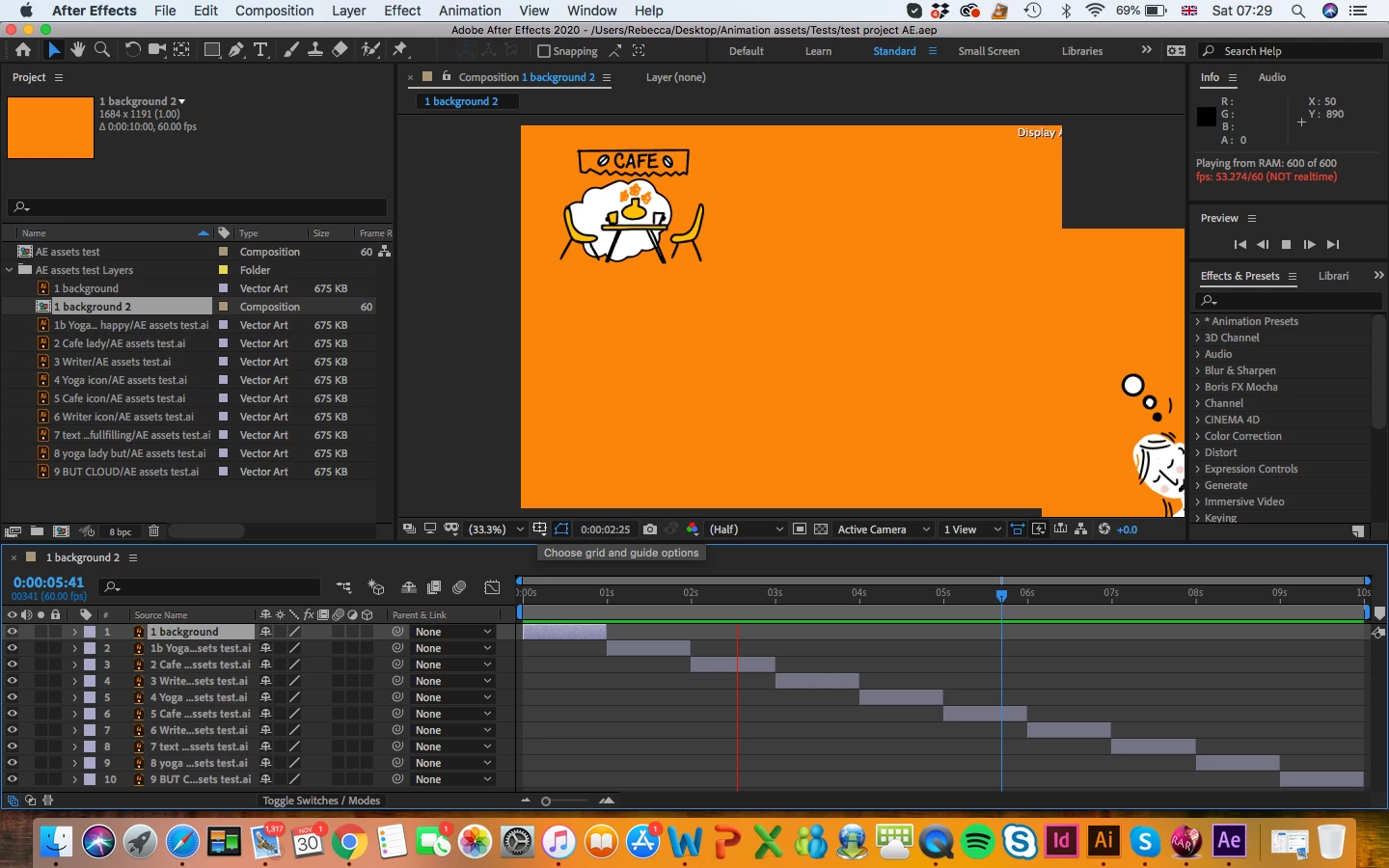
Hi - I'm new to AE and want to get started but when I open AE 2020 the view panel is running out of the frame (to the right). The main screen stays static. As seen in the image below (bottom right corner is playback and it is out of frame so I cant see what I'm doing)

I also get 'Display Acceleration Disabled' notificaion.


Is this a hardware issue?

I have the following installed at the moment:


NVIDIA GeForce GT 650M 512 MB

Intel HD Graphics 4000 1536 MB


This topic has been closed for replies.
Correct answer angie_taylor

This is a known bug which the team are working on fixing. Meanwhile, please revert back to using the previous version which can be installed via the Adobe CC app 🙂

1 reply

angie_taylor
angie_taylorCorrect answer
Legend
November 30, 2019

This is a known bug which the team are working on fixing. Meanwhile, please revert back to using the previous version which can be installed via the Adobe CC app 🙂

Participant
November 30, 2019

Thanks I'll give that a go now