Known Participant
October 13, 2015
Answered

After Effects 2015 won't preview in real time after El Capitan update.

  • October 13, 2015
  • 58 replies
  • 119367 views

Hello,

Has anyone experienced the following issue and found a solution for it?

Right after Update to El Capitan 10.11 the After Effects 2015 stopped ram previewing in real time.

No matter what i do it won’t work.

I have a latest MAC Pro 2.7 GHz 12-Core with 64GB ram.

The AE 2014 still works though.

    This topic has been closed for replies.
    Correct answer Roei Tzoref

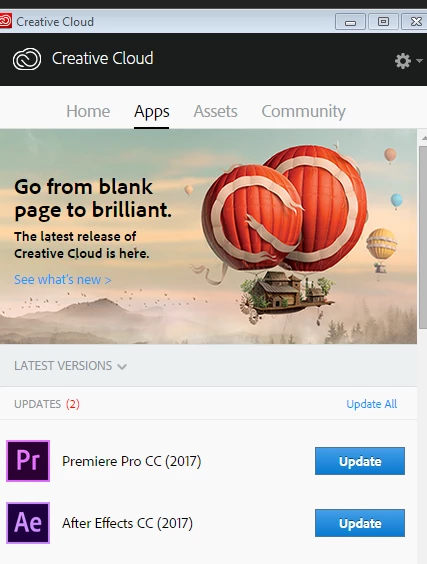
    Everybody who is having this issue please install the latest update: After Effects CC (November 2017) Bug-Fix Update Is Now Available that is supposed to finally close this thread for good! please report if this issue has been resolved.

    if you can't see the update yet, wait a while until you see it. try relaunching Creative Cloud app by typing Ctrl+Alt+R. I see it.

    this update is 14.0.1 and is a bug fix for many disturbing issues especially for Mac users. it does not fix all the bugs that are new with this release - look here for bug#2 and #3 that are still not fixed (bug #1 is fixed I believe): Known issues in After Effects CC 2017 and hopefully a bug fix for those will come pretty soon.

    58 replies

    Merlin Pardo
    Participating Frequently
    March 24, 2016

    Like "HerrRotkohl" said higher in the thread, a zombie lost in toxic fog

    Participating Frequently
    March 24, 2016

    I'm kinda afraid to install the update as AE is working fine with the docked panel under the timeline trick. Can anyone confirm that this has solved all the issues with real time previews, or are people experiencing the 2 second audio delay bug that StaphaneA is experiencing?

    Known Participant
    March 24, 2016

    I am successfully RAM previewing audio and keyframing with audio just fine in the new update.  This is with a 1920 x 1080, 23.976 comp.  I have not tested with 4K footage yet.

    It works really well and I am trying to break the habit I just developed of hiding the timeline during RAM previews.

    OSX 10.11.4

    Mac Pro 5,1

    Vinay Dwivedi
    Adobe Employee
    Adobe Employee
    March 22, 2016
    Stefan_Boeker
    Inspiring
    March 23, 2016

    I installed the update - seems to work.
    but I still feel a little bit like this poor zombie guy on the AE splash screen, standing in a toxic ugly orange-greenish fog:
    What "surprise" comes next?

    Do you remember the splash screen of former times, when AE claimed to be a lighthouse in animation and compositing?

    VPCEdit6
    Participating Frequently
    March 23, 2016

    ‌March 22, 2016: After Effects CC 2015 finally plays back a real-time RAM preview.  Progress!

    Inspiring
    March 22, 2016

    Sadly the last patch (13.7.1) doesn't solves fully the problem.

    The Ram preview is still not functionning correctly. It is still not playing real time during the first 2 seconds witch means still no audio during the first 2 sec of a ram preview... Very ennoying.

    Participant
    March 15, 2016

    Tick tick Adobe.

    Give us a yell on when you'll have this fixed.

    Szalam
    Community Expert
    Community Expert
    March 16, 2016

    theDuke wrote:

    Tick tick Adobe.

    Give us a yell on when you'll have this fixed.

    If you're talking about the real-time previewing issues, you can have it fixed now if you sign up to help test the After Effects CC 2015 (13.7.1) patch update

    Participant
    March 16, 2016

    With all due respect. even 'public' releases of the software have massive oversights like the failed preview issue.

    It simply doesn't leave me confident in needing to use a pre release to fix the problem (and probably break 100 other things).

    Just fix the issue and make another official release?!

    Participant
    March 4, 2016

    I spoke to an Adobe's support CSA and he said that this is a known bug and told me to download AE CC 2014 from the Creative Cloud application (the one that sits in your menu bar) > Apps > Find Additional Apps > (at the bottom in blue) View Previous Versions. There you will see all the apps. If you click "install" you can see the previous versions to DL.

    I have checked and confirmed AE CC 2014 RAM Preview works.

    Szalam
    Community Expert
    Community Expert
    March 10, 2016

    If you're tired of docking a panel under your timeline to workaround this issue and you don't want to go back to CC 2014, you can apply to help test the fix for this issue before it gets released to the public. help test the After Effects CC 2015 (13.7.1) patch update

    Inspiring
    February 25, 2016

    I don't quite know which tip worked, but I started applying these from the top down till AE was once again letting me preview in real time like it ought to do. So I'm glad the thread's here. Thanks!

    I'm still running yosemite and still don't believe it's time to upgrade. I still have other tools that aren't El Capitan ready.

    AMAXAuthor
    Known Participant
    February 25, 2016

    I'll tell you what works without any issues on El Capitan... CC2014! ha!

    It sux to downgrade but rather have a stable workflow then bunch of glitches!

    Note: whenever you upgrade always, ALWAYS save the previous version... i learned that the hard way.

    jays41964780
    Participant
    February 24, 2016

    I'm getting sporadic real-time playback on a fairly simple end tag but I'm on Windows 10. At the beginning of the day I was getting real-time, but suddenly it just started going at about 8fps for no apparent reason. The "tricks" that work on OSX don't seem to fix it. My workstation is more than capable of running this animation and even caches faster than the playback, so I'm not sure why I can't see it in real-time.

    On another note if anyone is looking for an alternative to AE, there's a plugin suite for Fusion that's totally free called Krovodove, and it has a ton of useful motion graphics effects. I haven't played with it yet but it definitely turns Fusion into much more of a motion graphics option.

    Inspiring
    February 24, 2016

    Thanks for the Krovodove shout - will check it out.  Quick google is just giving me some showcases rather than tuts, but will have a look.

    jays41964780
    Participant
    February 24, 2016

    Yeah I just found it last night and had a similar experience, but it should be interesting to play with it.

    Kevin J. Monahan Jr.
    Legend
    February 22, 2016

    Hi VFX Junkie,

    Has anyone experienced the following issue and found a solution for it?

    Sorry for the frustration and thanks for the post. Yes, it is a known issue and a major pain point for those on OS X 10.11. I apologize for this negative experience.

    See this article for all known issues: known issues in After Effects CC 2015  |  After Effects region of interest, see the section entitled, "playback of cached previews is not real-time on Mac OS X 10.11"

    You can work around the problem by hiding the preview time indicator (red line that moves across the Timeline panel during previews) during previews, such as the following:

    • close the Timeline panel
    • enable Full Screen the Preview panel, or press the accent-grave (`) keyboard shortcut while the mouse is over the composition panel
    • reduce the height or width of the Timeline panel, and/or twirl up layer properties to minimize the amount of screen space used by the Timeline panel
    • zoom in on the Timeline panel and move the current zoomed view up or down the composition to avoid showing the portion of the timeline you are currently previewing (thus hiding the preview time indicator)

    Status: A bug has been filed and is being worked on for the next update.

    The AE 2014 still works though.

    Thanks for mentioning that. I hope to see this update available for users ASAP. Thanks so much for your patience.

    Regards,
    Kevin

    Kevin Monahan - Sr. Community and Engagement Strategist – Adobe Pro Video and Audio
    Szalam
    Community Expert
    Community Expert
    February 22, 2016

    Kevin-Monahan wrote:

    You can work around the problem by hiding the preview time indicator (red line that moves across the Timeline panel during previews) during previews,

    Kevin-Monahan‌, there is an easier workaround mentioned earlier in this thread where you can dock any panel under the timeline panel (such as the Render Queue or the Libraries Panel) and it seems to make it work too.

    If you can test and verify it on your end, it wouldn't hurt to add that to the official Adobe articles as well.

    Kevin J. Monahan Jr.
    Legend
    February 22, 2016

    You can work around the problem by hiding the preview time indicator (red line that moves across the Timeline panel during previews) during previews,

    Kevin-Monahan, there is an easier workaround mentioned earlier in this thread where you can dock any panel under the timeline panel (such as the Render Queue or the Libraries Panel) and it seems to make it work too.

    If you can test and verify it on your end, it wouldn't hurt to add that to the official Adobe articles as well.

    Great, thanks for that Szalam! I'll come back with verificaiton.

    Kevin

    Kevin Monahan - Sr. Community and Engagement Strategist – Adobe Pro Video and Audio
    VPCEdit6
    Participating Frequently
    February 19, 2016

    ‌AE Scripts seems to be developing the best new features that are useful in a pro user workflow.  Scripts like Explode Shape Layers, True Comp Duplicator, DUIK, BG Renderer, PT Effect Search - we always wonder why these great features are not rolled into the core After Effects software. I just got colorLibrary - awesome!  I've been waiting for this for years!  We are so lucky that these developers exist.  I think the new Trapcode plugin Tao is incredible.  If Adobe can get the basic software to the next level - stable, light and fast with a new render queue and written for Metal API, the future would look very bright.

    Szalam
    Community Expert
    Community Expert
    February 19, 2016

    edit6d22971478 wrote:

    AE Scripts seems to be developing the best new features that are useful in a pro user workflow.  Scripts like Explode Shape Layers, True Comp Duplicator, DUIK, BG Renderer, PT Effect Search - we always wonder why these great features are not rolled into the core After Effects software. I just got colorLibrary - awesome!  I've been waiting for this for years!  We are so lucky that these developers exist.  I think the new Trapcode plugin Tao is incredible.  If Adobe can get the basic software to the next level - stable, light and fast with a new render queue and written for Metal API, the future would look very bright.

    Color Library looks interesting. I've used color schemes in After Effects using the Libraries feature that's now part of AE, but you have to build the color palettes outside of AE. (Side note: Adobe's Capture mobile app has some cool ways to build color palettes on the go and I rather enjoy using it.) The ability to grab colors in your project and put them all in one spot seems useful.

    Have you seen Ray Dynamic Color ? It looks awesome, but I haven't bought it yet.