This topic has been closed for replies.
Correct answer Shivangi_Gupta

Hi all,


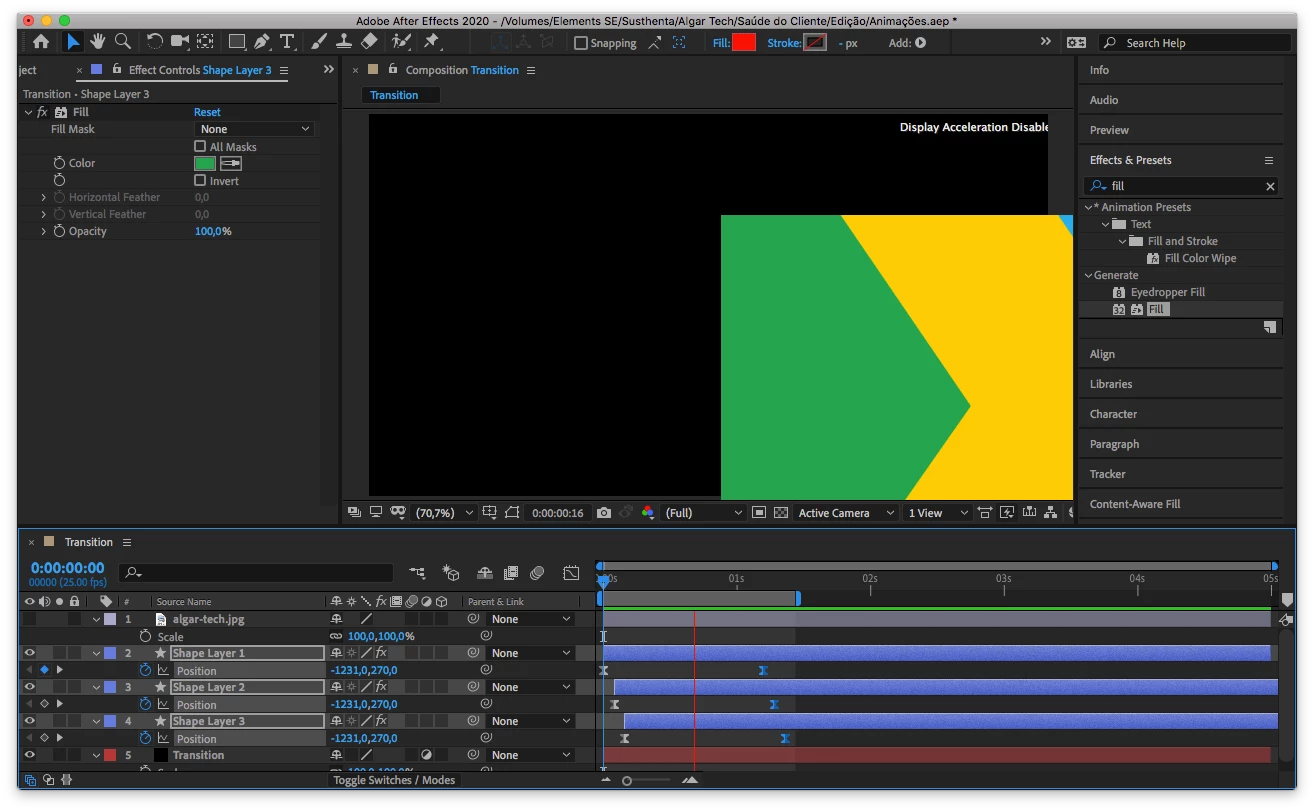
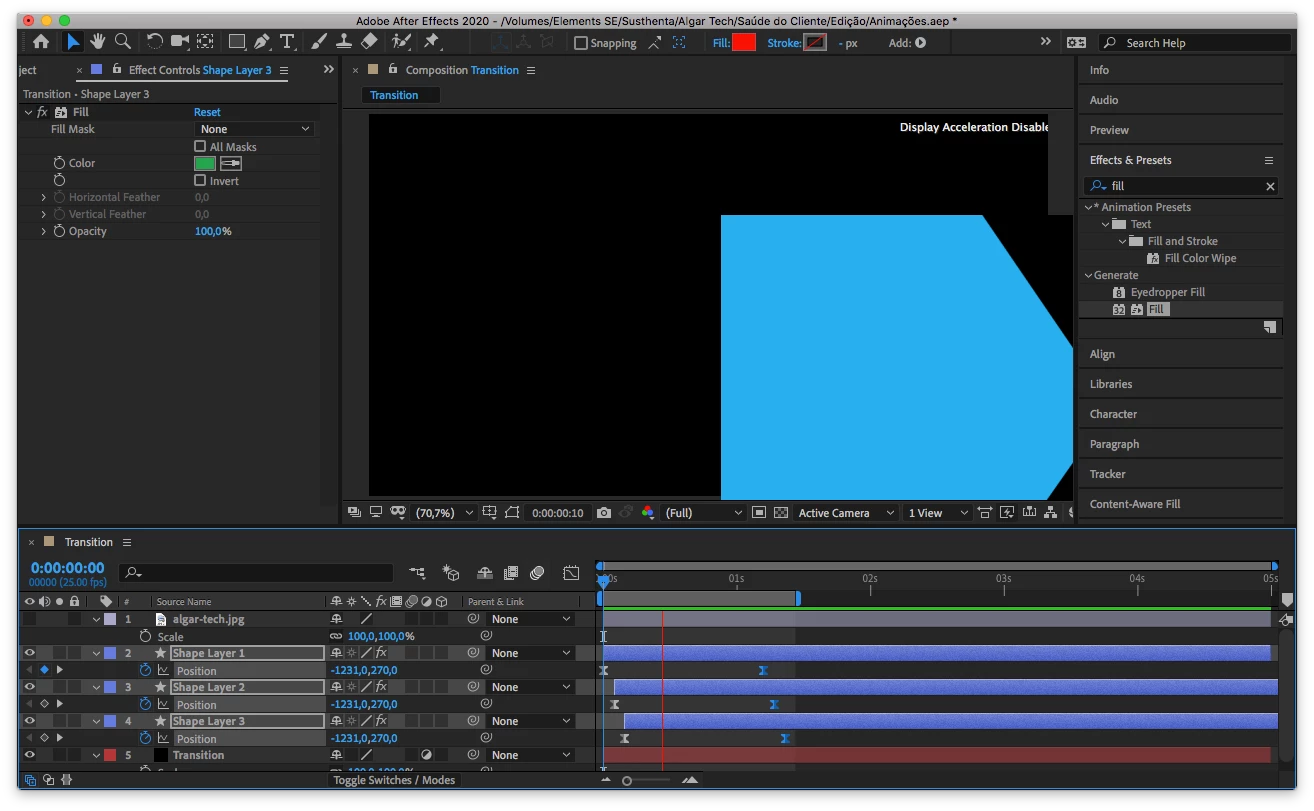
Thanks for your patience. Adobe After Effects has released a patch update which provide a fix for the duplicate preview issues. For more information, please check https://helpx.adobe.com/after-effects/kb/fixed-issues.html


Let us know if you have any other questions.


Thanks,

Shivangi

28 replies

Participating Frequently
May 17, 2020

I habe the same problem: preview doesn't work...

please provide to fix this bug!


Participant
March 9, 2020

I have a PC with Windows 10 a AMD Ryzen 9 3900X  3.8GHz ~ 4.6GHz / 12 Cores, 24 Threads  a 64 gb off ram and a Nvidea GTX 1070 Ti with 8gb of ram and my After Effects version 17.0.4 (build59) 2020 GUI is Slow. Working in the software is not smooth.  There is not realtime on my comp window, it freezes in one frame and when I move to another frame it continues frozen for a moment after After Effects display the new frame. I have the latest drivers fron Nvidea but that dident solve the problem. I installed after effects 2019 and everithing works fine.

megan2021
Participant
August 13, 2020

I have a PC running on a Ryzen Threadripper 2990WX 32 core proceessor with 64GB or RAM with Dual 2080TIs.  


My version of AE is 17.1.2 Build 37


I have tried multiple things, restarts, flushing the cached, using software instead of GPU for generating previews.  Moving the timeline from spanning across two monitors to being on a single monitor.  My problems started with this latest update.  Please fix this issue Adobe.  Why are we paying for subscriptions again??

Participant
February 9, 2020

Same problem here, I've tried to work this way but it's very frustrating and I thought I must have done something in my settings that caused it. I am relieved I am not the only one and currently updating to the latest version. If updating doesn't work I'll try and install the 2019 version.

Participant
February 10, 2020

Hi, Update to the latest version. It works; the problem has been solved.

Gerhard_Draws
Known Participant
February 14, 2020

I think I have the same issue (my preview window pops up to the bottom-right) I did a screen capture of this in my post here: https://community.adobe.com/t5/after-effects/weird-window-popping-up-off-screen-when-i-try-to-preview-or-ram-preview/m-p/10924084?page=1


I am running the latest version though... and that's where it started happening so unfortunately updating isn't an option 😞

Shivangi_Gupta
Community Manager
Shivangi_GuptaCommunity ManagerCorrect answer
Community Manager
December 11, 2019

Hi all,


Thanks for your patience. Adobe After Effects has released a patch update which provide a fix for the duplicate preview issues. For more information, please check https://helpx.adobe.com/after-effects/kb/fixed-issues.html


Let us know if you have any other questions.


Thanks,

Shivangi

Participant
December 15, 2019

i get many problems after the update from december,  A simple 20-second video never ends at least fully reproduced in the timeline (this without even starting to work with any effect)

LoicJ
Participating Frequently
December 9, 2019

I have the same problem.

How can this problem be solved Adobe please ?

billd45466980
Participant
December 7, 2019

HOW I FIXED IT.  This is an Adobe Disaster!  My Preview also failed as pictured above. None of the following worked : Purging disk cache; Fiddling with graphics cards; Uninstall 2019-install 2020 v17 gives preview ghost image as shown above.  So uninstall 2020 and REinstall 2019 v16.1.3 using Adobe "other version" option and 2019 now crashes on boot up. Lots of restarts, no effect.  I found nothing in Preferences that worked.  Adobe offers no previous versions.  

I have faithful Macbook Pro late2011, 2.2Ghz Intel i7, 16GB DDR3 ram SSD 500GB, AMD Radeon 6750M 512MB, plus Intel graphics 3000 512MB.   Im using MacOS High Sierra 10.13.6.  I'm lucky to have a 3 TB back-up disk with most versions of AE going back to 15.1.2 so I picked V.16.1.1.  After uninstalling and cleaning out both 2019 and 2020 from my SSD applications folder, doing restart, I then simply copied the complete AE 2019 v 16.1.1 files from back-up to SSD.  This was NOT an Adobe Installation procedure, just copy/paste and  I expected failure.  BUT YES it worked and even Duik Bassel worked.  If you have a version of AE 16.1.1 backed up somewhere (issued about 26 April 2019) try what I did.  Looks like Adobe might have to do some reverse engineering to go back to the stability of 16.1.1.  Meantime I will avoid all AE updates till I hear the problem has been fixed.

Participant
December 6, 2019

I'm having the same problem. Is Adobe doing anything at all? Has anyone gotten them to acknowledge a problem? There are 5 pages of people complaining about this. Is the only answer to downgrade to a version that won't work with the new Mac OS?

danw84
Participating Frequently
December 5, 2019

Yes. I have the same problem. I had it with CC2019 and updated to 2020 in the hope that would resolve the issue but I think it's even worse. I can only use AE for about 5mins before the composition preview window stops working.

Participant
December 5, 2019

Hi! I've updated to AE 2020. Ram preview isn't wokring. It kind of works in fullscreeen mode. Works fine in previous versions. Please advise.


System Specs:

Macbook Pro 15" Mid-2010 

OS: High Sierra

Processor: 2.66 GHz Intel Core i7

Memory: 8 GB 1067 MHz DDR3

Storage : 512 GB SSD

Graphics: NVIDIA GeForce GT 330M 512 MB

Intel HD Graphics 288 MB


Sciolla
Participant
December 5, 2019

same problem 😞

Participant
December 4, 2019

same here on my 2 imac mid2011, working fine on my pc with windows10 😞