Hi,
no idea how this could happen, but here is what you can do:
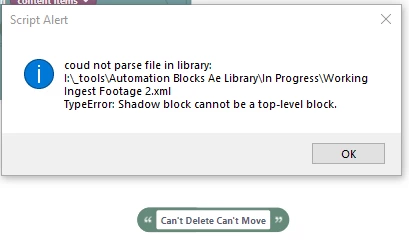
You can open the xml file in a text editor like VSCode or Notepad and search for a text looking like this:
<shadow type="text" id="someUglyTextHere">
<field name="TEXT">Can't Delete Can't Move</field>
</shadow>
If you know the text "Can't Delete Can't Move" of that block, then you can search for that text and then find the entire <shadow...> context around it and delete the entire part from <shadow ... to </shadow> from the file.
Note that in order to minimize file size, the xml files are stored in a single line. You can cut & paste them into a prettyprint tool like this one to make the xml more readable:
https://www.samltool.com/prettyprint.php
There is no need to "undo" the pretty printing after you changed the file - Automation Blocks can also read pretty xml.
Background on shadow blocks:
"default values" in Automation Blocks are implemented as shadow blocks in Automation Blocks. Those shadows always live inside other blocks and you can drag other blocks on top of them to overwrite the default. Not sure how you managed to separate such a shadow from its parent block, but it shows how extensively you use Automation Blocks 🙂


 AdChoices