

Building my first AE plugin using the example checkout - layer unvisible
Hi,
I am trying to learn how to build after effects CS6 plugin using Microsoft visual studio.
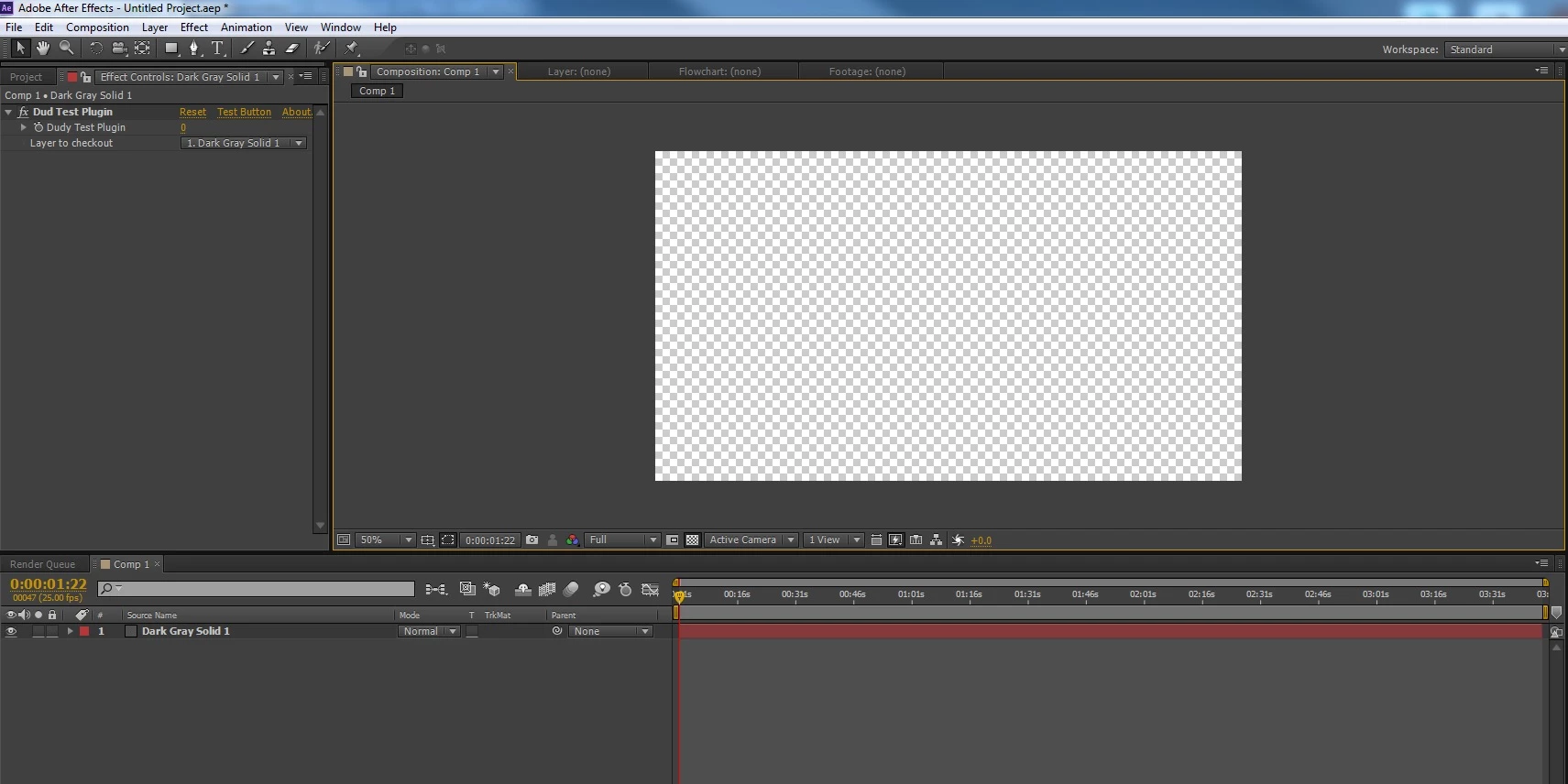
I managed to make a test plug using the "checkout" example from the SDK but whenever i apply it to a layer (solid or anything)
My layer which i applied it makes the solid disappear (attached JPG)
This is the code i used to compile.
#include "Checkout.h"
static PF_Err
GlobalSetup (
PF_InData *in_data,
PF_OutData *out_data,
PF_ParamDef *params[],
PF_LayerDef *output )
{
PF_Err err = PF_Err_NONE;
DuckSuite1* dsP = NULL;
if (AEFX_AcquireSuite( in_data,
out_data,
kDuckSuite1,
kDuckSuiteVersion1,
"Couldn't load suite.",
(void**)&dsP)) {
PF_STRCPY(out_data->return_msg, "plugin loaded successfully");
} else {
if (dsP) {
dsP->Quack(2);
ERR(AEFX_ReleaseSuite( in_data,
out_data,
kDuckSuite1,
kDuckSuiteVersion1,
"Couldn't release suite."));
}
}
// We do very little here.
out_data->my_version = PF_VERSION( MAJOR_VERSION,
MINOR_VERSION,
BUG_VERSION,
STAGE_VERSION,
BUILD_VERSION);
out_data->out_flags = PF_OutFlag_WIDE_TIME_INPUT |
PF_OutFlag_I_DO_DIALOG;
out_data->out_flags |= PF_OutFlag_PIX_INDEPENDENT |
PF_OutFlag_USE_OUTPUT_EXTENT;
out_data->out_flags2 = PF_OutFlag2_PARAM_GROUP_START_COLLAPSED_FLAG |
PF_OutFlag2_SUPPORTS_SMART_RENDER |
PF_OutFlag2_FLOAT_COLOR_AWARE |
PF_OutFlag2_SUPPORTS_QUERY_DYNAMIC_FLAGS;
return err;
}
/*static PF_Err
PreRender(
PF_InData *in_data,
PF_OutData *out_data,
PF_PreRenderExtra *extra)
{
/*PF_Err err = PF_Err_NONE;
PF_ParamDef channel_param;
PF_RenderRequest req = extra->input->output_request;
PF_CheckoutResult in_result;
AEFX_CLR_STRUCT(channel_param);
// In order to know whether we care about alpha
// or not, we check out our channel pull-down
// (the old-fashioned way); if it's set to alpha,
// we care. -bbb 10/4/05.
/*ERR(PF_CHECKOUT_PARAM( in_data,
SMARTY_CHANNEL,
in_data->current_time,
in_data->time_step,
in_data->time_scale,
&channel_param));
if (channel_param.u.pd.value == Channel_ALPHA){
req.channel_mask |= PF_ChannelMask_ALPHA;
}
req.preserve_rgb_of_zero_alpha = TRUE; // Hey, we care.
ERR(extra->cb->checkout_layer( in_data->effect_ref,
SMARTY_INPUT,
SMARTY_INPUT,
&req,
in_data->current_time,
in_data->time_step,
in_data->time_scale,
&in_result));
UnionLRect(&in_result.result_rect, &extra->output->result_rect);
UnionLRect(&in_result.max_result_rect, &extra->output->max_result_rect);
// Notice something missing, namely the PF_CHECKIN_PARAM to balance
// the old-fashioned PF_CHECKOUT_PARAM, above?
// For SmartFX, AE automagically checks in any params checked out
// during PF_Cmd_SMART_PRE_RENDER, new or old-fashioned.
//return err;
return 0;
}*/
static PF_Err
ParamsSetup (
PF_InData *in_data,
PF_OutData *out_data,
PF_ParamDef *params[],
PF_LayerDef *output )
{
PF_Err err = PF_Err_NONE;
PF_ParamDef def;
PF_EffectUISuite1 *effect_ui_suiteP = NULL;
AEFX_CLR_STRUCT(def);
PF_ADD_SLIDER( NAME,
CHECK_FRAME_MIN,
CHECK_FRAME_MAX,
CHECK_FRAME_MIN,
CHECK_FRAME_MAX,
CHECK_FRAME_DFLT,
CHECK_FRAME_DISK_ID);
AEFX_CLR_STRUCT(def);
//define the add layer dropdown menu name
PF_ADD_LAYER("Layer to checkout",
PF_LayerDefault_MYSELF,
CHECK_LAYER_DISK_ID);
out_data->num_params = CHECK_NUM_PARAMS;
// Premiere Pro/Elements does not support this suite
if (in_data->appl_id != 'PrMr')
{
ERR(AEFX_AcquireSuite( in_data,
out_data,
kPFEffectUISuite,
kPFEffectUISuiteVersion1,
NULL,
(void**)&effect_ui_suiteP));
ERR(effect_ui_suiteP->PF_SetOptionsButtonName(in_data->effect_ref, "Test Button"));
(void)AEFX_ReleaseSuite(in_data,
out_data,
kPFEffectUISuite,
kPFEffectUISuiteVersion1,
NULL);
}
return err;
}
static PF_Err
Render(
PF_InData *in_data,
PF_OutData *out_data,
PF_ParamDef *params[],
PF_LayerDef *output )
{
PF_Err err = PF_Err_NONE,
err2 = PF_Err_NONE;
int32_t num_channelsL = 0;
PF_Rect halfsies = {0,0,0,0};
PF_ParamDef checkout;
PF_ChannelSuite1 *csP = NULL;
PF_ChannelDesc desc;
PF_ChannelRef ref;
PF_ChannelChunk chunk;
PF_Boolean found_depthPB;
AEFX_CLR_STRUCT(checkout);
// Premiere Pro/Elements does not support this suite
if (in_data->appl_id != 'PrMr')
{
ERR(AEFX_AcquireSuite( in_data,
out_data,
kPFChannelSuite1,
kPFChannelSuiteVersion1,
"Couldn't load suite.",
(void**)&csP));
ERR(csP->PF_GetLayerChannelCount( in_data->effect_ref,
0,
&num_channelsL));
if(num_channelsL) {
ERR(csP->PF_GetLayerChannelTypedRefAndDesc( in_data->effect_ref,
0,
PF_ChannelType_DEPTH,
&found_depthPB,
&ref,
&desc));
ERR(csP->PF_CheckoutLayerChannel( in_data->effect_ref,
&ref,
in_data->current_time,
in_data->time_step,
in_data->time_scale,
desc.data_type,
&chunk));
// do interesting 3d stuff here;
ERR(csP->PF_CheckinLayerChannel(in_data->effect_ref,
&ref,
&chunk));
}
ERR2(AEFX_ReleaseSuite( in_data,
out_data,
kPFChannelSuite1,
kPFChannelSuiteVersion1,
"Couldn't release suite."));
}
// set the checked-out rect to be the top half of the layer
halfsies.top = halfsies.left = 0;
halfsies.right = (short)output->width;
halfsies.bottom = (short)(output->height / 2);
ERR(PF_CHECKOUT_PARAM( in_data,
CHECK_LAYER,
(in_data->current_time + params[CHECK_FRAME]->u.sd.value * in_data->time_step),
in_data->time_step,
in_data->time_scale,
&checkout));
if (!err) {
if (checkout.u.ld.data) {
ERR(PF_COPY(&checkout.u.ld,
output,
NULL,
&halfsies));
} else {
// no layer? Zero-alpha black.
ERR(PF_FILL(NULL, &halfsies, output));
}
if (!err) {
halfsies.top = halfsies.bottom; //reset rect, copy.
halfsies.bottom = (short)output->height;
ERR(PF_COPY(¶ms[CHECK_INPUT]->u.ld,
output,
NULL,
&halfsies));
}
}
ERR2(PF_CHECKIN_PARAM(in_data, &checkout)); // ALWAYS check in,
// even if invalid param.
return err;
}
static PF_Err
About (
PF_InData *in_data,
PF_OutData *out_data,
PF_ParamDef *params[],
PF_LayerDef *output )
{
PF_SPRINTF(out_data->return_msg,"Name: %s, Description: %s ", NAME, DESCRIPTION);
/*PF_SPRINTF( out_data->return_msg,
"%s, v%d.%d\r%s",
NAME,
MAJOR_VERSION,
MINOR_VERSION,
DESCRIPTION);*/
return PF_Err_NONE;
}
static PF_Err
PopDialog (
PF_InData *in_data,
PF_OutData *out_data,
PF_ParamDef *params[],
PF_LayerDef *output )
{
PF_Err err = PF_Err_NONE;
PF_SPRINTF( out_data->return_msg,
"Dudy Bin Message1");
out_data->out_flags |= PF_OutFlag_DISPLAY_ERROR_MESSAGE;
return err;
}
DllExport
PF_Err
EntryPointFunc (
PF_Cmd cmd,
PF_InData *in_data,
PF_OutData *out_data,
PF_ParamDef *params[],
PF_LayerDef *output,
void *extra)
{
PF_Err err = PF_Err_NONE;
switch (cmd) {
case PF_Cmd_ABOUT:
err = About(in_data,out_data,params,output);
break;
case PF_Cmd_GLOBAL_SETUP:
err = GlobalSetup(in_data,out_data,params,output);
break;
case PF_Cmd_PARAMS_SETUP:
err = ParamsSetup(in_data,out_data,params,output);
break;
case PF_Cmd_RENDER:
err = Render(in_data,out_data,params,output);
break;
case PF_Cmd_DO_DIALOG:
err = PopDialog(in_data,out_data,params,output);
break;
default:
break;
}
return err;
}
Thanks,
Dudy.


 AdChoices